TE3201: SOFTWARE ENGINEERING
SECTION: INTRODUCTION
Software Engineering
Software Engineering: Software Engineering is the application of a systematic, disciplined, quantifiable approach to the development, operation, and maintenance of software" -- IEEE Standard Glossary of Software Engineering Terminology
The following description of the Joys of the Programming Craft was taken from Chapter 1 of the famous book
Why is programming fun? What delights may its practitioner expect as his reward?
First is the sheer joy of making things. As the child delights in his mud pie, so the adult enjoys building things, especially things of his own design. I think this delight must be an image of God's delight in making things, a delight shown in the distinctness and newness of each leaf and each snowflake.
Second is the pleasure of making things that are useful to other people. Deep within, we want others to use our work and to find it helpful. In this respect the programming system is not essentially different from the child's first clay pencil holder "for Daddy's office."
Third is the fascination of fashioning complex puzzle-like objects of interlocking moving parts and watching them work in subtle cycles, playing out the consequences of principles built in from the beginning. The programmed computer has all the fascination of the pinball machine or the jukebox mechanism, carried to the ultimate.
Fourth is the joy of always learning, which springs from the nonrepeating nature of the task. In one way or another the problem is ever new, and its solver learns something: sometimes practical, sometimes theoretical, and sometimes both.
Finally, there is the delight of working in such a tractable medium. The programmer, like the poet, works only slightly removed from pure thought-stuff. He builds his castles in the air, from air, creating by the exertion of the imagination. Few media of creation are so flexible, so easy to polish and rework, so readily capable of realizing grand conceptual structures....
Yet the program construct, unlike the poet's words, is real in the sense that it moves and works, producing visible outputs separate from the construct itself. It prints results, draws pictures, produces sounds, moves arms. The magic of myth and legend has come true in our time. One types the correct incantation on a keyboard, and a display screen comes to life, showing things that never were nor could be.
Programming then is fun because it gratifies creative longings built deep within us and delights sensibilities we have in common with all men.
Not all is delight, however, and knowing the inherent woes makes it easier to bear them when they appear.
First, one must perform perfectly. The computer resembles the magic of legend in this respect, too. If one character, one pause, of the incantation is not strictly in proper form, the magic doesn't work. Human beings are not accustomed to being perfect, and few areas of human activity demand it. Adjusting to the requirement for perfection is, I think, the most difficult part of learning to program.
Next, other people set one's objectives, provide one's resources, and furnish one's information. One rarely controls the circumstances of his work, or even its goal. In management terms, one's authority is not sufficient for his responsibility. It seems that in all fields, however, the jobs where things get done never have formal authority commensurate with responsibility. In practice, actual (as opposed to formal) authority is acquired from the very momentum of accomplishment.
The dependence upon others has a particular case that is especially painful for the system programmer. He depends upon other people's programs. These are often maldesigned, poorly implemented, incompletely delivered (no source code or test cases), and poorly documented. So he must spend hours studying and fixing things that in an ideal world would be complete, available, and usable.
The next woe is that designing grand concepts is fun; finding nitty little bugs is just work. With any creative activity come dreary hours of tedious, painstaking labor, and programming is no exception.
Next, one finds that debugging has a linear convergence, or worse, where one somehow expects a quadratic sort of approach to the end. So testing drags on and on, the last difficult bugs taking more time to find than the first.
The last woe, and sometimes the last straw, is that the product over which one has labored so long appears to be obsolete upon (or before) completion. Already colleagues and competitors are in hot pursuit of new and better ideas. Already the displacement of one's thought-child is not only conceived, but scheduled.
This always seems worse than it really is. The new and better product is generally not available when one completes his own; it is only talked about. It, too, will require months of development. The real tiger is never a match for the paper one, unless actual use is wanted. Then the virtues of reality have a satisfaction all their own.
Of course the technological base on which one builds is always advancing. As soon as one freezes a design, it becomes obsolete in terms of its concepts. But implementation of real products demands phasing and quantizing. The obsolescence of an implementation must be measured against other existing implementations, not against unrealized concepts. The challenge and the mission are to find real solutions to real problems on actual schedules with available resources.
This then is programming, both a tar pit in which many efforts have floundered and a creative activity with joys and woes all its own. For many, the joys far outweigh the woes....
 |
 |
The Mythical Man-Month: Essays on Software Engineering is a book on software engineering and project management by Fred Brooks, whose central theme is that "adding manpower to a late software project makes it later". This idea is known as Brooks's law, and is presented along with the second-system effect and advocacy of prototyping.
SECTION: REQUIREMENTS
Requirements
Introduction 
A software requirement specifies a need to be fulfilled by the software product.
A software project may be,
- a brown-field project i.e., develop a product to replace/update an existing software product
- a green-field project i.e., develop a totally new system with no precedent
In either case, requirements need to be gathered, analyzed, specified, and managed.
Requirements come from stakeholders.
Stakeholder: A party that is potentially affected by the software project. e.g. users, sponsors, developers, interest groups, government agencies, etc.
Identifying requirements is often not easy. For example, stakeholders may not be aware of their precise needs, may not know how to communicate their requirements correctly, may not be willing to spend effort in identifying requirements, etc.
Non-Functional Requirements
There are two kinds of requirements:
- Functional requirements specify what the system should do.
- Non-functional requirements specify the constraints under which system is developed and operated.
📦 Some examples of non-functional requirement categories:
- Data requirements e.g. size,
volatility ,persistency etc., - Environment requirements e.g. technical environment in which system would operate or need to be compatible with.
- Accessibility, Capacity, Compliance with regulations, Documentation, Disaster recovery, Efficiency, Extensibility, Fault tolerance, Interoperability, Maintainability, Privacy, Portability, Quality, Reliability, Response time, Robustness, Scalability, Security, Stability, Testability, and more ...
- Business/domain rules: e.g. the size of the minefield cannot be smaller than five.
- Constraints: e.g. the system should be backward compatible with data produced by earlier versions of the system; system testers are available only during the last month of the project; the total project cost should not exceed $1.5 million.
- Technical requirements: e.g. the system should work on both 32-bit and 64-bit environments.
- Performance requirements: e.g. the system should respond within two seconds.
- Quality requirements: e.g. the system should be usable by a novice who has never carried out an online purchase.
- Process requirements: e.g. the project is expected to adhere to a schedule that delivers a feature set every one month.
- Notes about project scope: e.g. the product is not required to handle the printing of reports.
- Any other noteworthy points: e.g. the game should not use images deemed offensive to those injured in real mine clearing activities.
We should spend extra effort in digging NFRs out as early as possible because NFRs are easier to miss e.g., stakeholders tend to think of functional requirements first and sometimes they are critical to the success of the software. E.g. A web application that is too slow or that has low security is unlikely to succeed even if it has all the right functionality.
Prioritizing Requirements
Requirements can be prioritized based the importance and urgency, while keeping in mind the constraints of schedule, budget, staff resources, quality goals, and other constraints.
A common approach is to group requirements into priority categories. Note that all such scales are subjective, and stakeholders define the meaning of each level in the scale for the project at hand.
📦 An example scheme for categorizing requirements:
Essential: The product must have this requirement fulfilled or else it does not get user acceptanceTypical: Most similar systems have this feature although the product can survive without it.Novel: New features that could differentiate this product from the rest.
📦 Other schemes:
High,Medium,LowMust-have,Nice-to-have,Unlikely-to-haveLevel 0,Level 1,Level 2, ...
Some requirements can be discarded if they are considered ‘out of
📦 The requirement given below is for a Calendar application. Stakeholder of the software (e.g. product designers) might decide the following requirement is not in the scope of the software.
The software records the actual time taken by each task and show the difference between the actual and scheduled time for the task.
Quality of Requirements
Here are some characteristics of well-defined requirements
- Unambiguous
- Testable (verifiable)
- Clear (concise, terse, simple, precise)
- Correct
- Understandable
- Feasible (realistic, possible)
- Independent
-
Atomic - Necessary
- Implementation-free (i.e. abstract)
Besides these criteria for individual requirements, the set of requirements as a whole should be
- Consistent
- Non-redundant
- Complete
Peter Zielczynski, Requirements Management Using IBM Rational RequisitePro, IBM Press, 2008
Gathering Requirements
Brainstorming
Brainstorming: A group activity designed to generate a large number of diverse and creative ideas for the solution of a problem.
In a brainstorming session there are no "bad" ideas. The aim is to generate ideas; not to validate them. Brainstorming encourages you to "think outside the box" and put "crazy" ideas on the table without fear of rejection.
User Surveys
Surveys can be used to solicit responses and opinions from a large number of stakeholders regarding a current product or a new product.
Observation
Observing users in their natural work environment can uncover product requirements. Usage data of an existing system can also be used to gather information about how an existing system is being used, which can help in building a better replacement e.g. to find the situations where the user makes mistakes when using the current system.
Interviews
Interviewing stakeholders and
Domain Expert : An expert of a discipline to which the product is connected e.g., for a software used for Accounting, a domain expert is someone who is an expert of Accounting.
Focus Groups

[source]
Focus groups are a kind of informal interview within an interactive group setting. A group of people (e.g. potential users, beta testers) are asked about their understanding of a specific issue, process, product, advertisement, etc.
Prototyping
Prototype: A prototype is a mock up, a scaled down version, or a partial system constructed
- to get users’ feedback.
- to validate a technical concept (a "proof-of-concept" prototype).
- to give a preview of what is to come, or to compare multiple alternatives on a small scale before committing fully to one alternative.
- for early field-testing under controlled conditions.
Prototyping can uncover requirements, in particular, those related to how users interact with the system. UI prototypes are often used in brainstorming sessions, or in meetings with the users to get quick feedback from them.
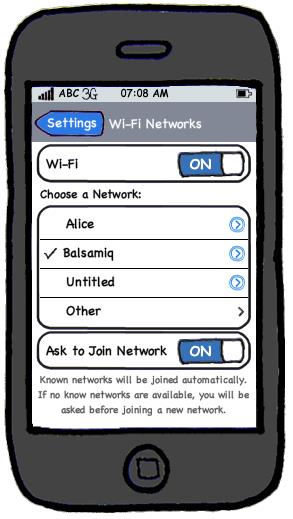
[source: http://balsamiq.com/products/mockups]
💡 Prototyping can be used for discovering as well as specifying requirements e.g. a UI prototype can serve as a specification of what to build.
Product Surveys
Studying existing products can unearth shortcomings of existing solutions that can be addressed by a new product. Product manuals and other forms of technical documentation of an existing system can be a good way to learn about how the existing solutions work.
📦 When developing a game for a mobile device, a look at a similar PC game can give insight into the kind of features and interactions the mobile game can offer.
Specifying Requirements
Prose
What
A normal textual description (i.e. prose) can be used to describe requirements. Prose is especially useful when describing abstract ideas such as the vision of a product.
📦 The product vision of the TEAMMATES Project given below is described using prose.
TEAMMATES aims to become the biggest student project in the world (biggest here refers to 'many contributors, many users, large code base, evolving over a long period'). Furthermore, it aims to serve as a training tool for Software Engineering students who want to learn SE skills in the context of a non-trivial real software product.
❗️ Avoid using lengthy prose to describe requirements; they can be hard to follow.
Feature List
What
Feature List: A list of features of a product grouped according to some criteria such as aspect, priority, order of delivery, etc.
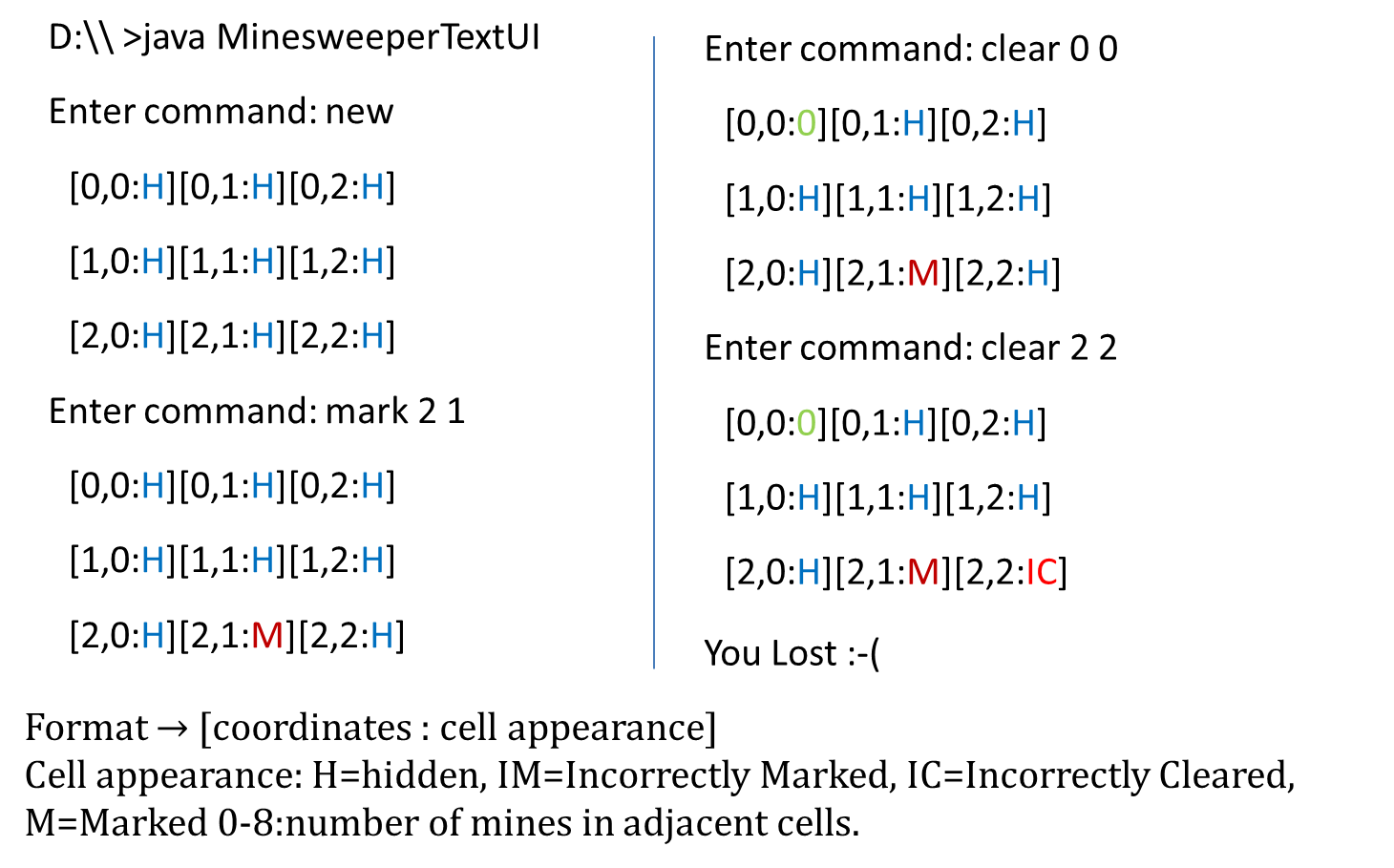
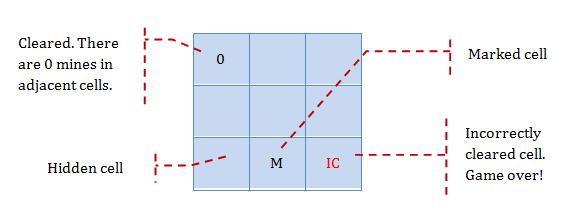
📦 A sample feature list from a simple Minesweeper game (only a brief description has been provided to save space):
- Basic play – Single player play.
- Difficulty levels
- Medium-levels
- Advanced levels
- Versus play – Two players can play against each other.
- Timer – Additional fixed time restriction on the player.
- ...
User Stories
Introduction
User story: User stories are short, simple descriptions of a feature told from the perspective of the person who desires the new capability, usually a user or customer of the system. [Mike Cohn]
A common format for writing user stories is:
User story format: As a {user type/role} I can {function} so that {benefit}
📦 Examples (from a Learning Management System):
- As a student, I can download files uploaded by lecturers, so that I can get my own copy of the files
- As a lecturer, I can create discussion forums, so that students can discuss things online
- As a tutor, I can print attendance sheets, so that I can take attendance during the class
We can write user stories on index cards or sticky notes, and arrange on walls or tables, to facilitate planning and discussion. Alternatively, we can use a software (e.g., GitHub Project Boards, Trello, Google Docs, ...) to manage user stories digitally.
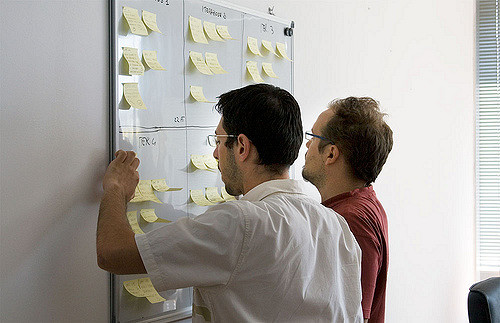
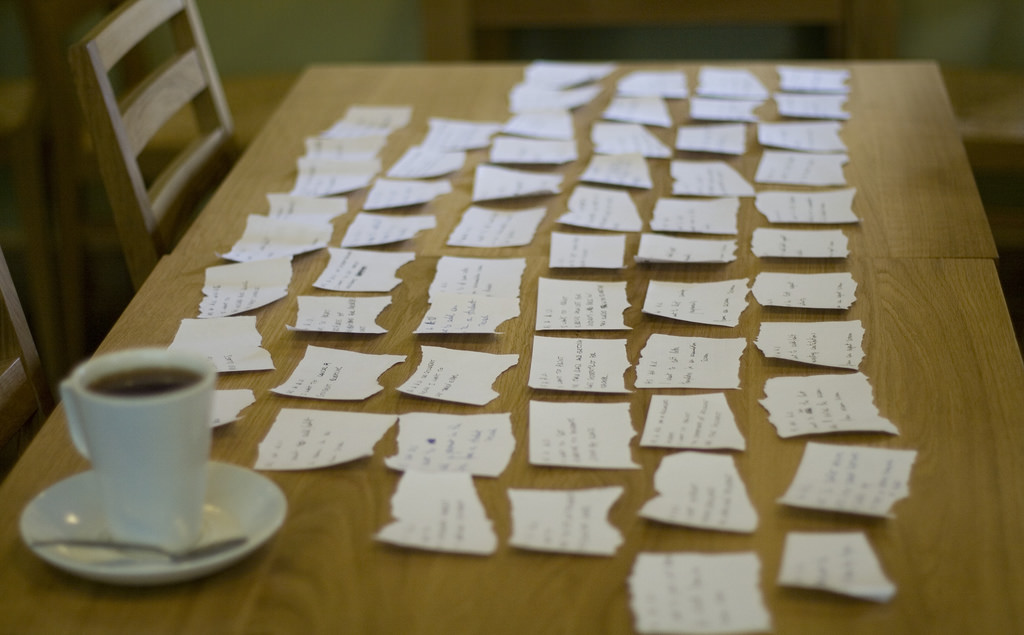
[credit: https://www.flickr.com/photos/jakuza/with/2726048607/]
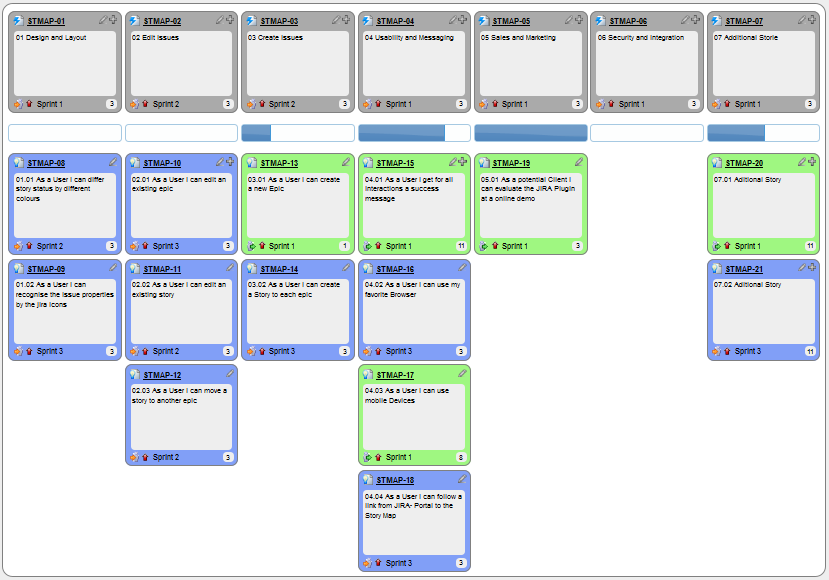
[credit: https://commons.wikimedia.org/wiki/File:User_Story_Map_in_Action.png]
Details 
The {benefit} can be omitted if it is obvious.
As a user, I can login to the system so that I can access my data
❗️ It is recommended to confirm there is a concrete benefit even if you omit it from the user story. If not, we could end up adding features that have no real benefit.
We can add more characteristics to the {user role} to provide more context to the user story.
- As a forgetful user, I can view a password hint, so that I can recall my password.
- As an expert user, I can tweak the underlying formatting tags of the document, so that I can format the document exactly as I need.
We can write user stories at various levels. High-level user stories, called epics (or themes) cover bigger functionality. We can then break down these epics to multiple user stories of normal size.
[Epic] As a lecturer, I can monitor student participation levels
- As a lecturer, I can view the forum post count of each student so that I can identify the activity level of students in the forum
- As a lecturer, I can view webcast view records of each student so that I can identify the students who did not view webcasts
- As a lecturer, I can view file download statistics of each student so that I can identify the students who do not download lecture materials
We can add conditions of satisfaction to a user story to specify things that need to be true for the user story implementation to be accepted as ‘done’.
- As a lecturer, I can view the forum post count of each student so that I can identify the activity level of students in the forum.
Conditions:
- Separate post count for each forum should be shown
- Total post count of a student should be shown
- The list should be sortable by student name and post count
Other useful info that can be added to a user story includes (but not limited to)
- Priority: how important the user story is
- Size: the estimated effort to implement the user story
- Urgency: how soon the feature is needed
User stories for a travel website (credit: Mike Cohen)
- As a registered user, I am required to log in so that I can access the system
- As a forgetful user, I can request a password reminder so that I can log in if I forget mine
- [Epic] As a user, I can cancel a reservation
- As a premium site member, I can cancel a reservation up to the last minute
- As a non-premium member, I can cancel up to 24 hours in advance
- As a member, I am emailed a confirmation of any cancelled reservation
- [Epic] As a frequent flyer, I want to book a trip
- As a frequent flyer, I want to book a trip using miles
- As a frequent flyer, I want to rebook a trip I take often
- As a frequent flyer, I want to request an upgrade
- As a frequent flyer, I want to see if my upgrade cleared
Usage 
User stories capture user requirements in a way that is convenient for
[User stories] strongly shift the focus from writing about features to discussing them. In fact, these discussions are more important than whatever text is written. [Mike Cohn, MountainGoat Software 🔗]
User stories differ from
User stories can capture non-functional requirements too because even NFRs must benefit some stakeholder.
📦 An example of a NFR captured as a user story:
| As a | I want to | so that |
|---|---|---|
| impatient user | to be able experience reasonable response time from the website while up to 1000 concurrent users are using it | I can use the app even when the traffic is at the maximum expected level |
Given their lightweight nature, user stories are quite handy for recording requirements during early requirements gathering.
💡 Here are some tips for using user stories for early stages of requirement gathering:
- Define the target user:
Decide your target user's profile (e.g. a student, office worker, programmer, sales person) and work patterns (e.g. Does he work in groups or alone? Does he share his computer with others?). A clear understanding of the target user will help when deciding the importance of a user story. You can even give this user a name. e.g. Target user Jean is a university student studying in a non-IT field. She interacts with a lot of people due to her involvement in university clubs/societies. ... - Define the problem scope: Decide that exact problem you are going to solve for the target user. e.g. Help Jean keep track of all her school contacts
- Don't be too hasty to discard 'unusual' user stories:
Those might make your product unique and stand out from the rest, at least for the target users. - Don't go into too much details:
For example, consider this user story:As a user, I want to see a list of tasks that needs my attention most at the present time, so that I pay attention to them first.
When discussing this user story, don't worry about what tasks should be considered needs my attention most at the present time. Those details can be worked out later. - Don't be biased by preconceived product ideas:
When you are at the stage of identifying user needs, clear your mind of ideas you have about what your end product will look like. - Don't discuss implementation details or whether you are actually going to implement it:
When gathering requirements, your decision is whether the user's need is important enough for you to want to fulfil it. Implementation details can be discussed later. If a user story turns out to be too difficult to implement later, you can always omit it from the implementation plan.
While use cases can be recorded on
You can create issues for each of the user stories and use a GitHub Project Board to sort them into categories.
📦 Example Project Board:
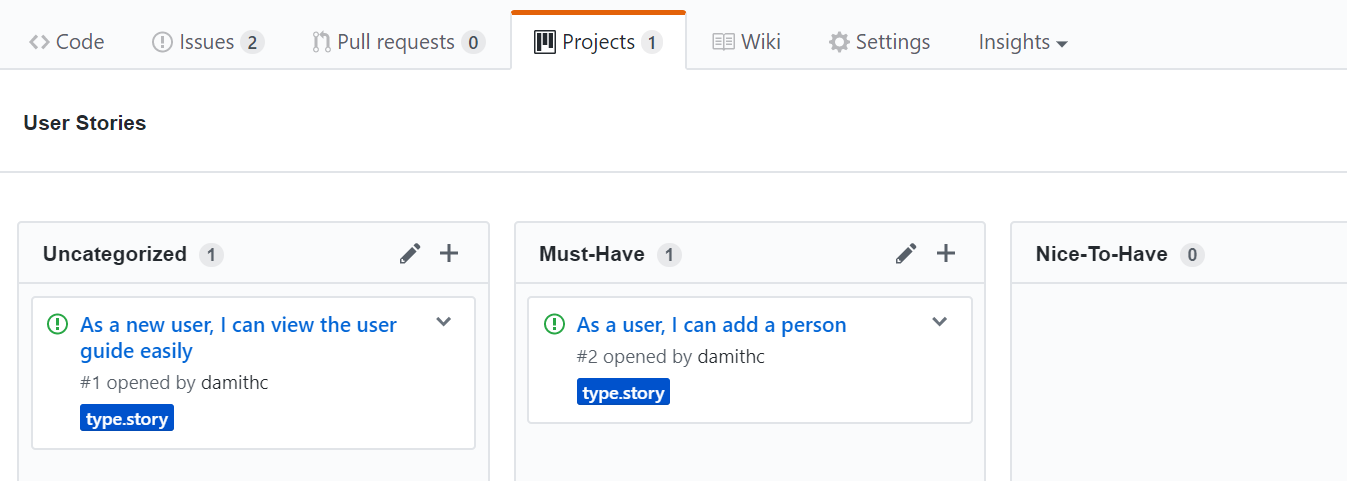
📦 Example Issue to represent a user story:
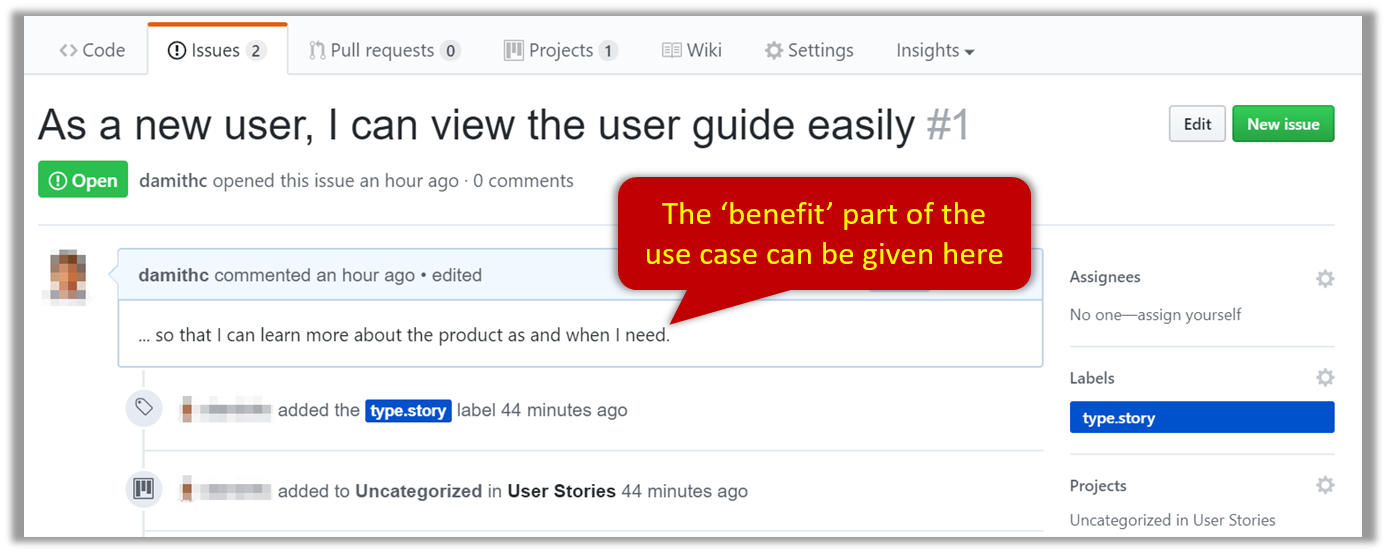
A video on GitHub Project Boards:
📦 Example Google Sheet for recording user stories:

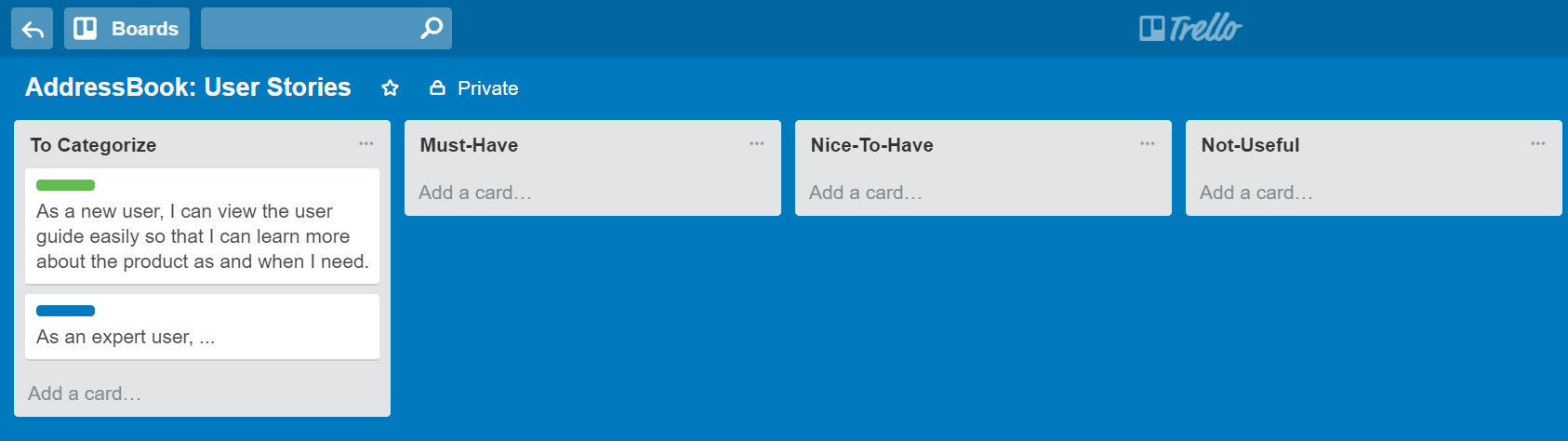
📦 Example Trello Board for recording user stories:
Extreme programming (XP) is a software development methodology which is intended to improve software quality and responsiveness to changing customer requirements. As a type of agile software development, it advocates frequent "releases" in short development cycles, which is intended to improve productivity and introduce checkpoints at which new customer requirements can be adopted. [wikipedia, 2017.05.01]
This page in their website explains the difference between user stories and traditional requirements.
One of the biggest misunderstandings with user stories is how they differ from traditional requirements specifications. The biggest difference is in the level of detail. User stories should only provide enough detail to make a reasonably low risk estimate of how long the story will take to implement. When the time comes to implement the story developers will go to the customer and receive a detailed description of the requirements face to face.
Use Cases
Introduction
Use Case: A description of a set of sequences of actions, including variants, that a system performs to yield an observable result of value to an
Actor: An actor (in a use case) is a role played by a user. An actor can be a human or another system. Actors are not part of the system; they reside outside the system.
A use case describes an interaction between the user and the system for a specific functionality of the system.
- System:
ATM - Actor: Customer
- Use Case: Check account balance
- User inserts an ATM card
- ATM prompts for PIN
- User enters PIN
- ATM prompts for withdrawal amount
- User enters the amount
- ATM ejects the ATM card and issues cash
- User collects the card and the cash.
- System: A Learning Management System (LMS)
- Actor: Student
- Use Case: Upload file
- Student requests to upload file
- LMS requests for the file location
- Student specifies the file location
- LMS uploads the file
Unified Modeling Language (UML) is a graphical notation to describe various aspects of a software system. UML is the brainchild of three software modeling specialists James Rumbaugh, Grady Booch and Ivar Jacobson (also known as the Three Amigos). Each of them has developed their own notation for modeling software systems before joining force to create a unified modeling language (hence, the term ‘Unified’ in UML). UML is currently the de facto modeling notation used in the software industry.
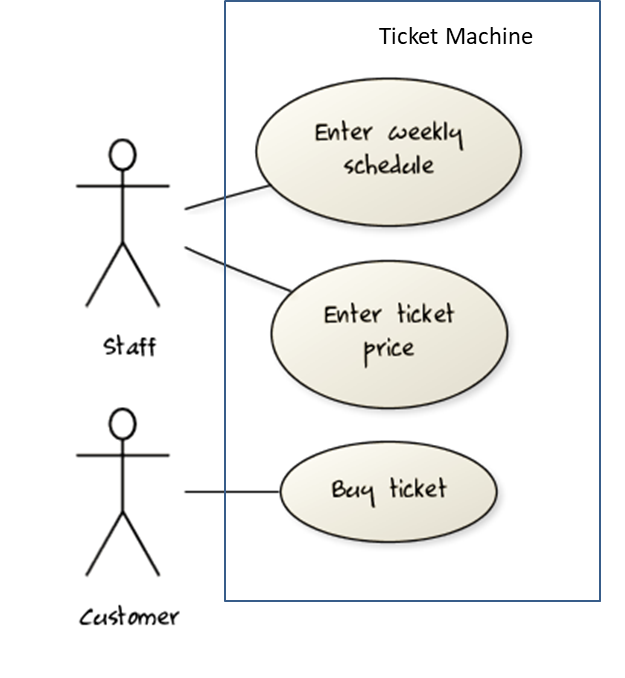
Use cases capture the functional requirements of a system.
Identifying
A use case is an interaction between a system and its actors.
Actors in Use Cases
Actor: An actor (in a use case) is a role played by a user. An actor can be a human or another system. Actors are not part of the system; they reside outside the system.
📦 Some example actors for a Learning Management System
- Actors: Guest, Student, Staff, Admin,
ExamSys ,LibSys .
A use case can involve multiple actors.
- Software System: LearnSys
- Use case: UC01 conduct survey
- Actors: Staff, Student
An actor can be involved in many use cases.
- Software System: LearnSys
- Actor: Staff
- Use cases: UC01 conduct survey, UC02 Set Up Course Schedule, UC03 Email Class, ...
A single person/system can play many roles.
- Software System: LearnSys
- Person: a student
- Actors (or Roles): Student, Guest, Tutor
Many persons/systems can play a single role.
- Software System: LearnSys
- Actor(or role) : Student
- Persons that can play this role : undergraduate student, graduate student, a staff member doing a part-time course, exchange student
Use cases can be specified at various levels of detail.
📦 Consider the three use cases given below. Clearly, (a) is at a higher level than (b) and (b) is at a higher level than (c).
- System: LearnSys
- Use cases:
a. Conduct a survey
b. Take the survey
c. Answer survey question
While modeling user-system interactions,
💡 Start with high level use cases and progressively work toward lower level use cases.
💡 Be mindful at which level of details you are working on and not to mix use cases of different levels.Details
Writing use case steps
The main body of the use case is the sequence of steps that describes the interaction between the system and the actors. Each step is given as a simple statement describing who does what.
📦 An example of the main body of a use case.
- Student requests to upload file
- LMS requests for the file location
- Student specifies the file location
- LMS uploads the file
A use case describes only the externally visible behavior, not internal details, of a system i.e. should not mention give details that are not part of the interaction between the user and the system.
📦 This example use case step refers to behaviors not externally visible .
- LMS saves the file into the cache and indicates success.
A step gives the intention of the actor (not the mechanics). That means UI details are usually omitted. The idea is to leave as much flexibility to the UI designer as possible. That is, the use case specification should be as general as possible (less specific) about the UI.
❌ User right-clicks the text box and chooses ‘clear’ : this contains UI-specific details and is not a good use case step)
✅ User clears the input : this is better because it omits UI-specific details
This is how you can include repetitive steps in a scenario.
Software System: Square game Use case:
- A Player starts the game.
- SquareGame asks for player names.
- Each Player enters his own name.
- SquareGame shows the order of play.
- SquareGame prompts for the current Player to throw die.
- Current Player adjusts the throw speed.
- Current Player triggers the die throw.
- Square Game shows the face value of the die.
- Square Game moves the Player's piece accordingly.
Steps 5-9 are repeated for each Player, and for as many rounds as required until a Player reaches the 100th square. - Square Game shows the Winner.
Use case ends.
The Main Success Scenario (MSS) describes the most straightforward interaction for a given use case, which assumes that nothing goes wrong. This is also called the Basic Course of Action or the Main Flow of Events of a use case.
- System: Online Banking System (OBS)
- Use case: UC23 - Transfer Money
- Actor: User
- MSS:
- User chooses to transfer money.
- OBS requests for details of the transfer.
- User enters the requested details.
- OBS requests for confirmation.
- OBS transfers the money and displays the new account balance.
- Use case ends.
Note how the MSS assumes that all entered details are correct and ignores problems such as timeouts, network outages etc. Fro example, MSS does not tell us what happens if the user enters an incorrect data.
Extensions are "add-on"s to the MSS that describe exceptional/alternative flow of events. They describe variations of the scenario that can happen if certain things are not as expected by the MSS. Extensions appear below the MSS.
📦 This example adds some extensions to the use case in the previous example.
- System: Online Banking System (OBS)
- Use case: UC23 - Transfer Money
- Actor: User
- MSS:
- User chooses to transfer money.
- OBS requests for details of the transfer.
- User enters the requested details.
- OBS requests for confirmation.
- OBS transfers the money and displays the new account balance.
- Use case ends.
- Extensions:
- 3a. OBS detects an error in the entered data.
- 3a1. OBS requests for the correct data.
- 3a2. User enters new data.
- Steps 3a1-3a2 are repeated until the data entered are correct.
- Use case resumes from step 4.
- 3b. User requests to effect the transfer in a future date.
- 3b1. OBS requests for confirmation.
- 3b2. User confirms future transfer.
- Use case ends.
- *a. At any time, User chooses to cancel the transfer.
- *a1. OBS requests to confirm the cancellation.
- *a2. User confirms the cancellation.
- Use case ends.
- *b. At any time, 120 seconds lapse without any input from the User.
- *b1. OBS cancels the transfer.
- *b2. OBS informs the User of the cancellation.
- Use case ends.
- 3a. OBS detects an error in the entered data.
Note that the numbering style is not a universal rule but a widely used convention. Based on that convention,
- either of the extensions marked
3a.and3b.can happen just after step3of the MSS. - the extension marked as
*a.can happen at any step (hence, the*).
When separating extensions from the MSS, keep in mind that the MSS should be self-contained. That is, the MSS should give us a complete usage scenario.
Also note that it is not useful to mention events such as power failures or system crashes as extensions because the system cannot function beyond such catastrophic failures.
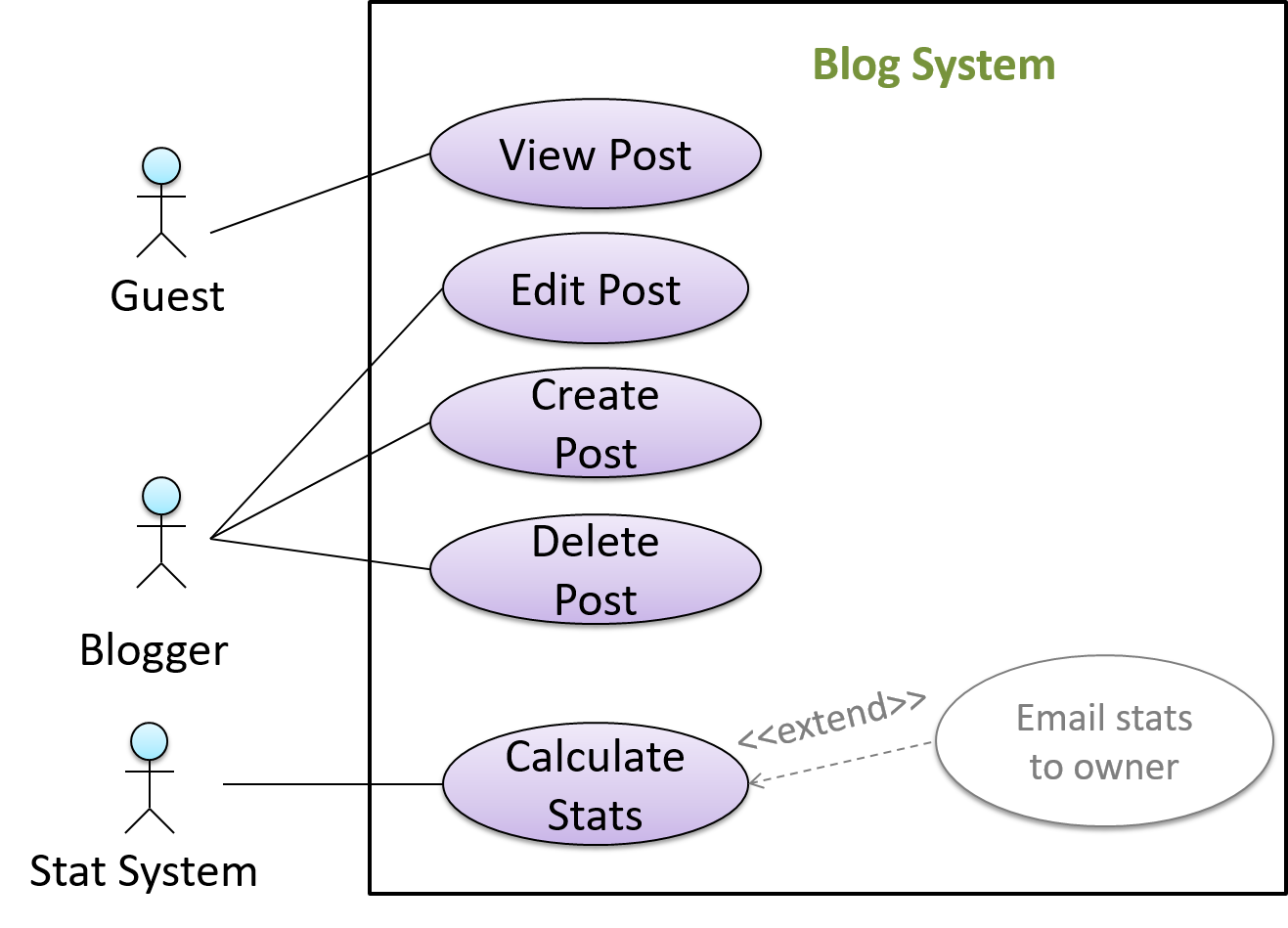
In use case diagrams you can use the << extend >> arrows to show extensions. Note the direction of the arrow is from the extension to the use case it extends and the arrow uses a dashed line.
A use case can include another use case. Underlined text is commonly used to show an inclusion of a use case.
📦 This use case includes two other use cases, one in step 1 and one in step 2.
- Software System: LearnSys
- Use case: UC01 - Conduct Survey
- Actors: Staff, Student
- MSS:
- Staff creates the survey (UC44).
- Student completes the survey (UC50).
- Staff views the survey results.
- Use case ends.
Inclusions are useful,
- when you don't want to clutter a use case with too many low-level steps.
- when a set of steps is repeated in multiple use cases.
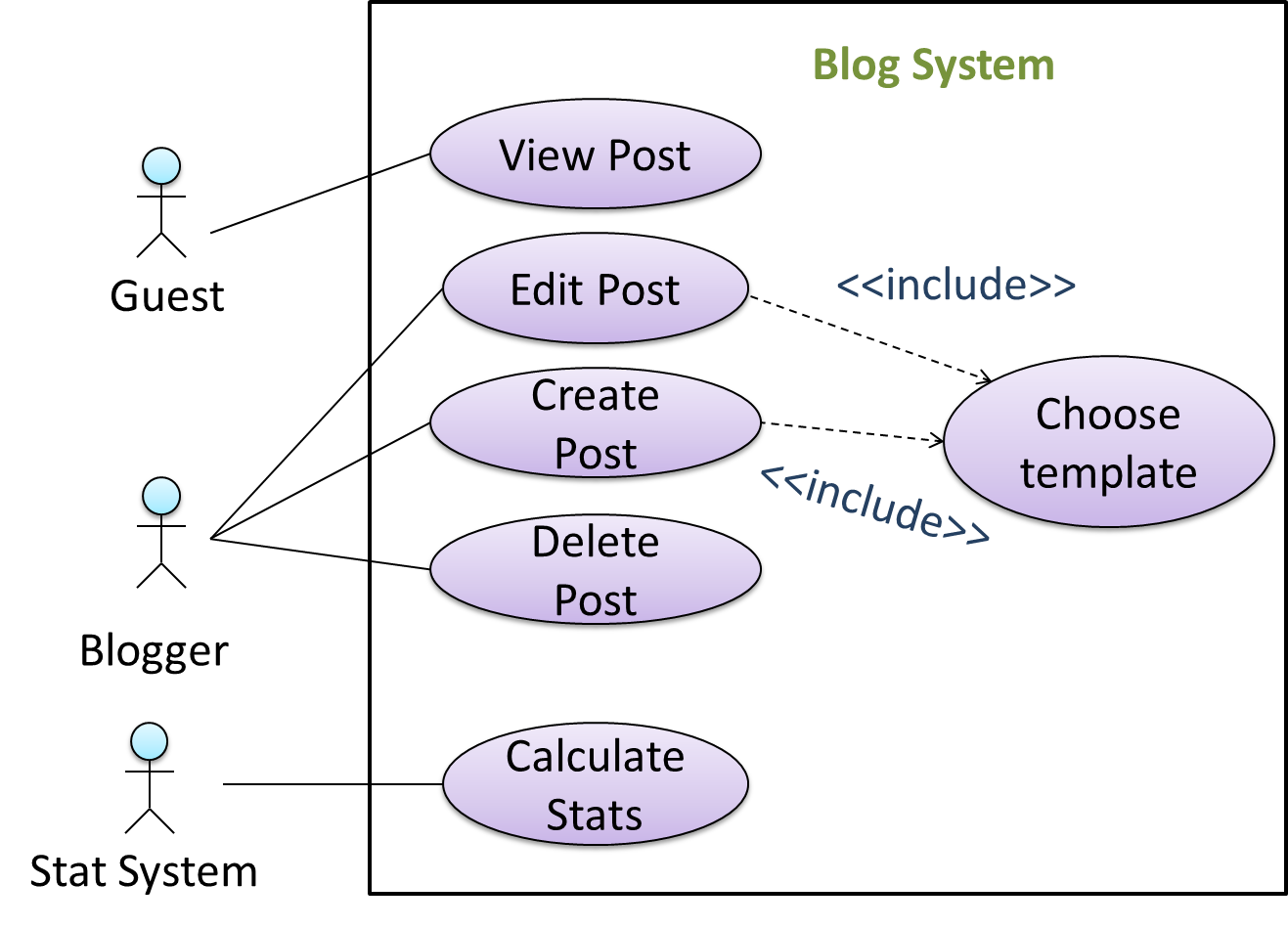
We use a dotted arrow and a << include >> annotation to show use case inclusions in a use case diagram. Note how the arrow direction is different from the << extend >> arrows.
Preconditions specify the specific state we expect the system to be in before the use case starts.
- Software System: Online Banking System
- Use case: UC23 - Transfer Money
- Actor: User
- Preconditions: User is logged in.
- MSS:
- User chooses to transfer money.
- OBS requests for details for the transfer.
- ...
Guarantees specify what the use case promises to give us at the end of its operation.
- Software System: Online Banking System
- Use case: UC23 - Transfer Money
- Actor: User
- Preconditions: User is logged in.
- Guarantees:
- Money will be deducted from the source account only if the transfer to the destination account is successful
- The transfer will not result in the account balance going below the minimum balance required.
- MSS:
- User chooses to transfer money.
- OBS requests for details for the transfer.
- ...
Usage
You can use actor generalization in use case diagrams using a symbol similar to that of UML notation for inheritance.
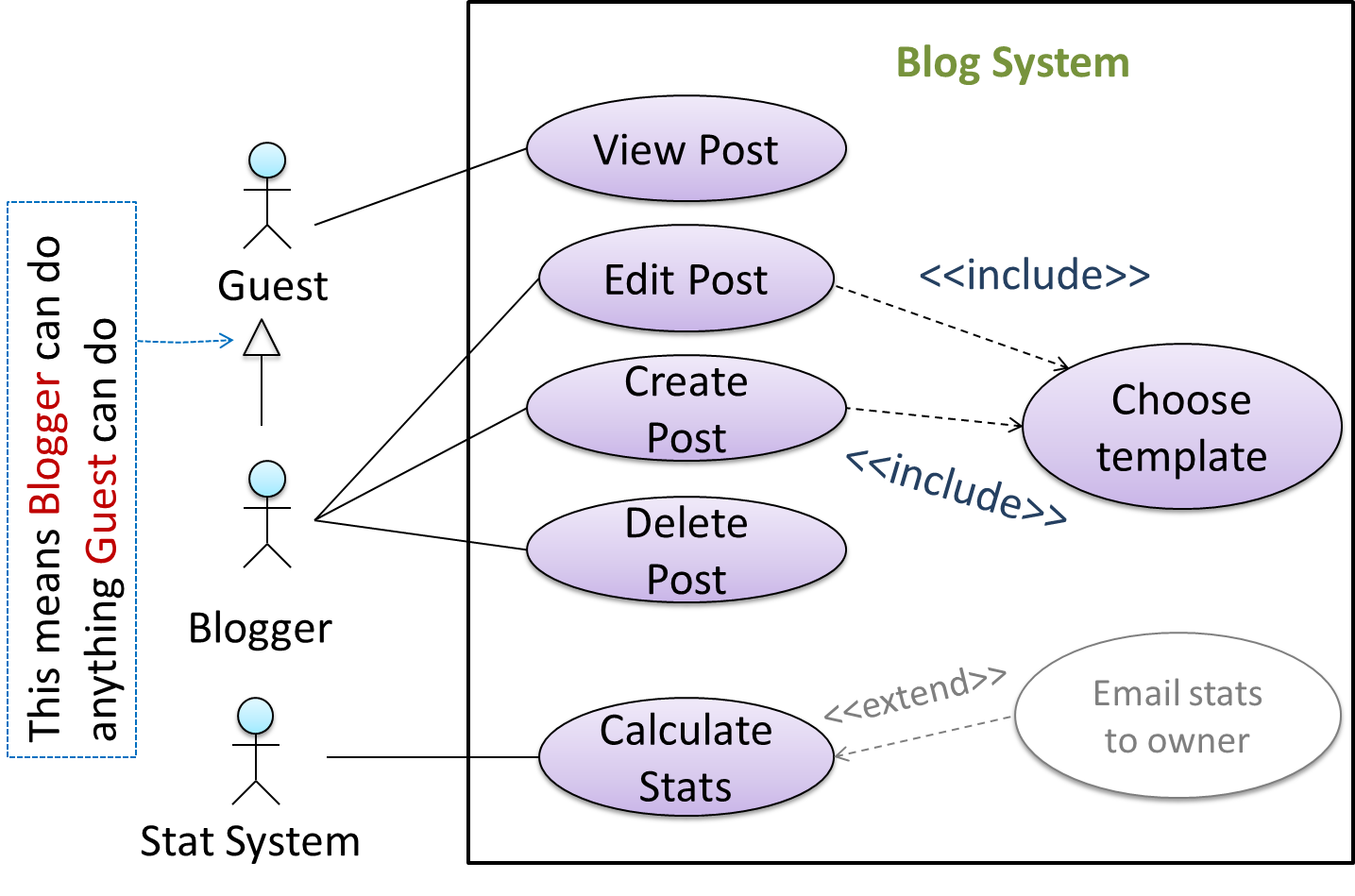
📦 In this example, actor Blogger can do all the use cases the actor Guest can do, as a result of the actor generalization relationship given in the diagram.
💡 Do not over-complicate use case diagrams by trying to include everything possible. A use case diagram is a brief summary of the use cases that is used as a starting point. Details of the use cases can be given in the use case descriptions.
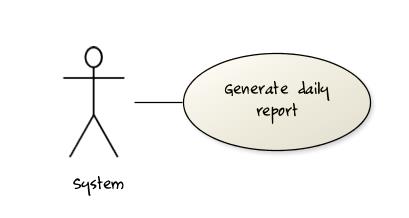
Some include ‘System’ as an actor to indicate that something is done by the system itself without being initiated by a user or an external system.
📦 The diagram below can be used to indicate that the system generates daily reports at midnight.
However, others argue that only use cases providing value to an external user/system should be shown in the use case diagram. For example, they argue that ‘view daily report’ should be the use case and generate daily report is not
to be shown in the use case diagram because it is simply something the system has to do to support the view daily report use case.
We recommend that you follow the latter view (i.e. not to use System as a user). Limit use cases for modeling behaviors that involve an external actor.
UML is not very specific about the text contents of a use case. Hence, there are many styles for writing use cases. For example, the steps can be written as a continuous paragraph. Use cases should be easy to read. Note that there is no strict rule about writing all details of all steps or a need to use all the elements of a use case.
There are some advantages of documenting system requirements as use cases:
- Because they use a simple notation and plain English descriptions, they are easy for users to understand and give feedback.
- They decouple user intention from mechanism (note that use cases should not include UI-specific details), allowing the system designers more freedom to optimize how a functionality is provided to a user.
- Identifying all possible extensions encourages us to consider all situations that a software product might face during its operation.
- Separating typical scenarios from special cases encourages us to optimize the typical scenarios.
One of the main disadvantages of use cases is that they are not good for capturing requirements that does not involve a user interacting with the system. Hence, they should not be used as the sole means to specify requirements.
Glossary
What
Glossary: A glossary serves to ensure that all stakeholders have a common understanding of the noteworthy terms, abbreviation, acronyms etc.
📦 Here is a partial glossary from a variant of the Snakes and Ladders game:
- Conditional square: A square that specifies a specific face value which a player has to throw before his/her piece can leave the square.
- Normal square: a normal square does not have any conditions, snakes, or ladders in it.
Supplementary Requirements
What
A supplementary requirements section can be used to capture requirements that do not fit elsewhere. Typically, this is where most
Requirements → Requirements →
Non-Functional Requirements
There are two kinds of requirements:
- Functional requirements specify what the system should do.
- Non-functional requirements specify the constraints under which system is developed and operated.
📦 Some examples of non-functional requirement categories:
- Data requirements e.g. size,
volatility ,persistency etc., - Environment requirements e.g. technical environment in which system would operate or need to be compatible with.
- Accessibility, Capacity, Compliance with regulations, Documentation, Disaster recovery, Efficiency, Extensibility, Fault tolerance, Interoperability, Maintainability, Privacy, Portability, Quality, Reliability, Response time, Robustness, Scalability, Security, Stability, Testability, and more ...
- Business/domain rules: e.g. the size of the minefield cannot be smaller than five.
- Constraints: e.g. the system should be backward compatible with data produced by earlier versions of the system; system testers are available only during the last month of the project; the total project cost should not exceed $1.5 million.
- Technical requirements: e.g. the system should work on both 32-bit and 64-bit environments.
- Performance requirements: e.g. the system should respond within two seconds.
- Quality requirements: e.g. the system should be usable by a novice who has never carried out an online purchase.
- Process requirements: e.g. the project is expected to adhere to a schedule that delivers a feature set every one month.
- Notes about project scope: e.g. the product is not required to handle the printing of reports.
- Any other noteworthy points: e.g. the game should not use images deemed offensive to those injured in real mine clearing activities.
We should spend extra effort in digging NFRs out as early as possible because NFRs are easier to miss e.g., stakeholders tend to think of functional requirements first and sometimes they are critical to the success of the software. E.g. A web application that is too slow or that has low security is unlikely to succeed even if it has all the right functionality.
Given below are some requirements of TEAMMATES (an online peer evaluation system for education). Which one of these are non-functional requirements?
- a. The response to any use action should become visible within 5 seconds.
- b. The application admin should be able to view a log of user activities.
- c. The source code should be open source.
- d. A course should be able to have up to 2000 students.
- e. As a student user, I can view details of my team members so that I can know who they are.
- f. The user interface should be intuitive enough for users who are not IT-savvy.
- g. The product is offered as a free online service.
(a)(c)(d)(f)(g)
Explanation: (b) are (e) are functions available for a specific user types. Therefore, they are functional requirements. (a), (c), (d), (f) and (g) are either constraints on functionality or constraints on how the project is done, both of which are considered non-functional requirements.
SECTION: DESIGN
Design
Introduction
What
Design in the creative process of transforming the problem into a solution; the solution is also called design. -- 📖 Software Engineering Theory and Practice, Shari Lawrence; Atlee, Joanne M. Pfleeger
Software design has two main aspects:
- Product/external design: designing the external behavior of the product to meet the users' requirements. This is usually done by product designers with the input from business analysts, user experience experts, user representatives, etc.
- Implementation/internal design: designing how the product will be implemented to meet the required external behavior. This is usually done by software architects and software engineers.
Object-Oriented Programming
Introduction
Introduction
Object-Oriented Programming (OOP) is a programming paradigm. A programming paradigm guides programmers to analyze programming problems, and structure programming solutions, in a specific way.
Programming languages have traditionally divided the world into two parts—data and operations on data. Data is static and immutable, except as the operations may change it. The procedures and functions that operate on data have no lasting state of their own; they’re useful only in their ability to affect data.
This division is, of course, grounded in the way computers work, so it’s not one that you can easily ignore or push aside. Like the equally pervasive distinctions between matter and energy and between nouns and verbs, it forms the background against which we work. At some point, all programmers—even object-oriented programmers—must lay out the data structures that their programs will use and define the functions that will act on the data.
With a procedural programming language like C, that’s about all there is to it. The language may offer various kinds of support for organizing data and functions, but it won’t divide the world any differently. Functions and data structures are the basic elements of design.
Object-oriented programming doesn’t so much dispute this view of the world as restructure it at a higher level. It groups operations and data into modular units called objects and lets you combine objects into structured networks to form a complete program. In an object-oriented programming language, objects and object interactions are the basic elements of design.
Some other examples of programming paradigms are:
| Paradigm | Programming Languages |
|---|---|
| Procedural Programming paradigm | C |
| Functional Programming paradigm | F#, Haskel, Scala |
| Logic Programming paradigm | Prolog |
Some programming languages support multiple paradigms.
📦 Java is primarily an OOP language but it supports limited forms of functional programming and it can be used to (although not recommended) write procedural code. e.g. se-edu/addressbook-level1
📦 JavaScript and Python support functional, procedural, and OOP programming.
Objects
Basic
Every object has both state (data) and behavior (operations on data). In that, they’re not much different from ordinary physical objects. It’s easy to see how a mechanical device, such as a pocket watch or a piano, embodies both state and behavior. But almost anything that’s designed to do a job does, too. Even simple things with no moving parts such as an ordinary bottle combine state (how full the bottle is, whether or not it’s open, how warm its contents are) with behavior (the ability to dispense its contents at various flow rates, to be opened or closed, to withstand high or low temperatures).
It’s this resemblance to real things that gives objects much of their power and appeal. They can not only model components of real systems, but equally as well fulfill assigned roles as components in software systems.
Object Oriented Programming (OOP) views the world as a network of interacting objects.
📦 A real world scenario viewed as a network of interacting objects:
You are asked to find out the average age of a group of people Adam, Beth, Charlie, and Daisy. You take a piece of paper and pen, go to each person, ask for their age, and note it down. After collecting the age of all four, you enter it into
a calculator to find the total. And then, use the same calculator to divide the total by four, to get the average age. This can be viewed as the objects You, Pen, Paper, Calculator, Adam,
Beth, Charlie, and Daisy interacting to accomplish to achieve the end result of calculating the average age of the four persons. These objects can be considered as connected in a certain network of
certain structure.
OOP solutions try to create a similar object network inside the computer’s memory – a sort of a virtual simulation of the corresponding real world scenario – so that a similar result can be achieved programmatically.
OOP does not demand that the virtual world object network follow the real world exactly.
📦 Our previous example can be tweaked a bit as follows:
- Use an object called
Mainto represent your role in the scenario. - As there is no physical writing involved, we can replace the
PenandPaperwith an object calledAgeListthat is able to keep a list of ages.
Every object has both state (data) and behavior (operations on data).
| Object | Real World? | Virtual World? | Example of State (i.e. Data) | Examples of Behavior (i.e. Operations) |
|---|---|---|---|---|
| Adam | 🗸 | 🗸 | Name, Date of Birth | Calculate age based on birthday |
| Pen | 🗸 | - | Ink color, Amount of ink remaining | Write |
| AgeList | - | 🗸 | Recorded ages | Give the number of entries, Accept an entry to record |
| Calculator | 🗸 | 🗸 | Numbers already entered | Calculate the sum, divide |
| You/Main | 🗸 | 🗸 | Average age, Sum of ages | Use other objects to calculate |
Every object has an interface and an implementation.
Every real world object has an interface that other objects can interact with and an implementation that supports the interface but may not be accessible to the other object.
📦 The interface and implementation of some real-world objects in our example:
- Calculator: the buttons and the display are part of the interface; circuits are part of the implementation.
- Adam: In the context of our 'calculate average age' example, the interface of Adam consists of requests that adam will respond to, e.g. "Give age to the nearest year, as at Jan 1st of this year" "State your name"; the implementation includes the mental calculation Adam uses to calculate the age which is not visible to other objects.
Similarly, every object in the virtual world has an interface and an implementation.
📦 The interface and implementation of some virtual-world objects in our example:
Adam: the interface might have a methodgetAge(Date asAt); the implementation of that method is not visible to other objects.
Objects interact by sending messages.
Both real world and virtual world object interactions can be viewed as objects sending message to each other. The message can result in the sender object receiving a response and/or the receiving object’s state being changed. Furthermore, the result can vary based on which object received the message, even if the message is identical (see rows 1 and 2 in the example below).
Examples:
| World | Sender | Receiver | Message | Response | State Change |
|---|---|---|---|---|---|
| Real | You | Adam | "What is your name?" | "Adam" | - |
| Real | as above | Beth | as above | "Beth" | - |
| Real | You | Pen | Put nib on paper and apply pressure | Makes a mark on your paper | Ink level goes down |
| Virtual | Main | Calculator (current total is 50) | add(int i): int i = 23 | 73 | total = total + 23 |
Objects as Abstractions
The concept of Objects in OOP is an abstraction mechanism because it allows us to abstract away the lower level details and work with bigger granularity entities i.e. ignore details data formats and the method implementation details and work at the level of objects.
📦 We can deal with a Person object that represents the person Adam and query the object for Adam's age instead of dealing with details such as Adam’s date of birth (DoB), in what format the DoB is stored, the algorithm used to
calculate the age from the DoB, etc.
Encapsulation Of Objects
Encapsulation protects an implementation from unintended actions and from inadvertent access.
-- Object-Oriented Programming with Objective-C, Apple
An object is an encapsulation of some data and related behavior in two aspects:
1. The packaging aspect: An object packages data and related behavior together into one self-contained unit.
2. The information hiding aspect: The data in an object is hidden from the outside world and are only accessible using the object's interface.
Classes
Basic
Writing an OOP program is essentially writing instructions that the computer uses to,
- create the virtual world of object network, and
- provide it the inputs to produce the outcome we want.
A class contains instructions for creating a specific kind of objects. It turns out sometimes multiple objects have the same behavior because they are of the same kind. Instructions for creating a one kind (or ‘class’) of objects can be done in one go and use that same instructions to instantiate (i.e. create) objects of that kind. We call such instructions a Class.
📦 Classes and objects in an example scenario
When writing an OOP program to calculate the average age of Adam, Beth, Charlie, and Daisy, instructions for creating objects Adam, Beth, Charlie, and Daisy will be very similar because they
are all of the same kind : they all represent ‘persons’ with the same interface, the same kind of data (i.e. name, DoB, etc.), and the same kind of behavior (i.e. getAge(Date), getName(),
etc.). Therefore, we can have a class called Person containing instructions on how to create Person objects and use that class to instantiate objects Adam, Beth, Charlie, and
Daisy. Similarly, we need classes AgeList, Calculator, and Main classes to instantiate one each of AgeList, Calculator, and Main objects.
Let us use the UML notation to illustrate classes and objects under discussion.

Person class and some example instances of the Person class.
Implementing Classes
Given below is a tutorial you can refer to (from Oracle’s official Java tutorials) to learn how to implement java classes, in the unlikely case you don't know how to do that already.
- Classes, methods, variables – Start from the linked page and follow the next few steps in the tutorial
Class Level Members
While all objects of a class has the same attributes, each object has its own copy of the attribute value.
Example:
All Person objects have the Name attribute but the value of that attribute varies between Person objects.
However, some attributes are not suitable to be maintained by individual objects. Instead, they should be maintained centrally, shared by all objects of the class. They are like ‘global variables’ but attached to a specific class. Such variables whose value is shared by all instances of a class are called class level attributes.
Example:
The attribute totalPersons should be maintained centrally and shared by all Person objects rather than copied at each Person object.
Similarly, when a normal method is being called, a message is being sent to the receiving object and the result may depend on the receiving object.
Example:
Sending the getName() message to Adam object results in the response "Adam" while sending the same message to the Beth object gets the response "Beth".
However, there can be methods related to a specific class but not suitable for sending message to a specific object of that class. Such methods that are called using the class instead of a specific instance are called class-level methods.
Example:
The method getTotalPersons() is not suitable to send to a specific Person object because a specific object of the Person class should not know about the total number of Person objects.
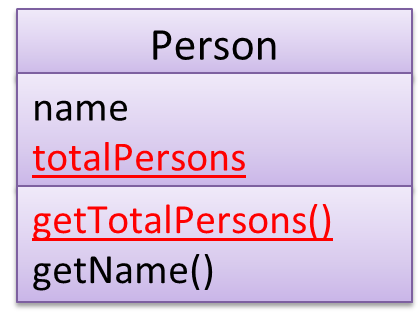
Class-level attributes and methods are collectively called class-level members (also called static members sometimes because some programming languages use the keyword static to identify
class-level members). They are to be accessed using the class name rather than an instance of the class.
📦 A Student class with a class-level attribute and a method:
Implementing Class-Level Members
You can refer to Oracle’s official Java tutorial on class-level members to learn how to implement Java class-level members, in the unlikely case you don't know how to do that already.
Associations
Basic
Objects in an OO solution need to be connected to each other to form a network so that they can interact with each other. Such connections between objects are called associations.
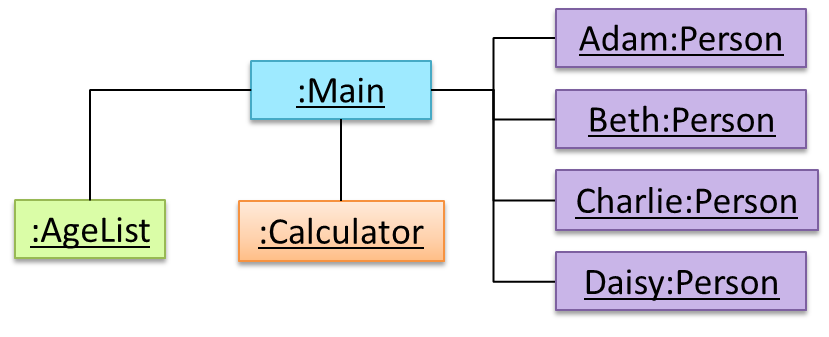
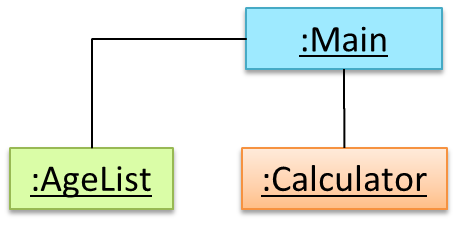
📦 An object diagram example showing associations among objects. For example, there is an association between the AgeList object and the Main object.
Associations in an object structure can change over time.
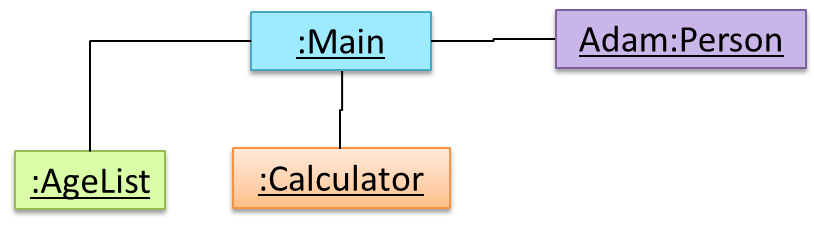
📦 In this example, the associations in the object structure have changed (from left to right) due to a new Person object being connected to the Main object.
 →
→
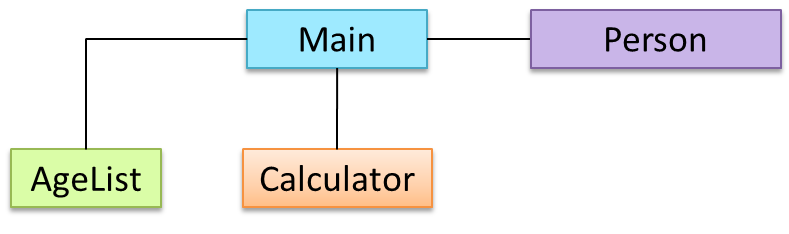
Associations among objects are reflected correspondingly in the class diagram too, as it is the class diagram that dictates the nature of the associations allowed in the object structures.
📦 An example class diagram showing associations between classes.
Navigability
When two classes are linked by an association, it does not necessarily mean both classes know about each other. The concept of which class in the association knows about the other class is called navigability.
Multiplicity
Multiplicity is the aspect of an OOP solution that dictates how many objects take part in each association.
📦 This class diagram does not tell us multiplicities. For exaple, how many Calculator objects can be associated with one Main object? How many Main objects can be associated with one Calculator object? and so on.
Implementing Associations
We use instance level variables to implement associations.
A normal instance-level variable gives us a 0..1 multiplicity (also called optional associations) because a variable can hold a reference to a single object or null.

class Logic {
    Minefield minefield;
    ...
}
class Minefield {
    ...
}
A variable can be used to implement a 1 multiplicity too (also called compulsory associations).

class Logic {
    ConfigGenerator cg = new ConfigGenerator();
    ...
}
Bi-directional associations require matching variables in both classes.

class Foo {
    Bar bar;
    ...
}
class Bar {
    Foo foo;
    ...
}
To implement other multiplicities, choose a suitable data structure such as Arrays, ArrayLists, HashMaps, Sets, etc.
class Minefield {
    Cell[][] cell;
    ...
}
Dependencies
Dependencies are objects that are not directly linked in the object network can still interact with each other. These are a weaker form of associations we call dependencies.
Implementing Dependencies
Dependencies result from interactions between objects that do not result in a long-term link between the said objects.
Example:
class TaxProcessor{
    double rate;

    void addTax(Taxable t){
        t.addTax(rate);
    }
}
The code above results in this dependency.

The code does not indicate an association between the two classes because the TaxProcessor object does not keep the Taxable object (i.e. it’s only a short-term interaction)
Composition
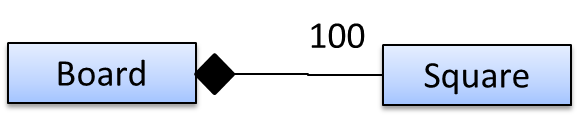
A composition is an association that represents a strong whole-part relationship. When the whole is destroyed, parts are destroyed too.
📦 A Board (used for playing board games) consists of Square objects.
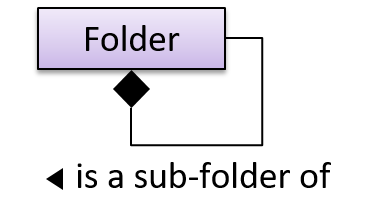
Composition also implies that there cannot be cyclical links.
📦 In this ‘sub-folder’ association, a Folder cannot be a sub-folder of itself. If the diamond is removed, it is no longer a composition relationship and technically, allows a folder to be sub-folder of itself.
Implementing Composition
Composition too is implemented using a normal variable. If correctly implemented, the ‘part’ object will be deleted when the ‘whole’ object is deleted. Ideally, the ‘part’ object may not even be visible to clients of the ‘whole’ object.
Example:

class Car {
    private Engine engine;
  ...
}
Aggregation
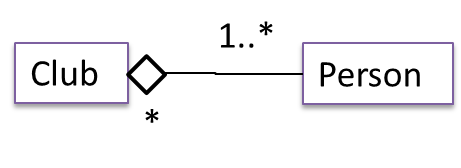
Aggregation represents a container-contained relationship. It is a weaker relationship than composition.
📦 Club acts as a container for Person objects. Person objects can survive without a Club object.
Aggregation vs Composition
The distinction between composition (◆) and aggregation (◇) is rather blurred. Martin Fowler’s famous book UML Distilled advocates omitting the aggregation symbol altogether because using it adds more confusion than clarity.
Implementing Aggregation
Implementation is similar to that of composition except the containee object can exist even after the container object is deleted.
📦 Example:

class Car {
    Person driver;
    ...
    void drive(Person p) {
        driver = p;
    }
}
Inheritance
What
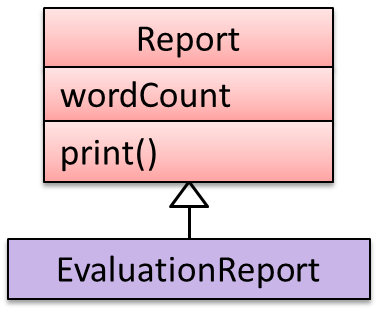
The OOP concept Inheritance allows you to define a new class based on an existing class. For example, you can use inheritance to define an EvaluationReport class based on an existing Report class
so that the EvaluationReport class does not have to duplicate code that is already implemented in the Report class.
📦 Example: The EvaluationReport inherits the wordCount attribute and the print() method from the base class Report.
- Other names for Base class: Parent class, Super class
- Other names for Derived class: Child class, Sub class, Extended class
A super class is said to be more general than the sub class. Conversely, a sub class is said to be more specialized than the super class.
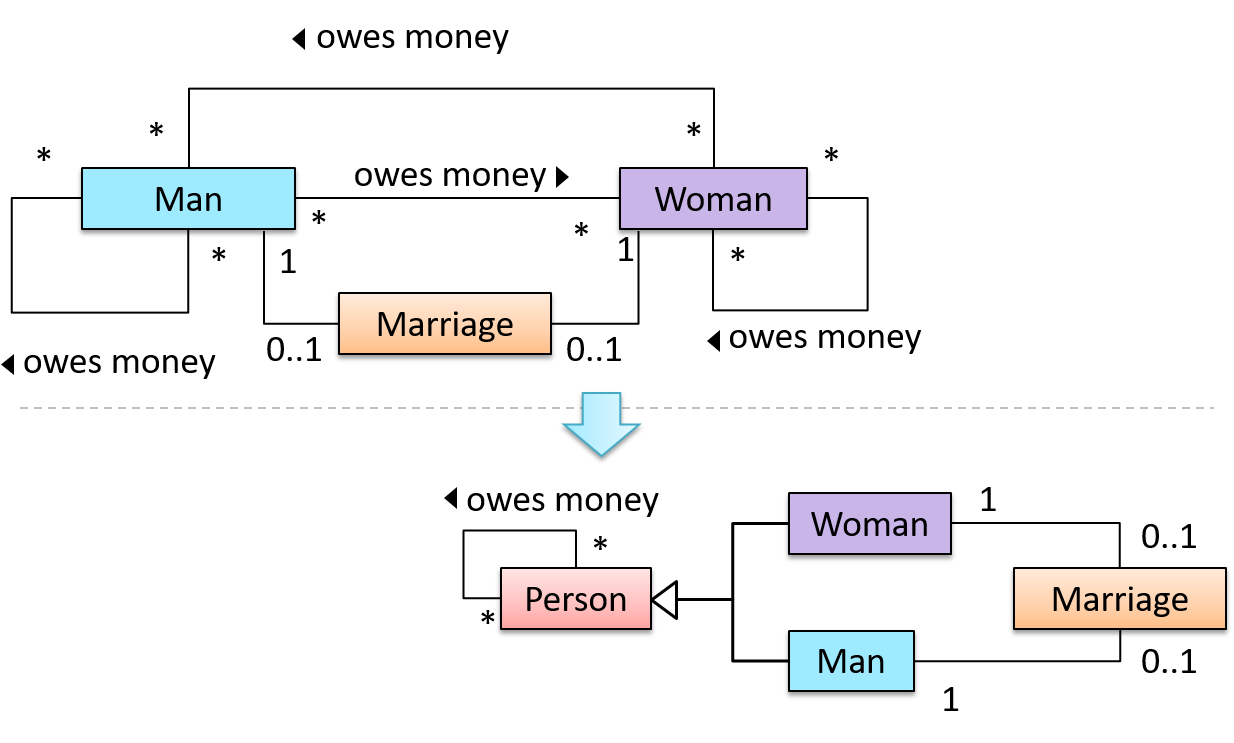
Applying inheritance on a group of similar classes can result in the common parts among classes being extracted into more general classes.
📦 Man and Woman behaves the same way for the 'owes money' association. However, the two classes cannot be simply replaced with a more general class Person because of the need to distinguish between Man and Woman for the ‘marriage’ association. A solution is to add the Person class as a super class and let Man and Woman inherit from Person.
Inheritance implies the derived class can be considered as a sub-type of the base class (and the base class is a super-type of the derived class), resulting in an is a relationship.
Inheritance does not necessarily mean a sub-type relationship exists. However, the two often go hand-in-hand. For simplicity, at this point let us assume inheritance implies a sub-type relationship.
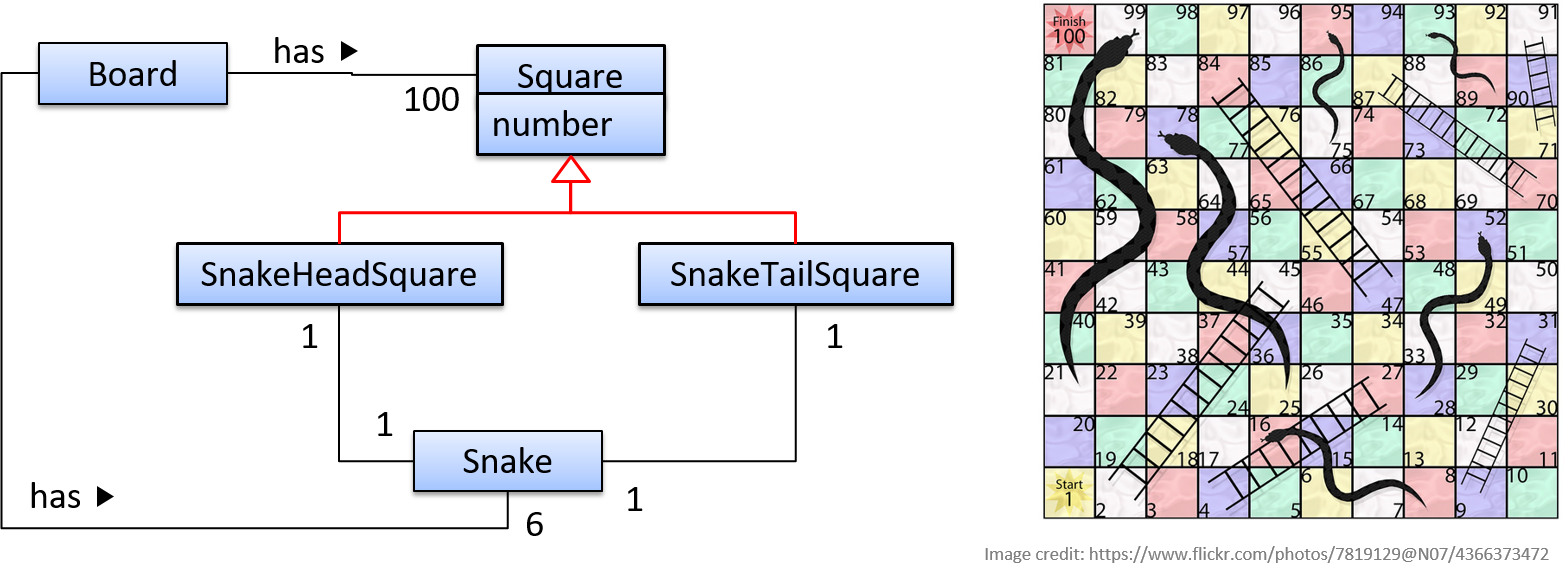
📦 In this class diagrams of a Snakes and Ladders board game,
SnakeHeadSquareis aSquare(aSnakeHeadSquareis a square in which the head of a snake appears)SnakeTailSquareis aSquare
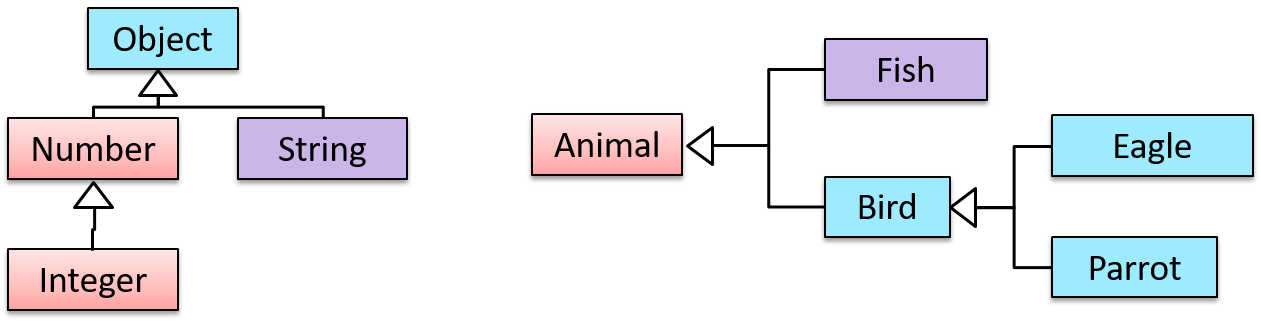
Inheritance relationships through a chain of classes can result in inheritance hierarchies (aka inheritance trees).
📦 Two inheritance hierarchies/trees are given below. Note that Parrot is a Bird as well as it is an Animal.
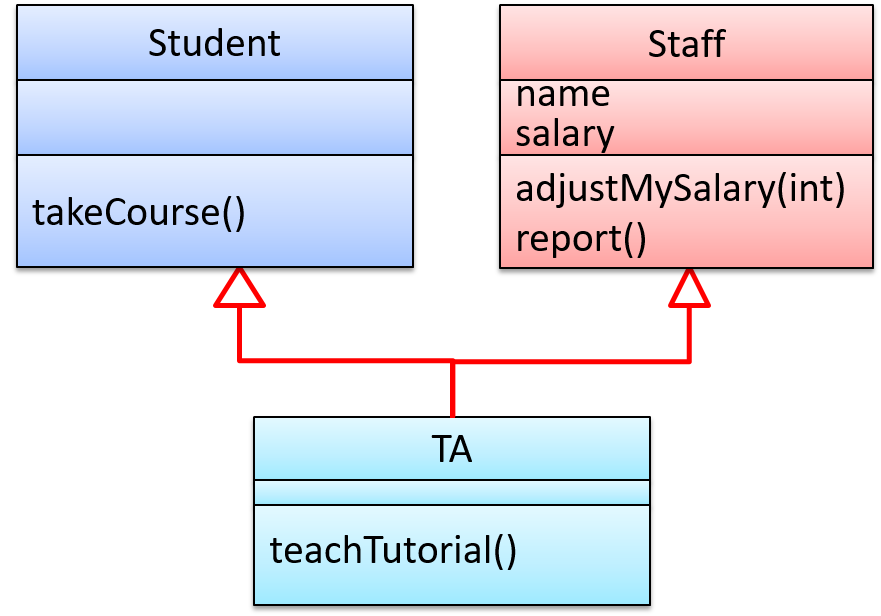
Multiple Inheritance is when a class inherits directly from multiple classes. Multiple inheritance is allowed among C++ classes but not among Java classes.
📦 The TA class inherits from the Staff class and the Student.
Implementing Inheritance
To learn how to implement inheritance in Java, you can follow [Oracle’s Java Tutorials: Inheritance]
A very beginner-friendly video about implementing Java inheritance.
Java requires all class to have a parent class. If you do not specify a parent class, Java automatically assigns the Object class as the parent class.
Overriding
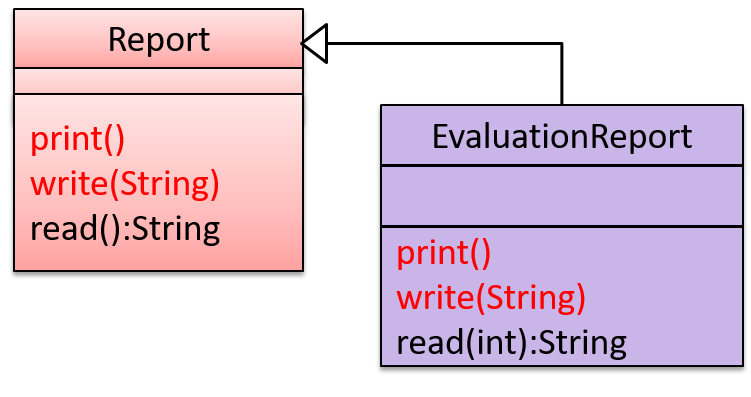
Method overriding is when a sub-class changes the behavior inherited from the parent class by re-implementing the method. Overridden methods have the same name, same type signature, and same return type.
📦 In the diagram below,
Report#print()method is overridden byEvaluationReport#print()method.Report#write(String)method is overridden byEvaluationReport#write(String)method.Report#read():Stringmethod is NOT overridden byEvaluationReport#read(int):Stringmethod. Reason: the two methods have different signatures;EvaluationReport#read(int):Stringoverloads (rather than overrides) theReport#read():Stringmethod.
Design → Object Oriented Programming →
Overloading
Method overloading is when there are multiple methods with the same name but different type signatures. Overloading is used to indicate that multiple operations do similar things but take different parameters.
Type Signature: The type signature of an operation is the type sequence of the parameters. The return type and parameter names are not part of the type signature. However, the parameter order is significant.
| Method | Type Signature |
|---|---|
int add(int X, int Y) |
(int, int) |
void add(int A, int B) |
(int, int) |
void m(int X, double Y) |
(int, double) |
void m(double X, int Y) |
(double, int) |
📦 In the class below, the calculate method is overloaded because the two methods have the same name but different type signatures (String) and (int[])
class RatingCalculator{
    void calculate(String matric) { ... }
    void calculate(int[] averages) { ... }
}
Implementing Overriding
To override a method inherited from an ancestor class, simply re-implement the method in the target class.
📦 A simple example where the Report#print() method is overridden by EvaluationReport#print() method:
class Report{

    void print(){
        System.out.println("Printing report");
    }

}

class EvaluationReport extends Report{

    @Override  // this annotation is optional
    void print(){
        System.out.println("Printing evaluation report");
    }

}

class ReportMain{

    public static void main(String[] args){
        Report report = new Report();
        report.print(); // prints "Printing report"

        EvaluationReport evaluationReport = new EvaluationReport();
        evaluationReport.print(); // prints "Printing evaluation report"
    }
}
Overloading
Method overloading is when there are multiple methods with the same name but different type signatures. Overloading is used to indicate that multiple operations do similar things but take different parameters.
Type Signature: The type signature of an operation is the type sequence of the parameters. The return type and parameter names are not part of the type signature. However, the parameter order is significant.
| Method | Type Signature |
|---|---|
int add(int X, int Y) |
(int, int) |
void add(int A, int B) |
(int, int) |
void m(int X, double Y) |
(int, double) |
void m(double X, int Y) |
(double, int) |
📦 In the class below, the calculate method is overloaded because the two methods have the same name but different type signatures (String) and (int[])
class RatingCalculator{
    void calculate(String matric) { ... }
    void calculate(int[] averages) { ... }
}
Implementing Overloading
An operation can be overloaded inside the same class or in sub/super classes.
📦 The constructor of the Account class below is overloaded because there are two constructors with different signatures: () and (String, String, double). Furthermore, the save method
in the Account class is overloaded in the child class SavingAccount.
class Account {
    Account () {
        ...
    }

    Account (String name, String number, double balance) {
        ...
    }

    void save(int amount){
        ...
    }
}

class SavingAccount extends Account{

    void save(Double amount){
        ...
    }
}
Design Fundamentals
Abstraction
What
Abstraction is a technique for dealing with complexity. It works by establishing a level of complexity (or an aspect) we are interested in, and suppressing the more complex details below that level (or irrelevant to that aspect).
Most programs are written to solve complex problems involving large amounts of intricate details. It is impossible to deal with all these details at the same time. The guiding principle of abstraction stipulates that we capture only details that are relevant to the current perspective or the task at hand.
Ignoring lower level data items and thinking in terms of bigger entities is called data abstraction.
📦 Within a certain software component, we might deal with a user data type, while ignoring the details contained in the user data item such as name, and date of birth. These details have been ‘abstracted away’ as they do not affect the task of that software component.
Control abstraction abstracts away details of the actual control flow to focus on tasks at a simplified level.
📦 print(“Hello”) is an abstraction of the actual output mechanism within the computer.
Abstraction can be applied repeatedly to obtain progressively higher levels of abstractions.
📦 An example of different levels of data abstraction: a File is a data item that is at a higher level than an array and an array is at a higher level than a bit.
📦 An example of different levels of control abstraction: execute(Game) is at a higher level than print(Char) which is at a higher than an Assembly language instruction MOV.
Modeling
Introduction
What
A model is a representation of something else.
📦 A
A class diagram is a diagram drawn using the UML modelling notation.
📦 An example class diagram:
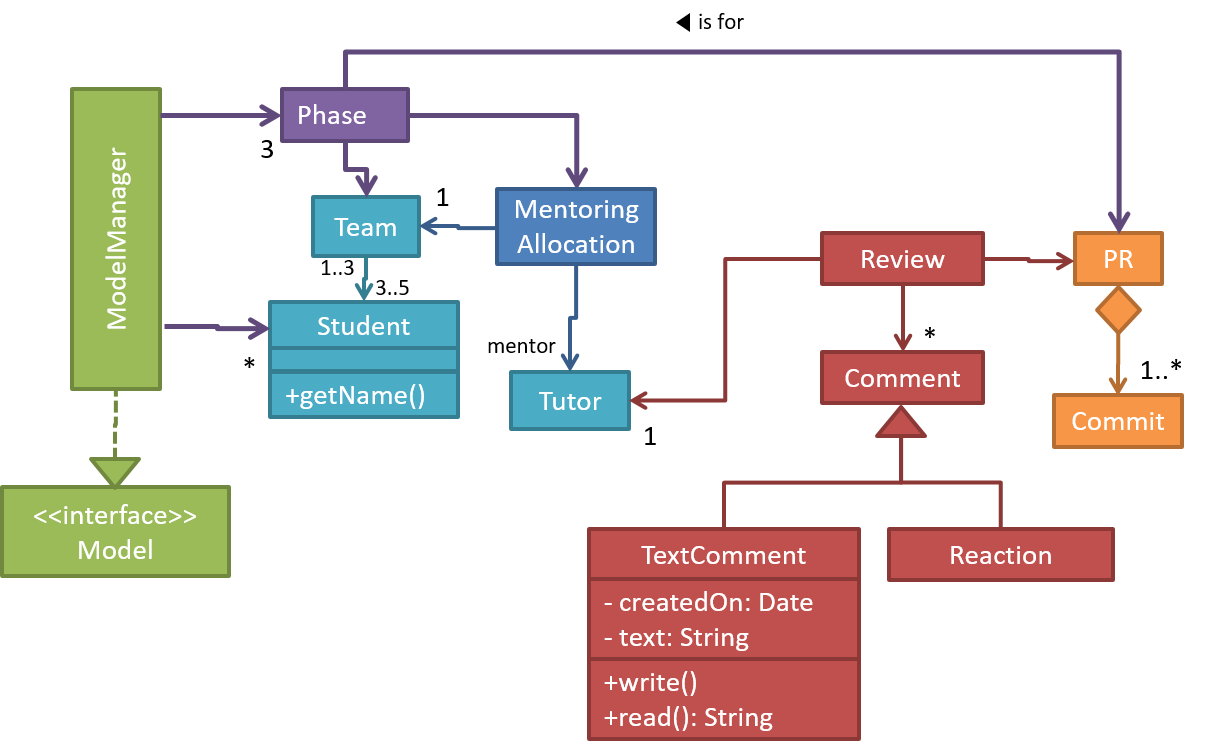
A model provides a simpler view of a complex entity because a model captures only a selected aspect. This omission of some aspects implies models are
Design → Design Fundamentals → Abstraction →
What
Abstraction is a technique for dealing with complexity. It works by establishing a level of complexity (or an aspect) we are interested in, and suppressing the more complex details below that level (or irrelevant to that aspect).
Most programs are written to solve complex problems involving large amounts of intricate details. It is impossible to deal with all these details at the same time. The guiding principle of abstraction stipulates that we capture only details that are relevant to the current perspective or the task at hand.
Ignoring lower level data items and thinking in terms of bigger entities is called data abstraction.
📦 Within a certain software component, we might deal with a user data type, while ignoring the details contained in the user data item such as name, and date of birth. These details have been ‘abstracted away’ as they do not affect the task of that software component.
Control abstraction abstracts away details of the actual control flow to focus on tasks at a simplified level.
📦 print(“Hello”) is an abstraction of the actual output mechanism within the computer.
Abstraction can be applied repeatedly to obtain progressively higher levels of abstractions.
📦 An example of different levels of data abstraction: a File is a data item that is at a higher level than an array and an array is at a higher level than a bit.
📦 An example of different levels of control abstraction: execute(Game) is at a higher level than print(Char) which is at a higher than an Assembly language instruction MOV.
📦 A class diagram captures the structure of the software design but not the behavior.
Multiple models of the same entity may be needed to capture it fully.
📦 In addition to a class diagram (or even multiple class diagrams), a number of other diagrams may be needed to capture various interesting aspects of the software.
How
In software development, models are useful in several ways:
a) To analyze a complex entity related to software development.
📦 Some examples of using models for analysis:
- Models of the problem domain (i.e. the environment in which the software is expected to solve a problem) can be built to aid the understanding of the problem to be solved.
- When planning a software solution, models can be created to figure out how the solution is to be built. An architecture diagram is such a model.
b) To communicate information among stakeholders. Models can be used as a visual aid in discussions and documentations.
📦 Some examples of using models to communicate:
- An architect can use an architecture diagram to explain the high-level design of the software to developers.
- A business analyst can use a use case diagram to explain to the customer the functionality of the system.
- A class diagram can be reverse-engineered from code so as to help explain the design of a component to a new developer.
c) As a blueprint for creating software. Models can be used as instructions for building software.
📦 Some examples of using models to as blueprints:
- A senior developer draws a class diagram to propose a design for an OOP software and passes it to a junior programmer to implement.
- A software tool allows users to draw UML models using its interface and the tool automatically generates the code based on the model.
Model-driven development (MDD), also called Model-driven engineering, is an approach to software development that strives to exploits models as blueprints. MDD uses models as primary engineering artifacts when developing software. That is, the system is first created in the form of models. After that, the models are converted to code using code-generation techniques (usually, automated or semi-automated, but can even involve manual translation from model to code). MDD requires the use of a very expressive modeling notation (graphical or otherwise), often specific to a given problem domain. It also requires sophisticated tools to generate code from models and maintain the link between models and the code. One advantage of MDD is that the same model can be used to create software for different platforms and different languages. MDD has a lot of promise, but it is still an emerging technology
Further reading:
- Martin Fowler's view on MDD - TLDR: he is sceptical
- 5 types of Model Driven Software Development - A more optimistic view, although an old article
UML Models 
The following diagram uses the class diagram notation to show the different types of UML diagrams.

source:https://en.wikipedia.org/
Modeling Structures
Class Diagrams (Basics)
Associations among objects/classes play an important role in an OO solution.
The most basic class diagram is a bunch of classes with some solid lines among them to represent associations, such as this one.
📦 An example class diagram showing associations between classes.
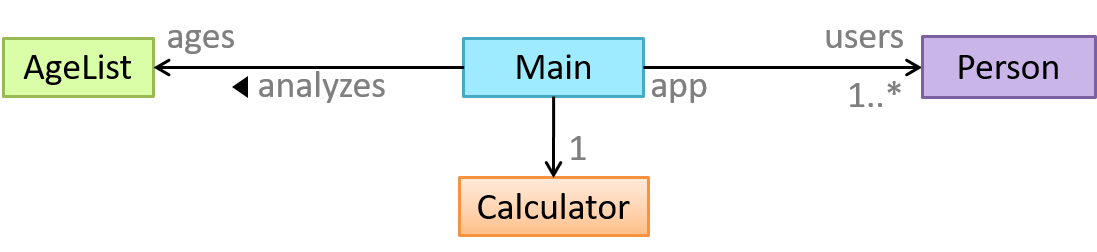
In addition, associations can show additional decorations such as association labels, association roles, multiplicity and navigability to add more information to a class diagram.
📦 Here is the same class diagram shown earlier but with some additional information included:
Object Diagrams
An object diagram shows an object structure at a given point of time.
Object Oriented Domain Models
The analysis process for identifying objects and object classes is recognized as one of the most difficult areas of object-oriented development. --Ian Sommerville, in the book Software Engineering
Class diagrams can also be used to model objects in the
📦 OO domain model of a snakes and ladders game is given below.
Description: Snakes and ladders game is played by two or more players using a board and a die. The board has 100 squares marked 1 to 100. Each player owns one piece. Players take turns to throw the die and advance their piece by the number of squares they earned from the die throw. The board has a number of snakes. If a player’s piece lands on a square with a snake head, the piece is automatically moved to the square containing the snake’s tail. Similarly, a piece can automatically move from a ladder foot to the ladder top. The player whose piece is the first to reach the 100th square wins.
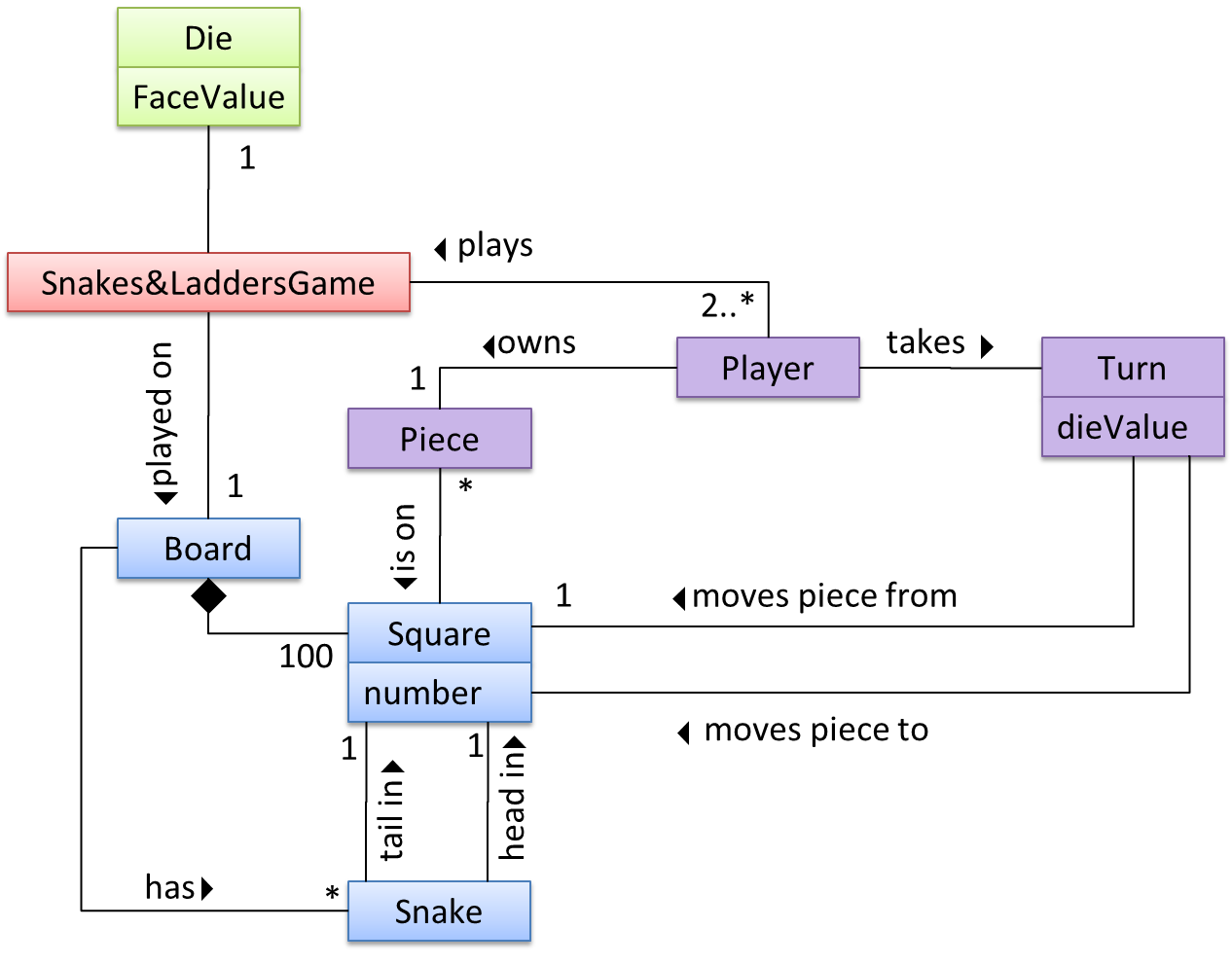
The above OO domain model omits the ladder class for simplicity. It can be included in a similar fashion to the Snake class.
OODMs do not contain solution-specific classes (i.e. classes that are used in the solution domain but do not exist in the problem domain). For example, a class called DatabaseConnection could appear in a class diagram but not usually in an OO domain model because DatabaseConnection is something related to a software solution but not an entity in the problem domain.
OODMs represents the class structure of the problem domain and not their behavior, just like class diagrams. To show behavior, use other diagrams such as sequence diagrams.
OODM notation is similar to class diagram notation but typically omit methods and navigability.
Modeling Behaviors
Activity Diagrams
Software projects often involve workflows. Workflows define the
Some examples in which a certain workflow is relevant to software project:
📦 A software that automates the work of an insurance company needs to take into account the workflow of processing an insurance claim.
📦 The algorithm of a price of code represents the workflow (i.e. the execution flow) of the code.
Understanding such workflows is important for the success of the software project.
Unified Modeling Language (UML) is a graphical notation to describe various aspects of a software system. UML is the brainchild of three software modeling specialists James Rumbaugh, Grady Booch and Ivar Jacobson (also known as the Three Amigos). Each of them has developed their own notation for modeling software systems before joining force to create a unified modeling language (hence, the term ‘Unified’ in UML). UML is currently the de facto modeling notation used in the software industry.
📦 An example activity diagram [source:wikipeida]:

The most basic activity diagram is simply a linear sequence of actions.
Some workflows have alternate paths where only one of the alternate paths is taken based on some condition.
In some workflows, multiple paths happen in parallel.
Use Case Diagrams
Use case diagrams model the mapping between features of a system and its user roles.
📦 A simple use case diagram:
SECTION: IMPLEMENTATION
Error Handling
Introduction
What
Well-written applications include error-handling code that allows them to recover gracefully from unexpected errors. When an error occurs, the application may need to request user intervention, or it may be able to recover on its own. In extreme cases, the application may log the user off or shut down the system. --(source)
Exceptions
What
Exceptions are used to deal with 'unusual' but not entirely unexpected situations that the program might encounter at run time.
Exception:
An exception is an event, which occurs during the execution of a program, that disrupts the normal flow of the program's instructions. –- Java Tutorial (Oracle Inc.)
📦 Examples:
- A network connection encounters a timeout due to a slow server.
- The code tries to read a file from the hard disk but the file is corrupted and cannot be read.
How
Most languages allow a method to encapsulate the unusual situation in an Exception object and 'throw'/'raise' that object so that another piece of code can 'catch' it and deal with it. This is especially useful when code segment that encountered the unusual situation does not know how to deal with it.
Exception objects can propagate up the method/function call hierarchy until it is dealt with. Usually, an exception thrown by a method is caught by the caller method. If the called method does not know how to deal with the exception it caught, it can throw/raise the Exception object to its own caller. If none of the callers is prepared to deal with the exception, the exceptions can propagate through the method call stack until it is received by the main method and thrown to the runtime, thus halting the system.
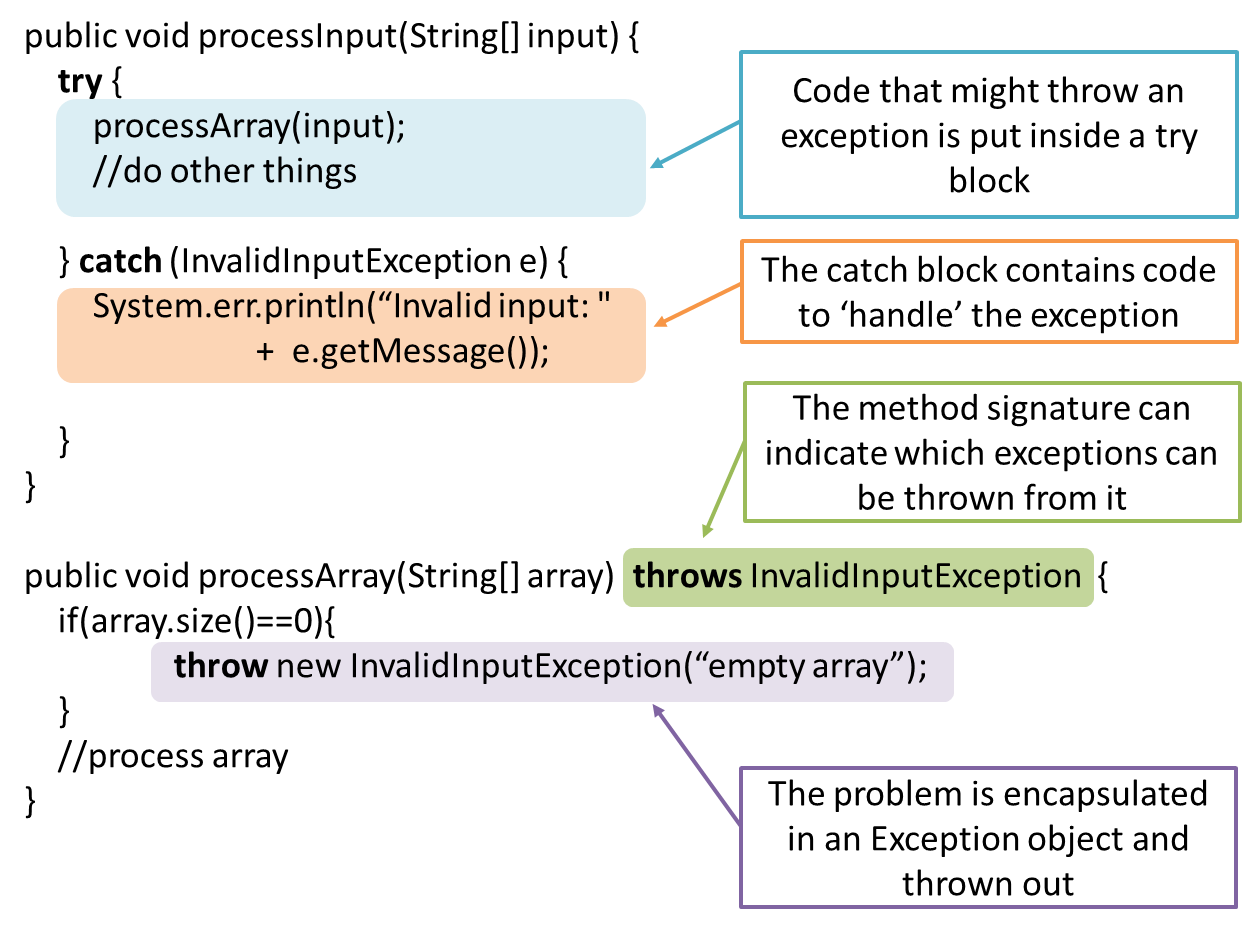
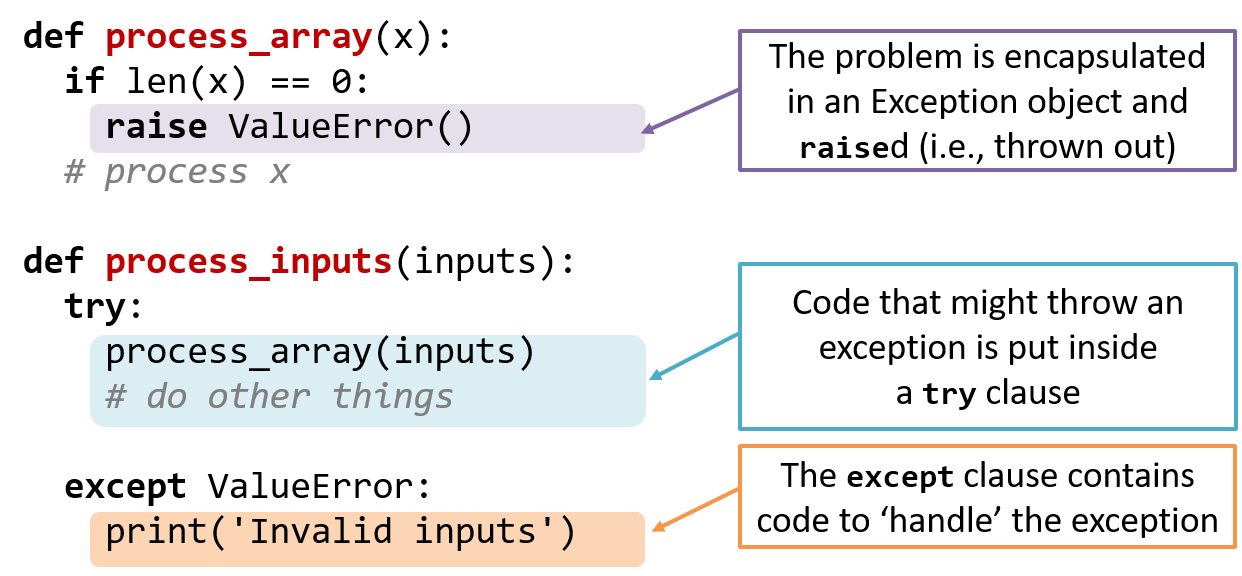
📦 In the code given below, processArray can potentially throw an InvalidInputException. Because of that, processInput method invokes processArray method inside a try{ } block and has a catch{ } block to specify what to do if the exception is actually thrown.
📦 In the code given below, process_array function can potentially raise a ValueError exception. Because of that, process_input function invokes process_array function inside a try clause and has a except clause to specify what to do if the exception is actually raised.
Advantages of exception handling in this way:
- The ability to propagate error information through the call stack.
- The separation of code that deals with 'unusual' situations from the code that does the 'usual' work.
When
In general, use exceptions only for 'unusual' conditions. Use normal return statements to pass control to the caller for conditions that are 'normal'.
IDEs
Introduction
Professional software engineers often write code using Integrated Development Environments (IDEs). IDEs support all development-related work within the same tool.
An IDE generally consists of:
- A source code editor that includes features such as syntax coloring, auto-completion, easy code navigation, error highlighting, and code-snippet generation.
- A compiler and/or an interpreter (together with other build automation support) that facilitates the compilation/linking/running/deployment of a program.
- A debugger that allows the developer to execute the program one step at a time to observe the run-time behavior in order to locate bugs.
- Other tools that aid various aspects of coding e.g. support for automated testing, drag-and-drop construction of UI components, version management support, simulation of the target runtime platform, and modeling support.
Examples of popular IDEs:
- Java: Eclipse, Intellij IDEA, NetBeans
- C#, C++: Visual Studio
- Swift: XCode
- Python: PyCharm
Some Web-based IDEs have appeared in recent times too e.g., Amazon's Cloud9 IDE.
Some experienced developers, in particular those with a UNIX background, prefer lightweight yet powerful text editors with scripting capabilities (e.g. Emacs) over heavier IDEs.
Debugging
What
Debugging is the process of discovering defects in the program. Here are some approaches to debugging:
-
👎 By inserting temporary print statements: This is an ad-hoc approach in which print statements are inserted in the program to print information relevant to debugging, such as variable values. e.g.
Exiting process() method, x is 5.347. This approach is not recommended due to these reasons.- Incurs extra effort when inserting and removing the print statements.
- Unnecessary program modifications increases the risk of introducing errors into the program.
- These print statements, if not promptly removed, may even appear unexpectedly in the production version.
-
👎 By manually tracing through the code: Otherwise known as ‘eye-balling’, this approach doesn't have the cons of the previous approach, but it too is not recommended (other than as a 'quick try') due to these reasons:
- It is difficult, time consuming, and error-prone technique.
- If you didn't spot the error while writing code, you might not spot the error when reading code too.
-
👍 Using a debugger: A debugger tool allows you to pause the execution, then step through one statement at a time while examining the internal state if necessary. Most IDEs come with an inbuilt debugger. This is the recommended approach for debugging.
Code Quality
Introduction
Basic
Always code as if the person who ends up maintaining your code will be a violent psychopath who knows where you live. -- Martin Golding
Guideline: Maximise Readability
Introduction
Programs should be written and polished until they acquire publication quality. --Niklaus Wirth
Among various dimensions of code quality, such as run-time efficiency, security, and robustness, one of the most important is understandability. This is because in any non-trivial software project, code needs to be read, understood, and modified by other developers later on. Even if we do not intend to pass the code to someone else, code quality is still important because we all become 'strangers' to our own code someday.
Example: The two code samples given below achieve the same functionality, but one is easier to read.

int subsidy() {
    int subsidy;
    if (!age) {
        if (!sub) {
            if (!notFullTime) {
                subsidy = 500;
            } else {
                subsidy = 250;
            }
        } else {
            subsidy = 250;
        }
    } else {
        subsidy = -1;
    }
    return subsidy;
}

int calculateSubsidy() {
    int subsidy;
    if (isSenior) {
        subsidy = REJECT_SENIOR;
    } else if (isAlreadySubsidised) {
        subsidy = SUBSIDISED_SUBSIDY;
    } else if (isPartTime) {
        subsidy = FULLTIME_SUBSIDY * RATIO;
    } else {
        subsidy = FULLTIME_SUBSIDY;
    }
    return subsidy;
}
Basic
Be wary when a method is longer than the computer screen, and take corrective action when it goes beyond 30 LOC (lines of code). The bigger the haystack, the harder it is to find a needle.
If you need more than 3 levels of indentation, you're screwed anyway, and should fix your program. --Linux 1.3.53 CodingStyle
In particular, avoid arrowhead style code.
Example:
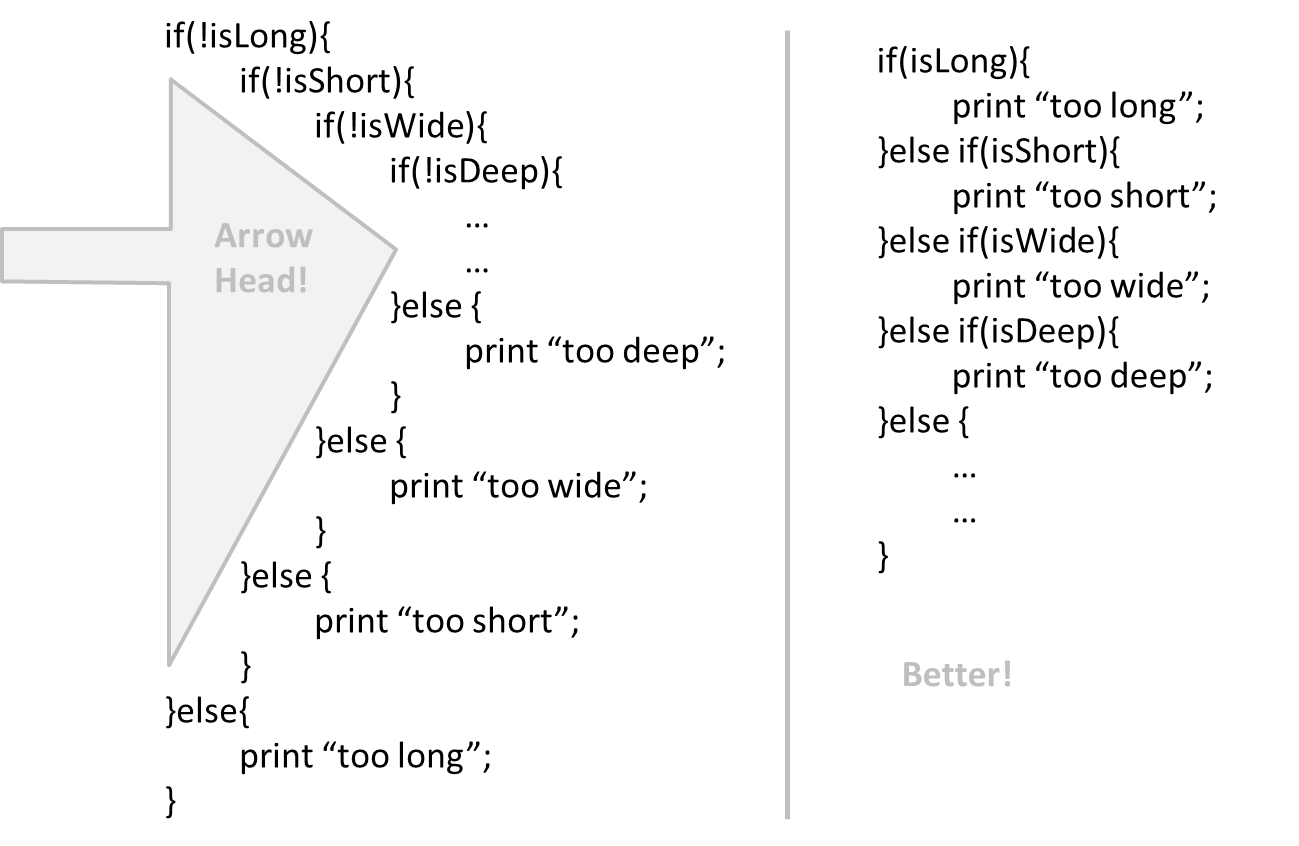
Avoid complicated expressions, especially those having many negations and nested parentheses. If you must evaluate complicated expressions, have it done in steps (i.e. calculate some intermediate values first and use them to calculate the final value).
Example:
return ((length < MAX_LENGTH) || (previousSize != length)) && (typeCode == URGENT);
boolean isWithinSizeLimit = length < MAX_LENGTH;
boolean isSameSize = previousSize != length;
boolean isValidCode = isWithinSizeLimit || isSameSize;

boolean isUrgent = typeCode == URGENT;

return isValidCode && isUrgent;
The competent programmer is fully aware of the strictly limited size of his own skull; therefore he approaches the programming task in full humility, and among other things he avoids clever tricks like the plague. -- Edsger Dijkstra
When the code has a number that does not explain the meaning of the number, we call that a magic number (as in “the number appears as if by magic”).
Example:
|
|
|---|---|
return 3.14236; |
return PI |
return 9 |
return MAX_SIZE-1 |
Using a named constant makes the code easier to understand because the name tells us more about the meaning of the number. Similarly, we can have ‘magic’ values of other data types.
return “Error 1432”; // A magic string!
Make the code as explicit as possible, even if the language syntax allows them to be implicit. Here are some examples:
- Use explicit type conversion instead of implicit type conversion.
- Use parentheses/braces to show grouping even when they can be skipped.
- Use enumerations when a certain variable can take only a small number of finite values. For example, instead of declaring the variable 'state' as an integer and using values 0,1,2 to denote the states 'starting', 'enabled', and 'disabled'
respectively, declare 'state' as type
SystemStateand define an enumerationSystemStatethat has values'STARTING','ENABLED', and'DISABLED'. - When statements should follow a particular order, try to make it obvious (with appropriate naming, or at least comments). For example, if you name two functions
'taskA()'and'taskB()', it is not obvious which one should be called first. Contrast this with naming the functions'phaseOne()'and'phaseTwo()'instead. This is especially important when statements in one function must be called before the other one.
Guideline: Follow a Standard
Introduction
One essential way to improve code quality is to follow a consistent style. That is why software engineers follow a strict coding standard (aka style guide).
The aim of a coding standard is to make the entire code base look like it was written by one person. A coding standard is usually specific to a programming language and specifies guidelines such as the location of opening and closing braces, indentation styles and naming styles (e.g. whether to use Hungarian style, Pascal casing, Camel casing, etc.). It is important that the whole team/company use the same coding standard and that standard is not generally inconsistent with typical industry practices. If a company's coding standards is very different from what is used typically in the industry, new recruits will take longer to get used to the company's coding style.
IDEs can help to enforce some parts of a coding standard e.g. indentation rules.
Basic
Go through the provided Java coding standard and learn the basic style rules.
Guideline: Name Well
Introduction
Proper naming improves the readability. It also reduces bugs caused by ambiguities regarding the intent of a variable or a method.
There are only two hard things in Computer Science: cache invalidation and naming things. -- Phil Karlton
Basic
Use nouns for classes/variables and verbs for methods/functions.
Examples:
| Name for a | |
|
|---|---|---|
| Class | CheckLimit |
LimitChecker |
| method | result() |
calculate() |
Distinguish clearly between single valued and multivalued variables.
Examples:
Person student
ArrayList<Person> students
Use correct spelling in names. Avoid 'texting-style' spelling. Avoid foreign language words, slang, and names that are only meaningful within specific contexts/times e.g. terms from private jokes, a TV show currently popular in your country
Guideline: Comment Minimally, But Sufficiently
Introduction
Good code is its own best documentation. As you’re about to add a comment, ask yourself, ‘How can I improve the code so that this comment isn’t needed?’ Improve the code and then document it to make it even clearer. --Steve McConnell, Author of Clean Code
Some think commenting heavily increases the 'code quality'. This is not so. Avoid writing comments to explain bad code. Improve the code to make it self-explanatory.
Basic
If the code is self-explanatory, refrain from repeating the description in a comment just for the sake of 'good documentation'.
// increment x
x++;

//trim the input
trimInput();
Do not write comments as if they are private notes to self. Instead, write them well enough to be understood by another programmer. One type of comments that is almost always useful is the header comment that you write for a class or an operation to explain its purpose.
Reason: this comment will only make sense to the person who wrote it
// a quick trim function used to fix bug I detected overnight
void trimInput(){
    ....
}
/** Trims the input of leading and trailing spaces */
void trimInput(){
    ....
}
Refactoring
What
The first version of the code you write may not be of production quality. It is OK to first concentrate on making the code work, rather than worry over the quality of the code, as long as you improve the quality later. This process of improving a program's internal structure in small steps without modifying its external behavior is called refactoring.
- Refactoring is not rewriting: Discarding poorly-written code entirely and re-writing it from scratch is not refactoring because refactoring needs to be done in small steps.
- Refactoring is not bug fixing: By definition, refactoring is different from bug fixing or any other modifications that alter the external behavior (e.g. adding a feature) of the component in concern.
💡 Improving code structure can have many secondary benefits: e.g.
- hidden bugs become easier to spot
- improve performance (sometimes, simpler code runs faster than complex code because simpler code is easier for the compiler to optimize).
Given below are two common refactorings (taken from
http://refactoring.com/catalog/ - This is a list of common refactorings, maintained by Martin Fowler, a leading authority on refactoring. He is also the author of the ‘bestseller’ on refactoring: Refactoring: Improving the Design of Existing Code
Refactoring Name: Consolidate Duplicate Conditional Fragments
Situation: The same fragment of code is in all branches of a conditional expression.
Method: Move it outside of the expression.
Example:
if (isSpecialDeal()) {
    total = price * 0.95;
    send();
} else {
    total = price * 0.98;
    send();
}
⤵️
if (isSpecialDeal()){
    total = price * 0.95;
} else {
    total = price * 0.98;
}
send();
Refactoring Name: Extract Method
Situation: You have a code fragment that can be grouped together.
Method: Turn the fragment into a method whose name explains the purpose of the method.
Example:
void printOwing() {
    printBanner();

    //print details
    System.out.println("name:	" + name);
    System.out.println("amount	" + getOutstanding());
}
⤵️
void printOwing() {
    printBanner();
    printDetails(getOutstanding());
}

void printDetails (double outstanding) {
    System.out.println("name:	" + name);
    System.out.println("amount	" + outstanding);
}
💡 Some IDEs have built in support for basic refactorings such as automatically renaming a variable/method/class in all places it has been used.
Important: Refactoring, even if done with the aid of an IDE, may still result in regressions. Therefore, each small refactoring should be followed by regression testing.
Reuse
Introduction
What
Reuse is a major theme in software engineering practices. By reusing tried-and-tested components, the robustness of a new software system can be enhanced while reducing the manpower and time requirement. Reusable components come in many forms; it can be reusing a piece of code, a subsystem, or a whole software.
When
While you may be tempted to use many libraries/frameworks/platform that seem to crop up on a regular basis and promise to bring great benefits, note that there are costs associated with reuse. Here are some:
- The reused code may be an overkill (think using a sledgehammer to crack a nut) increasing the size of, or/and degrading the performance of, your software.
- The reused software may not be mature/stable enough to be used in an important product. That means the software can change drastically and rapidly, possibly in ways that break your software.
- Non-mature software has the risk of dying off as fast as they emerged, leaving you with a dependency that is no longer maintained.
- The license of the reused software (or its dependencies) restrict how you can use/develop your software.
- The reused software might have bugs, missing features, or security vulnerabilities that are important to your product but not so important to the maintainers of that software, which means those flaws will not get fixed as fast as you need them to.
- Malicious code can sneak into your product via compromised dependencies.
APIs
What
An Application Programming Interface (API) specifies the interface through which other programs can interact with a software component. It is a contract between the component and its clients.
📦 The API of the Java String class is a collection of public methods that you can invoke to make use of the String class.
📦 The GitHub API is a collection of Web request formats GitHub server accepts and the corresponding responses. We can write a program that interacts with GitHub through that API.
When developing large systems, if you define the API of each components early, the development team can develop the components in parallel because the future behavior of the other components are now more predictable.
Libraries
What
A library is a collection of modular code that is general and can be used by other programs.
📦 Java classes you get with the JDK (such as String, ArrayList, HashMap, etc.) are library classes that are provided in the default Java distribution.
📦 Natty is a Java library that can be used for parsing strings that represent dates e.g. The 31st of April in the year 2008
How
These are the typical steps required to use a library.
- Read the documentation to confirm that its functionality fits your needs
- Check the license to confirm that it allows reuse in the way you plan to reuse it. For example, some libraries might allow non-commercial use only.
- Download the library and make it accessible to your project. Alternatively, you can configure your
dependency management tool to do it for you. - Call the library API from your code where you need to use the library functionality.
Frameworks
What
The overall structure and execution flow of a specific category of software systems can be very similar. The similarity is an opportunity to reuse at a high scale.
📦 Running example:
IDEs for different programming languages are similar in how they support editing code, organizing project files, debugging, etc.
A software framework is a reusable implementation of a software (or part thereof) providing generic functionality that can be selectively customized to produce a specific application.
📦 Running example:
Eclipse is an IDE framework that can be used to create IDEs for different programming languages.
Some frameworks provide a complete implementation of a default behavior which makes them immediately usable.
📦 Running example:
Eclipse is a fully functional Java IDE out-of-the-box.
A framework facilitates the adaptation and customization of some desired functionality.
📦 Running example:
Eclipse plugin system can be used to create an IDE for different programming languages while reusing most of the existing IDE features of Eclipse. E.g. https://marketplace.eclipse.org/content/pydev-python-ide-eclipse
Some frameworks cover only a specific components or an aspect.
📦 JavaFx a framework for creating Java GUIs.
📦 More examples of frameworks
- Drupal: a framework for Web-based applications, content management systems in particular. Implemented using PHP
- Ruby on Rails : another Web-application framework similar to Drupal but uses Ruby instead of PHP
- JUnit: a framework for testing Java code.
Frameworks vs Libraries
Although both frameworks and libraries are reuse mechanisms, there are notable differences:
-
Libraries are meant to be used ‘as is’ while frameworks are meant to be customized/extended. e.g., writing plugins for Eclipse so that it can be used as an IDE for different languages (C++, PHP, etc.), adding modules and themes to Drupal, and adding test cases to JUnit.
-
Your code calls the library code while the framework code calls your code. Frameworks use a technique called inversion of control, aka the “Hollywood principle” (i.e. don’t call us, we’ll call you!). That is, you write code that will be called by the framework, e.g. writing test methods that will be called by the JUnit framework. In the case of libraries, your code calls libraries.
Platforms
What
A platform provides a runtime environment for applications. A platform is often bundled with various libraries, tools, frameworks, and technologies in addition to a runtime environment but the defining characteristic of a software platform is the presence of a runtime environment.
📦 Technically, an operating system can be called a platform. For example, Windows PC is a platform for desktop applications while iOS is a platform for mobile apps.
📦 Two well-known examples of platforms are JavaEE and .NET, both of which sit above Operating systems layer, and are used to develop
- JavaEE (Java Enterprise Edition) is both a framework and a platform for writing enterprise applications. The runtime used by the JavaEE applications is the JVM (Java Virtual Machine) that can run on different Operating Systems.
- .NET is a similar platform and a framework. Its runtime is called CLR (Common Language Runtime) and usually used on Windows machines.
Enterprise Application: ‘enterprise applications’ means software applications used at organizations level and therefore has to meet much higher demands (such as in scalability, security, performance, and robustness) than software meant for individual use.
Cloud Computing
What
Cloud computing is the delivery of computing as a service over the network, rather than a product running on a local machine. This means the actual hardware and software is located at a remote location, typically, at a large server farm, while users access them over the network. Maintenance of the hardware and software is managed by the cloud provider while users typically pay for only the amount of services they use. This model is similar to the consumption of electricity; the power company manages the power plant, while the consumers pay them only for the electricity used. The cloud computing model optimizes hardware and software utilization and reduces the cost to consumers. Furthermore, users can scale up/down their utilization at will without having to upgrade their hardware and software. The traditional non-cloud model of computing is similar to everyone buying their own generators to create electricity for their own use.
Iaas, PaaS, and SaaS

source:https://commons.wikimedia.org
Cloud computing can deliver computing services at three levels:
-
Infrastructure as a service (IaaS) delivers computer infrastructure as a service. For example, a user can deploy virtual servers on the cloud instead of buying physical hardware and installing server software on them. Another example would be a customer using storage space on the cloud for off-site storage of data. Rackspace is an example of an IaaS cloud provider. Amazon Elastic Compute Cloud (Amazon EC2) is another one.
-
Platform as a service (PaaS) provides a platform on which developers can build applications. Developers do not have to worry about infrastructure issues such as deploying servers or load balancing as is required when using IaaS. Those aspects are automatically taken care of by the platform. The price to pay is reduced flexibility; applications written on PaaS are limited to facilities provided by the platform. A PaaS example is the Google App Engine where developers can build applications using Java, Python, PHP, or Go whereas Amazon EC2 allows users to deploy application written in any language on their virtual servers.
-
Software as a service (SaaS) allows applications to be accessed over the network instead of installing them on a local machine. For example, Google Docs is an SaaS word processing software, while Microsoft Word is a traditional word processing software.
Documentation
Introduction
What
Developer-to-developer documentation can be in one of two forms:
- Documentation for developer-as-user: Software components are written by developers and reused by other developers, which means there is a need to document how such components are to be used. Such documentation can take
several forms:
- API documentation: APIs expose functionality in small-sized, independent and easy-to-use chunks, each of which can be documented systematically.
- Tutorial-style instructional documentation: In addition to explaining functions/methods independently, some higher-level explanations of how to use an API can be useful.
- 📦 Example of API Documentation: String API.
- 📦 Example of tutorial-style documentation: Java Intenatioanalization Tutorial
- 📦 Example of API Documentation: string API.
- 📦 Example of tutorial-style documentation: How to use Regular Expressions in Python
- Documentation for developer-as-maintainer: There is a need to document how a system or a component is designed, implemented and tested so that other developers can maintain and evolve the code. Writing documentation of this type is harder because of the need to explain complex internal details. However, given that readers of this type of documentation usually have access to the source code itself, only some information need to be included in the documentation, as code (and code comments) can also serve as a complementary source of information.
- 📦 An example: se-edu/addressbook-level4 Developer Guide.
Guidelines
Given below are some guidelines to write developer documentation.
Guideline: Aim for Comprehensibility
What
Technical documents exist to help others understand technical details. Therefore, it is not enough for the documentation to be accurate and comprehensive, it should also be comprehensible too.
How
Here are some tips on writing effective documentation.
- Use plenty of diagrams: It is not enough to explain something in words; complement it with visual illustrations (e.g. a UML diagram).
- Use plenty of examples: When explaining algorithms, show a running example to illustrate each step of the algorithm, in parallel to worded explanations.
- Use simple and direct explanations: Convoluted explanations and fancy words will annoy readers. Avoid long sentences.
- Get rid of statements that do not add value: For example, 'We made sure our system works perfectly' (who didn't?), 'Component X has its own responsibilities' (of course it has!).
- It is not a good idea to have separate sections for each type of artifact, such as 'use cases', 'sequence diagrams', 'activity diagrams', etc. Such a structure, coupled with the indiscriminate inclusion of diagrams without justifying their need, indicates a failure to understand the purpose of documentation. Include diagrams when they are needed to explain something. If you want to provide additional diagrams for completeness' sake, include them in the appendix as a reference.
Guideline: Document Minimally, but Sufficiently
What
Aim for 'just enough' developer documentation.
- Writing and maintaining developer documents is an overhead. You should try to minimize that overhead.
- If the readers are developers who will eventually read the code, the documentation should complement the code and should provide only just enough guidance to get started.
How
Anything that is already clear in the code need not be described in words. Instead, focus on providing higher level information that is not readily visible in the code or comments.
Refrain from duplicating chunks or text. When describing several similar algorithms/designs/APIs, etc., do not simply duplicate large chunks of text. Instead, describe the similarity in one place and emphasize only the differences in other places. It is very annoying to see pages and pages of similar text without any indication as to how they differ from each other.
SECTION: QUALITY ASSURANCE
Testing
Introduction
Testing: Testing is operating a system or component under specified conditions, observing or recording the results, and making an evaluation of some aspect of the system or component. –- source: IEEE
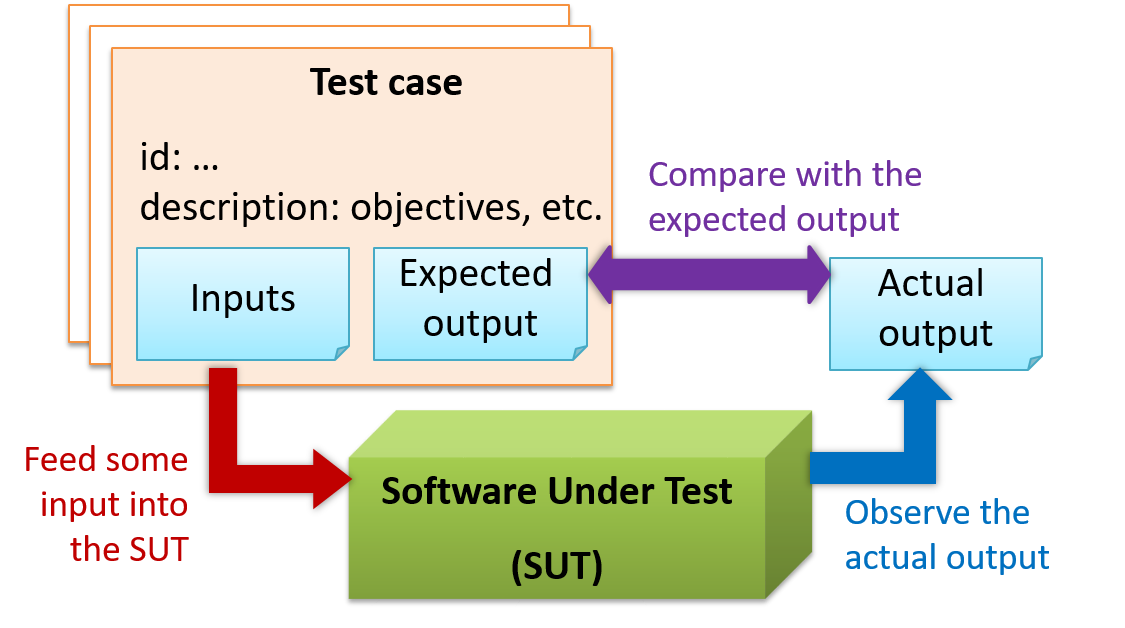
When testing, we execute a set of test cases. A test case specifies how to perform a test. At a minimum, it specifies the input to the software under test (SUT) and the expected behavior.
📦 Example: A minimal test case for testing a browser:
- Input – Start the browser using a blank page (vertical scrollbar disabled). Then, load
longfile.htmllocated in thetest datafolder. - Expected behavior – The scrollbar should be automatically enabled upon loading
longfile.html.
Test cases can be determined based on the specification, reviewing similar existing systems, or comparing to the past behavior of the SUT.
A more elaborate test case can have other details such as those given below.
- A unique identifier : e.g. TC0034-a
- A descriptive name: e.g. vertical scrollbar activation for long web pages
- Objectives: e.g. to check whether the vertical scrollbar is correctly activated when a long web page is loaded to the browser
- Classification information: e.g. priority - medium, category - UI features
- Cleanup, if any: e.g. empty the browser cache.
For each test case we do the following:
- Feed the input to the SUT
- Observe the actual output
- Compare actual output with the expected output
A test case failure is a mismatch between the expected behavior and the actual behavior. A failure is caused by a defect (or a bug).
📦 Example: In the browser example above, a test case failure is implied if the scrollbar remains disabled after loading longfile.html. The defect/bug causing that failure could be an uninitialized variable.
Here is another definition of testing:
Software testing consists of the dynamic verification that a program provides expected behaviors on a finite set of test cases, suitably selected from the usually infinite execution domain. -– source: Software Engineering Book of Knowledge V3
Some things to note (indicated by keywords in the above definition):
- Dynamic: Testing involves executing the software. It is not by examining the code statically.
- Finite: In most non-trivial cases there are potentially infinite test scenarios but resource constraints dictate that we can test only a finite number of scenarios.
- Selected: In most cases it is not possible to test all scenarios. That means we need to select what scenarios to test.
- Expected: Testing requires some knowledge of how the software is expected to behave.
Test Automation
An automated test case can be run programmatically and the result of the test case (pass or fail) is determined programmatically. Compared to manual testing, automated testing reduces the effort required to run tests repeatedly and increases precision of testing (because manual testing is susceptible to human errors).
A simple way to semi-automate testing of a CLI(Command Line Interface) app is by using input/output re-direction.
- First, we feed the app with a sequence of test inputs that is stored in a file while redirecting the output to another file.
- Next, we compare the actual output file with another file containing the expected output.
Let us assume we are testing a CLI app called AddressBook. Here are the detailed steps:
-
Store the test input in the text file
input.txt.add Valid Name p/12345 valid@email.butNoPrefix add Valid Name 12345 e/valid@email.butPhonePrefixMissing -
Store the output we expect from the SUT in another text file
expected.txt.Command: || [add Valid Name p/12345 valid@email.butNoPrefix] Invalid command format: add Command: || [add Valid Name 12345 e/valid@email.butPhonePrefixMissing] Invalid command format: add -
Run the program as given below, which will redirect the text in
input.txtas the input toAddressBookand similarly, will redirect the output of AddressBook to a text fileoutput.txt. Note that this does not require any code changes toAddressBook.java AddressBook < input.txt > output.txt-
💡 The way to run a CLI program differs based on the language.
e.g., In Python, assuming the code is inAddressBook.pyfile, use the command
python AddressBook.py < input.txt > output.txt -
💡 If you are using Windows, use a normal command window to run the app, not a Power Shell window.
A CLI program takes input from the keyboard and outputs to the console. That is because those two are default input and output streams, respectively. But you can change that behavior using
<and>operators. For example, if you runAddressBookin a command window, the output will be shown in the console, but if you run it like this,java AddressBook > output.txtthe Operating System then creates a file
output.txtand stores the output in that file instead of displaying it in the console. No file I/O coding is required. Similarly, adding< input.txt(or any other filename) makes the OS redirect the contents of the file as input to the program, as if the user typed the content of the file one line at a time.📎 Resources:
-
-
Next, we compare
output.txtwith theexpected.txt. This can be done using a utility such as WindowsFC(i.e. File Compare) command, Unixdiffcommand, or a GUI tool such as WinMerge.FC output.txt expected.txt
Note that the above technique is only suitable when testing CLI apps, and only if the exact output can be predetermined. If the output varies from one run to the other (e.g. it contains a time stamp), this technique will not work. In those cases we need more sophisticated ways of automating tests.
CLI App: An application that has a Command Line Interface. i.e. user interacts with the app by typing in commands.
Testing Types
Regression Testing
When we modify a system, the modification may result in some unintended and undesirable effects on the system. Such an effect is called a regression.
Regression testing is re-testing the software to detect regressions. Note that to detect regressions, we need to retest all related components, even if they were tested before.
Regression testing is more effective when it is done frequently, after each small change. However, doing so can be prohibitively expensive if testing is done manually. Hence, regression testing is more practical when it is automated.
Unit Testing
What
Unit testing : testing individual units (methods, classes, subsystems, ...) to ensure each piece works correctly.
In OOP code, it is common to write one or more unit tests for each public method of a class.
📦 Here are the code skeletons for a Foo class containing two methods and a FooTest class that contains JUnit tests for those two methods.
class Foo{
    String read(){
        //...
    }

    void write(String input){
        //...
    }

}

class FooTest{

    @Test
    void read(){
        //a unit test for Foo#read() method
    }

    @Test
    void write_emptyInput_exceptionThrown(){
        //a unit tests for Foo#write(String) method
    }

    @Test
    void write_normalInput_writtenCorrectly(){
        //another unit tests for Foo#write(String) method
    }
}
Integration Testing
What
Integration testing : testing whether different parts of the software work together (i.e. integrates) as expected. Integration tests aim to discover bugs in the 'glue code' related to how components interact with each other. These bugs are often the result of misunderstanding of what the parts are supposed to do vs what the parts are actually doing.
📦 Suppose a class Car users classes Engine and Wheel. If the Car class assumed a Wheel can support 200 mph speed but the Wheel can only support 150 mph, it is the
integration test that is supposed to uncover this discrepancy.
System Testing
What
System testing: take the whole system and test it against the system specification.
System testing is typically done by a testing team (also called a QA team).
System test cases are based on the specified external behavior of the system. Sometimes, system tests go beyond the bounds defined in the specification. This is useful when testing that the system fails 'gracefully' having pushed beyond its limits.
📦 Suppose the SUT is a browser capable of handling web pages containing up to 5000 characters. Given below is a test case to test if the SUT fails gracefully if pushed beyond its limits.
Test case: load a web page that is too big
* Input: load a web page containing more than 5000 characters.
* Expected behavior: abort the loading of the page and show a meaningful error message.
This test case would fail if the browser attempted to load the large file anyway and crashed.
System testing includes testing against non-functional requirements too. Here are some examples.
- Performance testing – to ensure the system responds quickly.
- Load testing (also called stress testing or scalability testing) – to ensure the system can work under heavy load.
- Security testing – to test how secure the system is.
- Compatibility testing, interoperability testing – to check whether the system can work with other systems.
- Usability testing – to test how easy it is to use the system.
- Portability testing – to test whether the system works on different platforms.
Alpha-Beta Testing
What
Alpha testing is performed by the users, under controlled conditions set by the software development team.
Beta testing is performed by a selected subset of target users of the system in their natural work setting.
An open beta release is the release of not-yet-production-quality-but-almost-there software to the general population. For example, Google’s Gmail was in 'beta' for many years before the label was finally removed.
Developer Testing
What
Developer testing is the testing done by the developers themselves as opposed to professional testers or end-users.
Why
Delaying testing until the full product is complete has a number of disadvantages:
- Locating the cause of such a test case failure is difficult due to a large search space; in a large system, the search space could be millions of lines of code, written by hundreds of developers! The failure may also be due to multiple inter-related bugs.
- Fixing a bug found during such testing could result in major rework, especially if the bug originated during the design or during requirements specification (i.e. a faulty design or faulty requirements).
- One bug might 'hide' other bugs, which could emerge only after the first bug is fixed.
- The delivery may have to be delayed if too many bugs were found during testing.
Therefore, it is better to do early testing, as hinted by the popular rule of thumb given below, also illustrated by the graph below it.
The earlier a bug is found, the easier and cheaper to have it fixed.
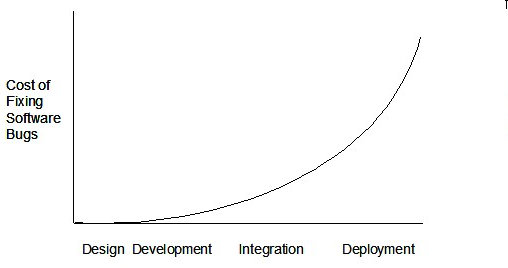
Such early testing of partially developed software is usually, and by necessity, done by the developers themselves i.e. developer testing.
Acceptance Testing
What
Acceptance testing (aka User Acceptance Testing (UAT)): test the delivered system to ensure it meets the user requirements.
Acceptance tests give an assurance to the customer that the system does what it is intended to do. Acceptance test cases are often defined at the beginning of the project, usually based on the use case specification. Successful completion of UAT is often a prerequisite to the project sign-off.
Acceptance vs System Testing
Acceptance testing comes after system testing. Similar to system testing, acceptance testing involves testing the whole system.
Some differences between system testing and acceptance testing:
| System Testing | Acceptance Testing |
|---|---|
| Done against the system specification | Done against the requirements specification |
| Done by testers of the project team | Done by a team that represents the customer |
| Done on the development environment or a test bed | Done on the deployment site or on a close simulation of the deployment site |
| Both negative and positive test cases | More focus on positive test cases |
Note: negative test cases: cases where the SUT is not expected to work normally e.g. incorrect inputs; positive test cases: cases where the SUT is expected to work normally
Requirement Specification vs System Specification
The requirement specification need not be the same as the system specification. Some example differences:
| Requirements Specification | System Specification |
|---|---|
| limited to how the system behaves in normal working conditions | can also include details on how it will fail gracefully when pushed beyond limits, how to recover, etc. specification |
| written in terms of problems that need to be solved (e.g. provide a method to locate an email quickly) | written in terms of how the system solve those problems (e.g. explain the email search feature) |
| specifies the interface available for intended end-users | could contain additional APIs not available for end-users (for the use of developers/testers) |
However, in many cases one document serves as both a requirement specification and a system specification.
Passing system tests does not necessarily mean passing acceptance testing. Some examples:
- The system might work on the testbed environments but might not work the same way in the deployment environment, due to subtle differences between the two environments.
- The system might conform to the system specification but could fail to solve the problem it was supposed to solve for the user, due to flaws in the system design.
Test Case Design
Introduction
What
Except for trivial
📦 Consider the test cases for adding a String object to a Collection object:
- Add an item to an empty collection.
- Add an item when there is one item in the collection.
- Add an item when there are 2, 3, .... n items in the collection.
- Add an item that has an English, a French, a Spanish, ... word.
- Add an item that is the same as an existing item.
- Add an item immediately after adding another item.
- Add an item immediately after system startup.
- ...
Exhaustive testing of this operation can take many more test cases.
Program testing can be used to show the presence of bugs, but never to show their absence!
--Edsger Dijkstra
Every test case adds to the cost of testing. In some systems, a single test case can cost thousands of dollars e.g. on-field testing of flight-control software. Therefore, test cases need to be designed to make the best use of testing resources. In particular:
-
Testing should be effective i.e., it finds a high % of existing bugs e.g., a set of test cases that finds 60 defects is more effective than a set that finds only 30 defects in the same system.
-
Testing should be efficient i.e., it has a high rate of success (bugs found/test cases) a set of 20 test cases that finds 8 defects is more efficient than another set of 40 test cases that finds the same 8 defects.
For testing to be
Black Box vs Glass Box
Test case design can be of three types, based on how much of SUT internal details are considered when designing test cases:
-
Black-box (aka specification-based or responsibility-based) approach: test cases are designed exclusively based on the SUT’s specified external behavior.
-
White-box (aka glass-box or structured or implementation-based) approach: test cases are designed based on what is known about the SUT’s implementation, i.e. the code.
-
Gray-box approach: test case design uses some important information about the implementation. For example, if the implementation of a sort operation uses different algorithms to sort lists shorter than 1000 items and lists longer than 1000 items, more meaningful test cases can then be added to verify the correctness of both algorithms.
Note: these videos are from the Udacity course Software Development Process by Georgia Tech
Equivalence Partitions
What
Consider the testing of the following operation.
isValidMonth (int m): boolean : returns true if m is in the range [1..12]
It is inefficient and impractical to test this method for all integer values [-MIN_INT to MAX_INT]. Fortunately, there is no need to test all possible input values. For example, if the input value 233 failed to produce
the correct result, the input 234 is likely to fail too; there is no need to test both.
In general, most SUTs do not treat each input in a unique way. Instead, they process all possible inputs in a small number of distinct ways. That means a range of inputs is treated the same way inside the SUT. Equivalence partitioning (EP) is a test case design technique that uses the above observation to improve the E&E of testing.
Equivalence partition (aka equivalence class): A group of test inputs that are likely to be processed by the SUT in the same way.
By dividing possible inputs into equivalence partitions we can,
- avoid testing too many inputs from one partition. Testing too many inputs from the same partition is unlikely to find new bugs. This increases the efficiency of testing by reducing redundant test cases.
- ensure all partitions are tested. Missing partitions can result in bugs going unnoticed. This increases the effectiveness of testing by increasing the chance of finding bugs.
Basic
Equivalence partitions (EPs) are usually derived from the specifications of the SUT.
📦 These could be EPs for the
- [MIN_INT ... 0] : below the range that produces
true - [1 … 12] : the range that produces
true - [13 … MAX_INT] : above the range that produces
true
isValidMonth (int m): boolean : returns true if m is in the range [1..12]
When the SUT has multiple inputs, you should identify EPs for each input.
📦 Consider the method duplicate(String s, int n): String which returns a String that contains s repeated n times.
Example EPs for s:
- zero-length strings
- string containing whitespaces
- ...
Example EPs for n:
0- negative values
- ...
An EP may not have adjacent values.
📦 Consider the method isPrime(int i):boolean that returns true if i is a prime number.
EPs for i:
- prime numbers
- non-prime numbers
Some inputs have only a small number of possible values and a potentially unique behavior for each value. In those cases we have to consider each value as a partition by itself.
📦 Consider the method showStatusMessage(GameStatus s):String that returns a unique String for each of the possible value of s (GameStatus is an enum). In this case, each possible value for
s will have to be considered as a partition.
Note that the EP technique is merely a heuristic and not an exact science, especially when applied manually (as opposed to using an automated program analysis tool to derive EPs). The partitions derived depend on how one ‘speculates’ the SUT to behave internally. Applying EP under a glass-box or gray-box approach can yield more precise partitions.
📦 Consider the method EPs given above for the isValidMonth. A different tester might use these EPs instead:
- [1 … 12] : the range that produces
true - [all other integers] : the range that produces
false
📦 Some more examples:
| Specification | Equivalence partitions |
|---|---|
|
|
[“F”] [“T”] [“D”] [“f”, “t”, “d”] [any other string][null] |
|
|
[s is not a valid number] [s is a negative integer] [s has an integer square root] [s does not have an integer square root] |
Intermediate
When deciding EPs of OOP methods, we need to identify EPs of all data participants that can potentially influence the behaviour of the method, such as,
- the target object of the method call
- input parameters of the method call
- other data/objects accessed by the method such as global variables. This category may not be applicable if using the black box approach (because the test case designer using the black box approach will not know how the method is implemented)
📦 Consider this method in the DataStack class:
/**
 * Adds o to the top of the stack if the stack is not full.
 * @throws MutabilityException if the global flag FREEZE==true.
 * @throws InvalidValueException if  o is null.
 * @return true if the push operation was a success.
 */
boolean push(Object o) {
    ...
}
EPs:
DataStackobject: [full] [not full]o: [null] [not null]FREEZE: [true][false]
📦 Consider a simple Minesweeper app. What are the EPs for the newGame() method of the Logic component?
As newGame() does not have any parameters, the only obvious participant is the Logic object itself.
Note that if the glass-box or the grey-box approach is used, other associated objects that are involved in the method might also be included as participants. For example, Minefield object can be considered as another participant
of the newGame() method. Here, the black-box approach is assumed.
Next, let us identify equivalence partitions for each participant. Will the newGame() method behave differently for different Logic objects? If yes, how will it differ? In this case, yes, it might behave differently
based on the game state. Therefore, the equivalence partitions are:
PRE_GAME: before the game starts, minefield does not exist yetREADY: a new minefield has been created and waiting for player’s first moveIN_PLAY: the current minefield is already in useWON,LOST: let us assume thenewGamebehaves the same way for these two values
📦 Consider the Logic component of the Minesweeper application. What are the EPs for the markCellAt(int x, int y) method?. The partitions in bold represent valid inputs.
Logic: PRE_GAME, READY, IN_PLAY, WON, LOSTx: [MIN_INT..-1] [0..(W-1)] [W..MAX_INT] (we assume a minefield size of WxH)y: [MIN_INT..-1] [0..(H-1)] [H..MAX_INT]Cellat(x,y): HIDDEN, MARKED, CLEARED
A test case for the push method can be a combination of the equivalence partitions. Given below is such a test case.
- id: DataStack_Push_001
- description: checks whether pushing onto a full stack works correctly
- input: stack is full, o != null, FREEZE == false
- expected output: returns false, stack remains unchanged
Boundary Value Analysis
What
Boundary Value Analysis (BVA) is test case design heuristic that is based on the observation that bugs often result from incorrect handling of boundaries of equivalence partitions. This is not surprising, as the end points of the boundary are often used in branching instructions etc. where the programmer can make mistakes.
📦 markCellAt(int x, int y) operation could contain code such as if (x > 0 && x < = (W-1)) which involves boundaries of x’s equivalence partitions.
BVA suggests that when picking test inputs from an equivalence partition, values near boundaries (i.e. boundary values) are more likely to find bugs.
Boundary values are sometimes called corner cases.
How
Typically, we choose three values around the boundary to test: one value from the boundary, one value just below the boundary, and one value just above the boundary. The number of values to pick depends on other factors, such as the cost of each test case.
📦 Some examples:
| Equivalence partition | Some possible boundary values |
|---|---|
|
[1-12] |
0,1,2, 11,12,13 |
|
[MIN_INT, 0] |
MIN_INT, MIN_INT+1, -1, 0 , 1 |
|
[any non-null String] |
Empty String, a String of maximum possible length |
|
[prime numbers] |
No specific boundary |
|
[non-empty Stack] |
Stack with: one element, two elements, no empty spaces, only one empty space |
Quality Assurance
Introduction
What
Software Quality Assurance (QA) is the process of ensuring that the software being built has the required levels of quality.
While testing is the most common activity used in QA, there are other complementary techniques such as static analysis, code reviews, and formal verification.
Validation vs Verification
Quality Assurance = Validation + Verification
QA involves checking two aspects:
- Validation: are we building the right system i.e., are the requirements correct?
- Verification: are we building the system right i.e., are the requirements implemented correctly?
Whether something belongs under validation or verification is not that important. What is more important is both are done, instead of limiting to verification (i.e., remember that the requirements can be wrong too).
Code Reviews
What
Code review is the systematic examination code with the intention of finding where the code can be improved.
Reviews can be done in various forms. Some examples below:
-
In
pair programming - As pair programming involves two programmers working on the same code at the same time, there is an implicit review of the code by the other member of the pair.
Pair Programming:
Pair programming is an agile software development technique in which two programmers work together at one workstation. One, the driver, writes code while the other, the observer or navigator, reviews each line of code as it is typed in. The two programmers switch roles frequently. [source: Wikipedia]
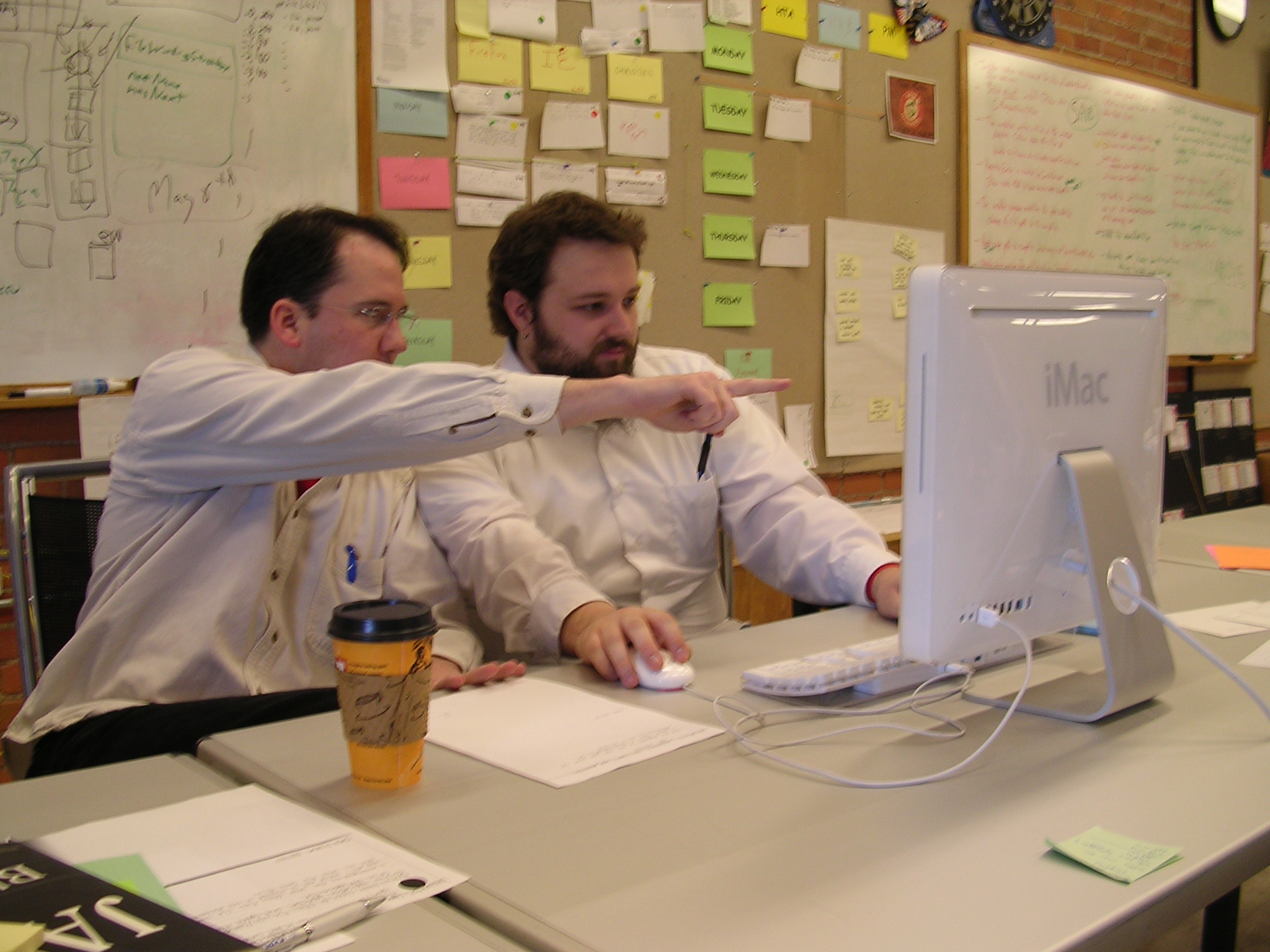


📺 A good introduction to pair programming:
-
Pull Request reviews
- Project Management Platforms such as GitHub and BitBucket allows the new code to be proposed as Pull Requests and provides the ability for others to review the code in the PR.
-
Formal inspections
-
Inspections involve a group of people systematically examining a project artifacts to discover defects. Members of the inspection team play various roles during the process, such as:
- the author - the creator of the artifact
- the moderator - the planner and executor of the inspection meeting
- the secretary - the recorder of the findings of the inspection
- the inspector/reviewer - the one who inspects/reviews the artifact.
-
Advantages of code reviews over testing:
- It can detect functionality defects as well as other problems such as coding standard violations.
- Can verify non-code artifacts and incomplete code
- Do not require test drivers or stubs.
Disadvantages:
- It is a manual process and therefore, error prone.
Static Analysis
What
Static analysis: Static analysis is the analysis of code without actually executing the code.
Static analysis of code can find useful information such unused variables, unhandled exceptions, style errors, and statistics. Most modern IDEs come with some inbuilt static analysis capabilities. For example, an IDE can highlight unused variables as you type the code into the editor.
Higher-end static analyzer tools can perform for more complex analysis such as locating potential bugs, memory leaks, inefficient code structures etc.
📦 Some example static analyzer for Java:
Linters are a subset of static analyzers that specifically aim to locate areas where the code can be made 'cleaner'.
Formal Verification
What
Formal verification uses mathematical techniques to prove the correctness of a program.
📺 An introduction to Formal Methods by Eric Hehner
Advantages:
- Formal verification can be used to prove the absence of errors. In contrast, testing can only prove the presence of error, not their absence.
Disadvantages:
- It only proves the compliance with the specification, but not the actual utility of the software.
- It requires highly specialized notations and knowledge which makes it an expensive technique to administer. Therefore, formal verifications are more commonly used in safety-critical software such as flight control systems.
SECTION: PROJECT MANAGEMENT
Project Planning
Work Breakdown Structure
A Work Breakdown Structure (WBS) depicts information about tasks and their details in terms of subtasks. When managing projects it is useful to divide the total work into smaller, well-defined units. Relatively complex tasks can be further split into subtasks. In complex projects a WBS can also include prerequisite tasks and effort estimates for each task.
📦 The high level tasks for a single iteration of a small project could look like the following:
| Task ID | Task | Estimated Effort | Prerequisite Task |
|---|---|---|---|
| A | Analysis | 1 man day | - |
| B | Design | 2 man day | A |
| C | Implementation | 4.5 man day | B |
| D | Testing | 1 man day | C |
| E | Planning for next version | 1 man day | D |
The effort is traditionally measured in man hour/day/month i.e. work that can be done by one person in one hour/day/month. The Task ID is a label for easy reference to a task. Simple labeling is suitable for a small project, while a more informative labeling system can be adopted for bigger projects.
📦 An example WBS for a project for developing a game.
| Task ID | Task | Estimated Effort | Prerequisite Task |
|---|---|---|---|
| A | High level design | 1 man day | - |
| B |
Detail design
|
2 man day
|
A |
| C |
Implementation
|
4.5 man day
|
|
| D | System Testing | 1 man day | C |
| E | Planning for next version | 1 man day | D |
All tasks should be well-defined. In particular, it should be clear as to when the task will be considered done.
📦 Some examples of ill-defined tasks and their better-defined counterparts:
| 👎 Not good | 👍 Better |
|---|---|
| more coding | implement component X |
| do research on UI testing | find a suitable tool for testing the UI |
Milestones
A milestone is the end of a stage which indicates a significant progress. We should take into account dependencies and priorities when deciding on the features to be delivered at a certain milestone.
📦 Each intermediate product release is a milestone.
In some projects, it is not practical to have a very detailed plan for the whole project due to the uncertainty and unavailability of required information. In such cases, we can use a high-level plan for the whole project and a detailed plan for the next few milestones.
📦 Milestones for the Minesweeper project, iteration 1
| Day | Milestones |
|---|---|
| Day 1 | Architecture skeleton completed |
| Day 3 | ‘new game’ feature implemented |
| Day 4 | ‘new game’ feature tested |
Buffers
A buffer is a time set aside to absorb any unforeseen delays. It is very important to include buffers in a software project schedule because effort/time estimations for software development is notoriously hard. However, do not inflate task estimates to create hidden buffers; have explicit buffers instead. Reason: With explicit buffers it is easier to detect incorrect effort estimates which can serve as a feedback to improve future effort estimates.
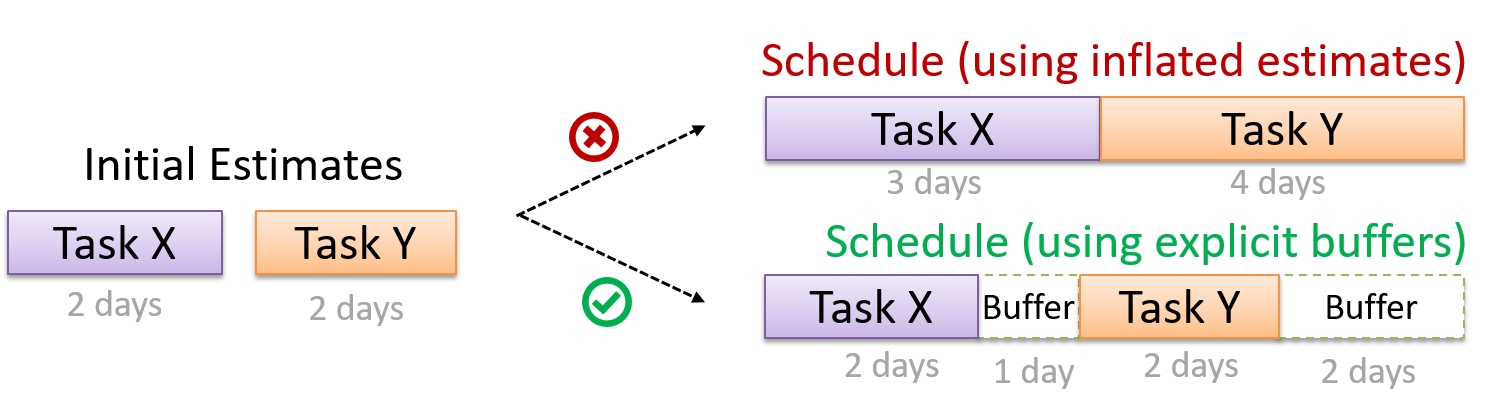
Issue Trackers
Keeping track of project tasks (who is doing what, which tasks are ongoing, which tasks are done etc.) is an essential part of project management. In small projects it may be possible to track tasks using simple tools as online spreadsheets or general-purpose/light-weight tasks tracking tools such as Trello. Bigger projects need more sophisticated task tracking tools.
Issue trackers (sometimes called bug trackers) are commonly used to track task assignment and progress. Most online project management software such as GitHub, SourceForge, and BitBucket come with an integrated issue tracker.
📦 A screenshot from the Jira Issue tracker software (Jira is part of the BitBucket project management tool suite):
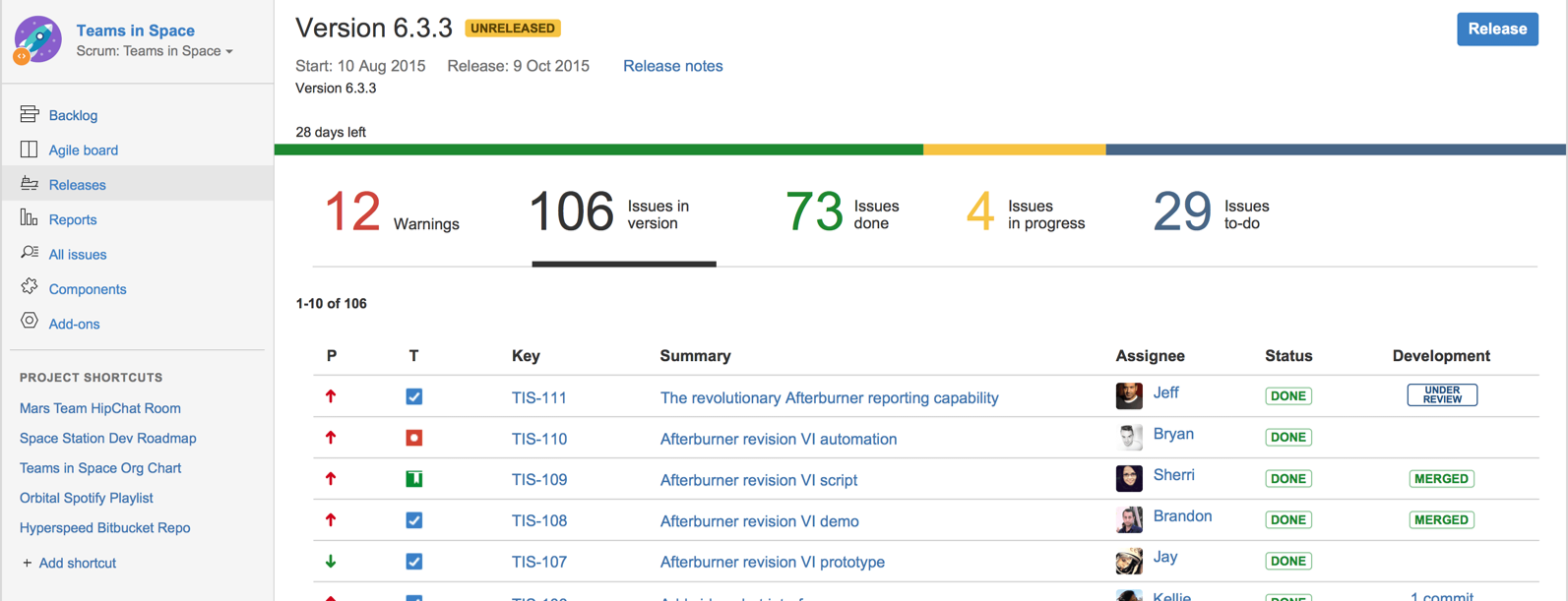
GANTT Charts
A Gantt chart is a 2-D bar-chart, drawn as time vs tasks (represented by horizontal bars).
📦 A sample Gantt chart:
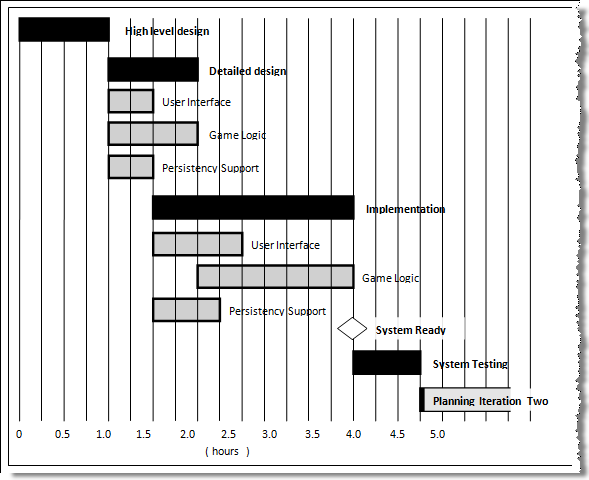
In a Gantt chart, a solid bar represents the main task, which is generally composed of a number of subtasks, shown as grey bars. The diamond shape indicates an important deadline/deliverable/milestone.
PERT Charts
PERT (Program Evaluation Review Technique) chart uses a graphical technique to show the order/sequence of tasks. It is based on a simple idea of drawing a directed graph in which:
- Node or vertex captures the effort estimation of a task, and
- Arrow depicts the precedence between tasks
📦 an example PERT chart for a simple software project
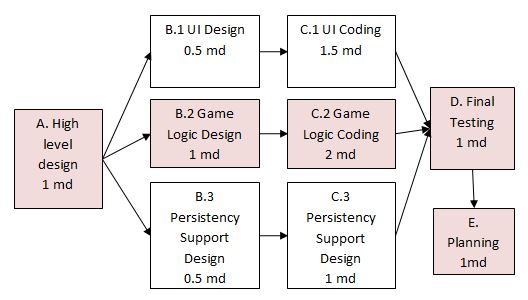
md = man days
A PERT chart can help determine the following important information:
- The order of tasks. In the example above,
Final Testingcannot begin until all coding of individual subsystems have been completed. - Which tasks can be done concurrently. In the example above, the various subsystem designs can start independently once the
High level designis completed. - The shortest possible completion time. In the example above, there is a path (indicated by the shaded boxes) from start to end that determines the shortest possible completion time.
- The Critical Path. In the example above, the shortest possible path is also the critical path.
Critical path is the path in which any delay can directly affect the project duration. It is important to ensure tasks on the critical path are completed on time.
Teamwork
Team Structures
Given below are three commonly used team structures in software development. Irrespective of the team structure, it is a good practice to assign roles and responsibilities to different team members so that someone is clearly in charge of each aspect of the project. In comparison, the ‘everybody is responsible for everything’ approach can result in more chaos and hence slower progress.
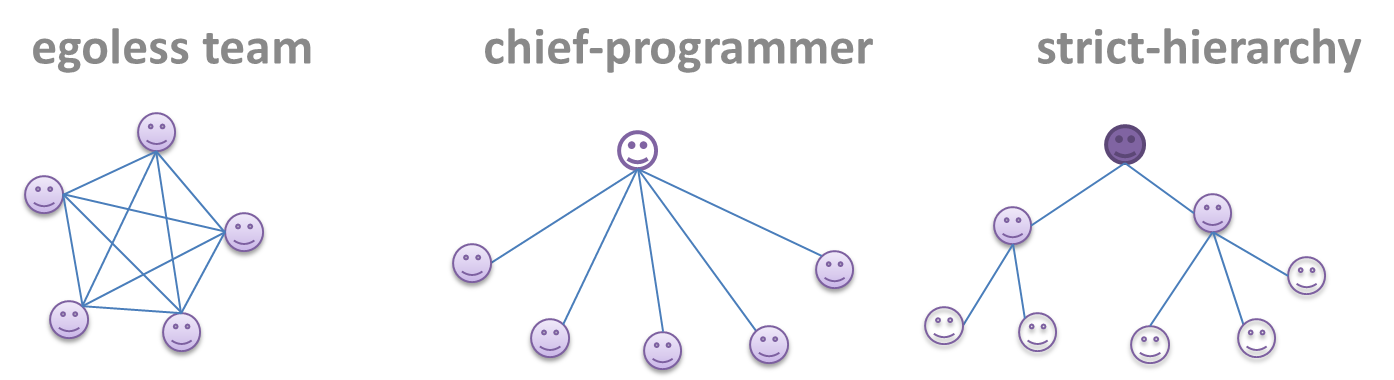
Egoless team
In this structure, every team member is equal in terms of responsibility and accountability. When any decision is required, consensus must be reached. This team structure is also known as a democratic team structure. This team structure usually finds a good solution to a relatively hard problem as all team members contribute ideas.
However, the democratic nature of the team structure bears a higher risk of falling apart due to the absence of an authority figure to manage the team and resolve conflicts.
Chief programmer team
Frederick Brooks proposed that software engineers learn from the medical surgical team in an operating room. In such a team, there is always a chief surgeon, assisted by experts in other areas. Similarly, in a chief programmer team structure, there is a single authoritative figure, the chief programmer. Major decisions, e.g. system architecture, are made solely by him/her and obeyed by all other team members. The chief programmer directs and coordinates the effort of other team members. When necessary, the chief will be assisted by domain specialists e.g. business specialists, database expert, network technology expert, etc. This allows individual group members to concentrate solely on the areas where they have sound knowledge and expertise.
The success of such a team structure relies heavily on the chief programmer. Not only must he be a superb technical hand, he also needs good managerial skills. Under a suitably qualified leader, such a team structure is known to produce successful work. .
Strict hierarchy team
In the opposite extreme of an egoless team, a strict hierarchy team has a strictly defined organization among the team members, reminiscent of the military or bureaucratic government. Each team member only works on his assigned tasks and reports to a single “boss”.
In a large, resource-intensive, complex project, this could be a good team structure to reduce communication overhead.
SDLC Process Models
Introduction
What
Software development goes through different stages such as requirements, analysis, design, implementation and testing. These stages are collectively known as the software development life cycle (SDLC). There are several approaches, known as software development life cycle models (also called software process models) that describe different ways to go through the SDLC. Each process model prescribes a "roadmap" for the software developers to manage the development effort. The roadmap describes the aims of the development stage(s), the artifacts or outcome of each stage as well as the workflow i.e. the relationship between stages.
Sequential Models
The sequential model, also called the waterfall model, models software development as a linear process, in which the project is seen as progressing steadily in one direction through the development stages. The name waterfall stems from how the model is drawn to look like a waterfall (see below).
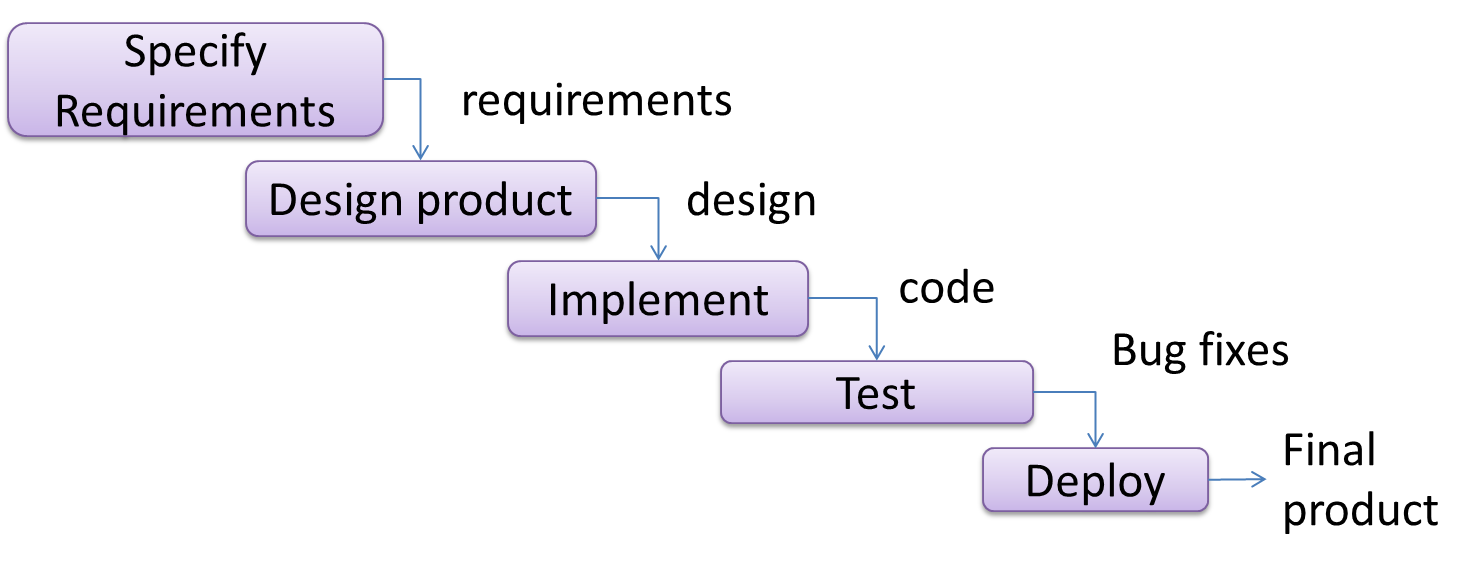
When one stage of the process is completed, it should produce some artifacts to be used in the next stage. For example, upon completion of the requirement stage a comprehensive list of requirements is produced that will see no further modifications. A strict application of the sequential model would require each stage to be completed before starting the next.
This could be a useful model when the problem statement that is well-understood and stable. In such cases, using the sequential model should result in a timely and systematic development effort, provided that all goes well. As each stage has a well-defined outcome, the progress of the project can be tracked with a relative ease.
The major problem with this model is that requirements of a real-world project are rarely well-understood at the beginning and keep changing over time. One reason for this is that users are generally not aware of how a software application can be used without prior experience in using a similar application.
Iterative Models
The iterative model (sometimes called iterative and incremental) advocates having several iterations of SDLC. Each of the iterations could potentially go through all the development stages, from requirement gathering to testing & deployment. Roughly, it appears to be similar to several cycles of the sequential model.
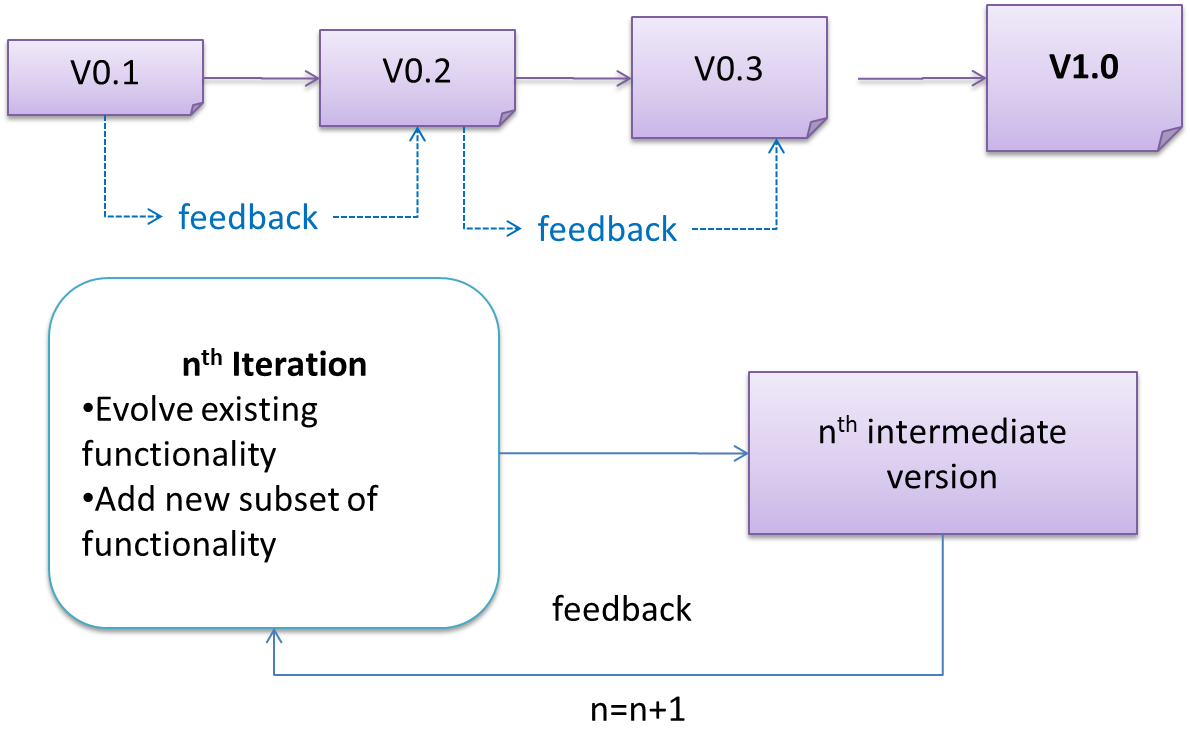
In this model, each of the iterations produces a new version of the product. Feedback on the version can then be fed to the next iteration. Taking the Minesweeper game as an example, the iterative model will deliver a fully playable version from the early iterations. However, the first iteration will have primitive functionality, for example, a clumsy text based UI, fixed board size, limited randomization etc. These functionalities will then be improved in later releases.
The iterative model can take a breadth-first or a depth-first approach to iteration planning.
- breadth-first: an iteration evolves all major components in parallel.
- depth-first: an iteration focuses on fleshing out only some components.
Most project use a mixture of breadth-first and depth-first iterations. Hence, the common phrase ‘an iterative and incremental process’.
Agile Models
In 2001, a group of prominent software engineering practitioners met and brainstormed for an alternative to documentation-driven, heavyweight software development processes that were used in most large projects at the time. This resulted in something called the agile manifesto (a vision statement of what they were looking to do).
We are uncovering better ways of developing software by doing it and helping others do it.
Through this work we have come to value:
- Individuals and interactions over processes and tools
- Working software over comprehensive documentation
- Customer collaboration over contract negotiation
- Responding to change over following a plan
That is, while there is value in the items on the right, we value the items on the left more.
Extract from the Agile Manifesto
Subsequently, some of the signatories of the manifesto went on to create process models that try to follow it. These processes are collectively called agile processes. Some of the key features of agile approaches are:
- Requirements are prioritized based on the needs of the user, are clarified regularly (at times almost on a daily basis) with the entire project team, and are factored into the development schedule as appropriate.
- Instead of doing a very elaborate and detailed design and a project plan for the whole project, the team works based on a rough project plan and a high level design that evolves as the project goes on.
- Strong emphasis on complete transparency and responsibility sharing among the team members. The team is responsible together for the delivery of the product. Team members are accountable, and regularly and openly share progress with each other and with the user.
There are a number of agile processes in the development world today. eXtreme Programming (XP) and Scrum are two of the well-known ones.
Example Process Models
XP
The following description was adapted from the XP home page, emphasis added:
Extreme Programming (XP) stresses customer satisfaction. Instead of delivering everything you could possibly want on some date far in the future, this process delivers the software you need as you need it.
XP aims to empower developers to confidently respond to changing customer requirements, even late in the life cycle.
XP emphasizes teamwork. Managers, customers, and developers are all equal partners in a collaborative team. XP implements a simple, yet effective environment enabling teams to become highly productive. The team self-organizes around the problem to solve it as efficiently as possible.
XP aims to improve a software project in five essential ways: communication, simplicity, feedback, respect, and courage. Extreme Programmers constantly communicate with their customers and fellow programmers. They keep their design simple and clean. They get feedback by testing their software starting on day one. Every small success deepens their respect for the unique contributions of each and every team member. With this foundation, Extreme Programmers are able to courageously respond to changing requirements and technology.
XP has a set of simple rules. XP is a lot like a jig saw puzzle with many small pieces. Individually the pieces make no sense, but when combined together a complete picture can be seen. This flow chart shows how Extreme Programming's rules work together.
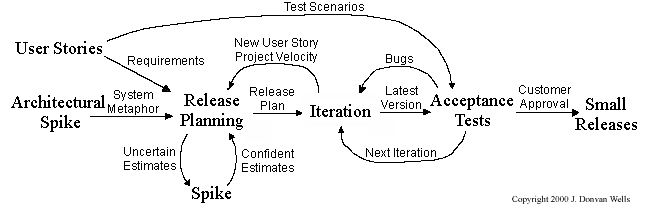
Pair programming, CRC cards, project velocity, and standup meetings are some interesting topics related to XP. Refer to extremeprogramming.org to find out more about XP.
Scrum
This description of Scrum was adapted from Wikipedia [retrieved on 18/10/2011], emphasis added:
Scrum is a process skeleton that contains sets of practices and predefined roles. The main roles in Scrum are:
- The Scrum Master, who maintains the processes (typically in lieu of a project manager)
- The Product Owner, who represents the stakeholders and the business
- The Team, a cross-functional group who do the actual analysis, design, implementation, testing, etc.
A Scrum project is divided into iterations called Sprints. A sprint is the basic unit of development in Scrum. Sprints tend to last between one week and one month, and are a timeboxed (i.e. restricted to a specific duration) effort of a constant length.
Each sprint is preceded by a planning meeting, where the tasks for the sprint are identified and an estimated commitment for the sprint goal is made, and followed by a review or retrospective meeting, where the progress is reviewed and lessons for the next sprint are identified.
During each sprint, the team creates a potentially deliverable product increment (for example, working and tested software). The set of features that go into a sprint come from the product backlog, which is a prioritized set of high level requirements of work to be done. Which backlog items go into the sprint is determined during the sprint planning meeting. During this meeting, the Product Owner informs the team of the items in the product backlog that he or she wants completed. The team then determines how much of this they can commit to complete during the next sprint, and records this in the sprint backlog. During a sprint, no one is allowed to change the sprint backlog, which means that the requirements are frozen for that sprint. Development is timeboxed such that the sprint must end on time; if requirements are not completed for any reason they are left out and returned to the product backlog. After a sprint is completed, the team demonstrates the use of the software.
Scrum enables the creation of self-organizing teams by encouraging co-location of all team members, and verbal communication between all team members and disciplines in the project.
A key principle of Scrum is its recognition that during a project the customers can change their minds about what they want and need (often called requirements churn), and that unpredicted challenges cannot be easily addressed in a traditional predictive or planned manner. As such, Scrum adopts an empirical approach—accepting that the problem cannot be fully understood or defined, focusing instead on maximizing the team’s ability to deliver quickly and respond to emerging requirements.
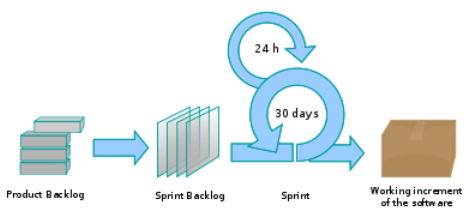
Daily Scrum is another key scrum practice. The description below was adapted from https://www.mountaingoatsoftware.com (emphasis added):
In Scrum, on each day of a sprint, the team holds a daily scrum meeting called the "daily scrum.” Meetings are typically held in the same location and at the same time each day. Ideally, a daily scrum meeting is held in the morning, as it helps set the context for the coming day's work. These scrum meetings are strictly time-boxed to 15 minutes. This keeps the discussion brisk but relevant.
...
During the daily scrum, each team member answers the following three questions:
- What did you do yesterday?
- What will you do today?
- Are there any impediments in your way?
...
The daily scrum meeting is not used as a problem-solving or issue resolution meeting. Issues that are raised are taken offline and usually dealt with by the relevant subgroup immediately after the meeting.
(This is not an endorsement of the product mentioned in the video)
Unified Process
The unified process is developed by the Three Amigos - Ivar Jacobson, Grady Booch and James Rumbaugh (the creators of UML).
The unified process consists of four phases: inception, elaboration, construction and transition. The main purpose of each phase can be summarized as follows:
| Phase | Activities | Typical Artifacts |
|---|---|---|
| Inception |
|
|
| Elaboration |
|
|
| Construction |
|
|
| Transition |
|
|
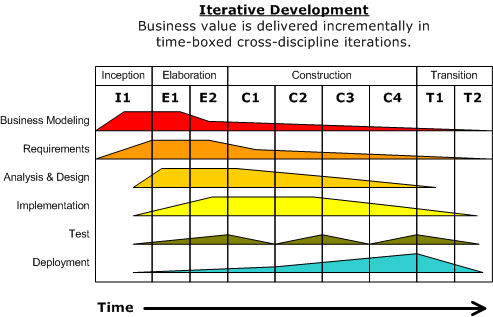
Given above is a visualization of a project done using the Unified process (source: Wikipedia). As the diagram shows, a phase can consist of several iterations. Each vertical column (labeled “I1” “E1”, “E2”, “C1”, etc.) represents a single iteration. Each of the iterations consists of a set of ‘workflows’ such as ‘Business modeling’, ‘Requirements’, ‘Analysis & Design’ etc. The shaded region indicates the amount of resource and effort spent on a particular workflow in a particular iteration.
Unified process is a flexible and customizable process model framework rather than a single fixed process. For example, the number of iterations in each phase, definition of workflows, and the intensity of a given workflow in a given iteration can be adjusted according to the nature of the project. Take the Construction Phase, to develop a simple system, one or two iterations would be sufficient. For a more complicated system, multiple iterations will be more helpful. Therefore, the diagram above simply records a particular application of the UP rather than prescribe how the UP is to be applied. However, this record can be refined and reused for similar future projects.
More
CMMI
CMMI (Capability Maturity Model Integration) is a process improvement approach defined by Software Engineering Institute at Carnegie Melon University. CMMI provides organizations with the essential elements of effective processes, which will improve their performance. -- adapted from http://www.sei.cmu.edu/cmmi/
CMMI defines five maturity levels for a process and provides criteria to determine if the process of an organization is at a certain maturity level. The diagram below [taken from Wikipedia] gives an overview of the five levels.
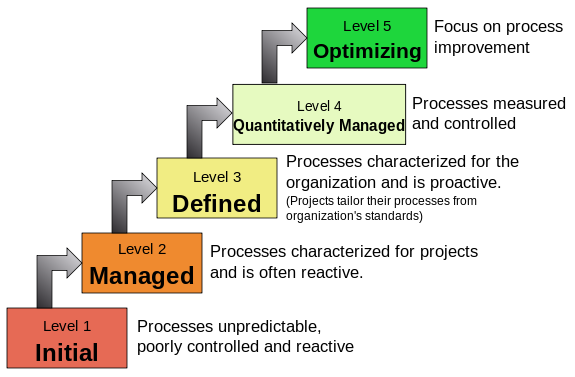
Revision Control
Revision Control Software (RCS) are the software tools that automate the process of Revision Control i.e. managing revisions of software artifacts.
Revision control is also known as Version Control Software (VCS), and a few other names. Here, we use the terms revision and version interchangeably.
Revision control is the process of managing multiple versions of a piece of information. In its simplest form, this is something that many people do by hand: every time you modify a file, save it under a new name that contains a number, each one higher than the number of the preceding version.
Manually managing multiple versions of even a single file is an error-prone task, though, so software tools to help automate this process have long been available. The earliest automated revision control tools were intended to help a single user to manage revisions of a single file. Over the past few decades, the scope of revision control tools has expanded greatly; they now manage multiple files, and help multiple people to work together. The best modern revision control tools have no problem coping with thousands of people working together on projects that consist of hundreds of thousands of files.
There are a number of reasons why you or your team might want to use an automated revision control tool for a project. It will track the history and evolution of your project, so you don't have to. For every change, you'll have a log of who made it; why they made it; when they made it; and what the change was.
When you're working with other people, revision control software makes it easier for you to collaborate. For example, when people more or less simultaneously make potentially incompatible changes, the software will help you to identify and resolve those conflicts.
It can help you to recover from mistakes. If you make a change that later turns out to be an error, you can revert to an earlier version of one or more files. In fact, a really good revision control tool will even help you to efficiently figure out exactly when a problem was introduced.
It will help you to work simultaneously on, and manage the drift between, multiple versions of your project. Most of these reasons are equally valid, at least in theory, whether you're working on a project by yourself, or with a hundred other people.
-- [adapted from
bryan-mercurial-guide ]
Mercurial: The Definitive Guide by Bryan O'Sullivan retrieved on 2012/07/11
SECTION: TOOLS
UML
Class Diagrams
Introduction
What
UML class diagrams describe the structure (but not the behavior) of an OOP solution. These are possibly the most often used diagrams in the industry and an indispensable tool for an OO programmer.
📦 An example class diagram:
Classes
What
The basic UML notations used to represent a class:
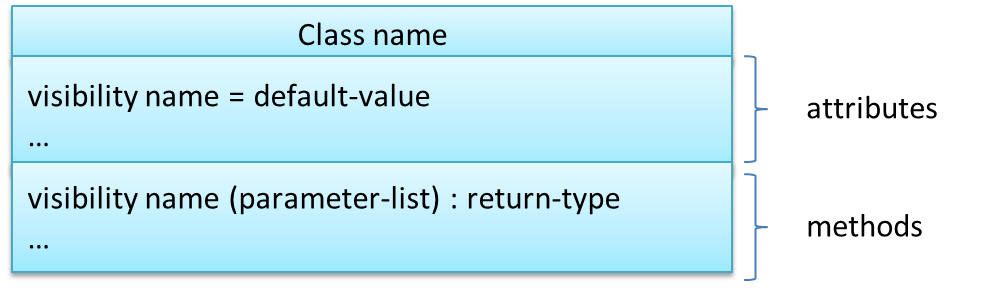
📦 A Table class shown in UML notation:
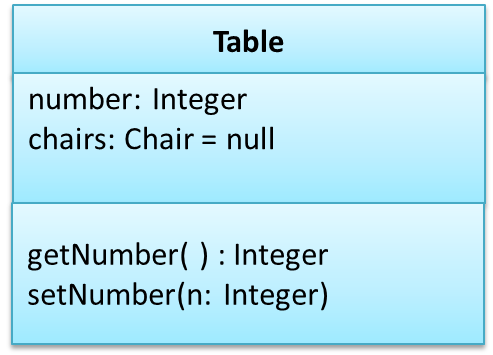
class Table{

    Integer number;
    Chair[] chairs = null;

    Integer getNumber(){
        ...
    }

    void setNumber(Integer n){
        ...
    }
}
The 'Operations' compartment and/or the 'Attributes' compartment may be omitted if such details are not important for the task at hand. 'Attributes' always appear above the 'Operations' compartment. All operations should be in one compartment rather than each operation in a separate compartment. Same goes for attributes.

The visibility of attributes and operations is used to indicate the level of access allowed for each attribute or operation. The types of visibility and their exact meanings depend on the programming language used. Here are some common visibilities and how they are indicated in a class diagram:
+:public-:private#:protected~:package private
📦 Table class with visibilities shown:
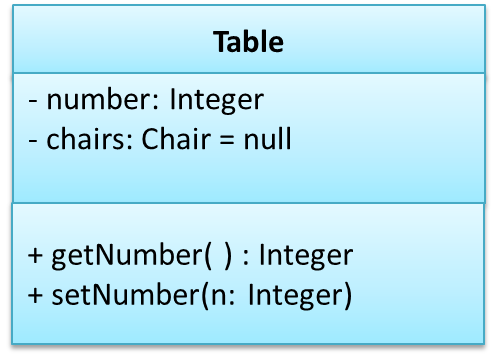
Associations
Basic
We use a solid line to show an association between two classes.

📦 This example shows an association between the Admin class and the Student class:
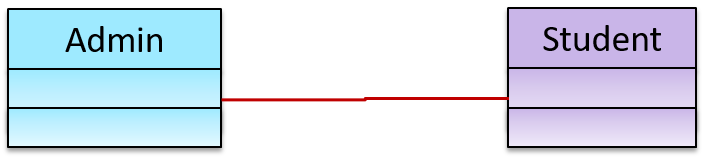
Navigability
We use arrow heads to indication the navigability of an association.
📦 Logic is aware of Minefield, but Minefield is not aware of Logic

class Logic{
    Minefield minefield;
}

class Minefield{
    ...
}
Navigability can be shown in class diagrams as well as object diagrams.
Roles
Association Role labels are used to indicate the role played by the classes in the association.
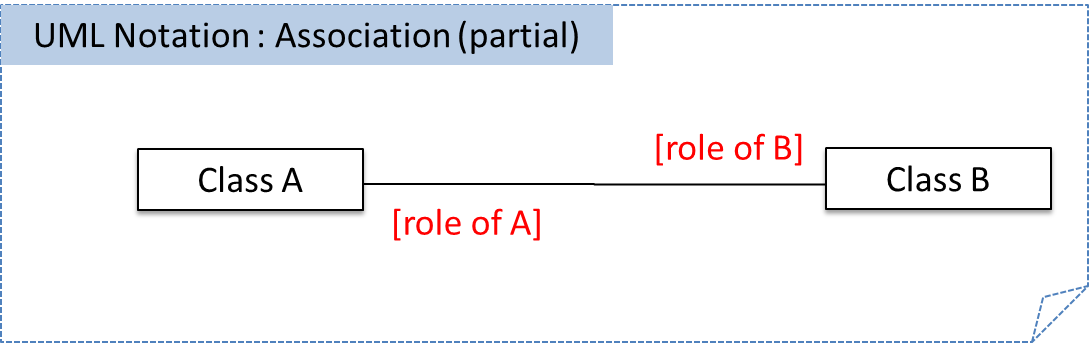
📦 This association represents a marriage between a Man object and a Woman object. The respective roles played by objects of these two classes are husband and wife.
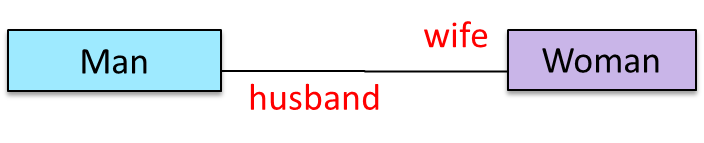
Note how the variable names match closely with the association roles.
class Man{
    Woman wife;
}

class Woman{
    Man husband;
}
📦 The role of Student objects in this association is charges (i.e. Admin is in charge of students)
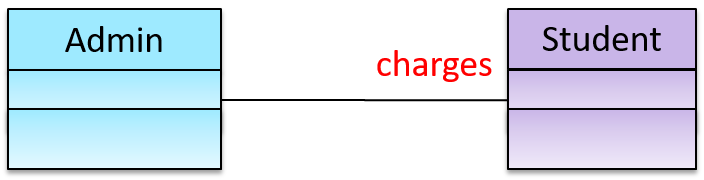
class Admin{
    List<Student> charges;
}
Labels
Association labels describe the meaning of the association. The arrow head indicates the direction in which the label is to be read.

📦 In this example, the same association is described using two different labels.

- Diagram on the left:
Adminclass is associated withStudentclass because anAdminobject uses aStudentobject. - Diagram on the right:
Adminclass is associated withStudentclass because aStudentobject is used by anAdminobject.
Multiplicity
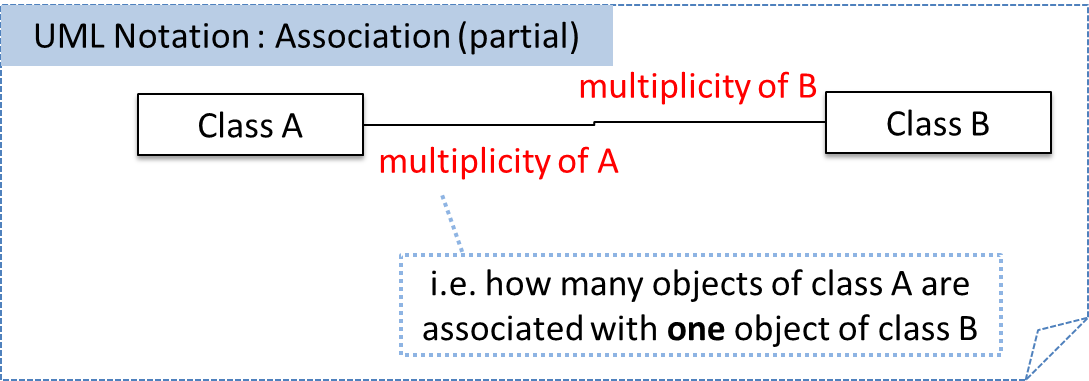
Commonly used multiplicities:
0..1: optional, can be linked to 0 or 1 objects1: compulsory, must be linked to one object at all times.*: can be linked to 0 or more objects.n..m: the number of linked objects must bentominclusive
📦 In the diagram below, an Admin object administers (in charge of) any number of students but a Student object must always be under the charge of exactly one Admin object

📦 In the diagram below,
- Each student must be supervised by exactly one professor. i.e. There cannot be a student who doesn't have a supervisor or has multiple supervisors.
- A professor cannot supervise more than 5 students but can have no students to supervise.
- An admin can handle any number of professors and any number of students, including none.
- A professor/student can be handled by any number of admins, including none.

Associations as Attributes
Associations as Attributes
🏆 Can show an association as an attribute
An association can be shown as an attribute instead of a line.
Association multiplicities and the default value too can be shown as part of the attribute using the following notation. Both are optional.
name: type [multiplicity] = default value
📦 The diagram below depicts a multi-player Square Game being played on a board comprising of 100 squares. Each of the squares may be occupied with any number of pieces, each belonging to a certain player.
A Piece may or may not be on a Square. Note how that association can be replaced by an isOn attribute of the Piece class. The isOn attribute can either be null or
hold a reference to a Square object, matching the 0..1 multiplicity of the association it replaces. The default value is null.
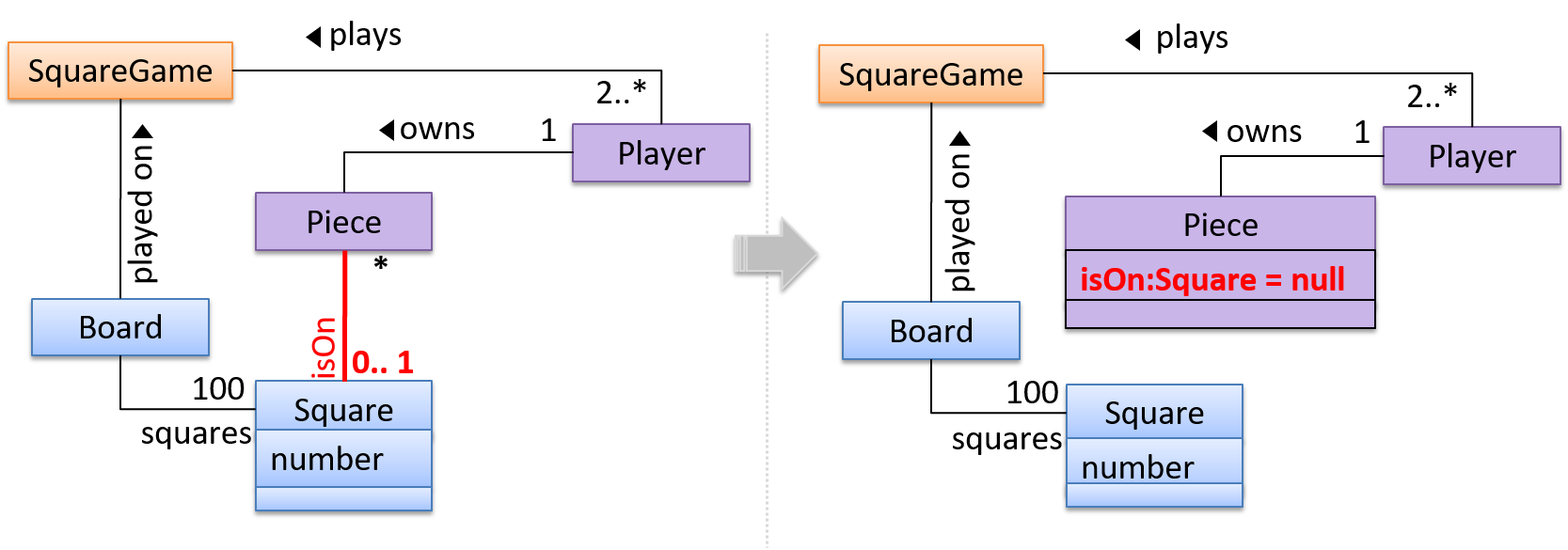
The association that a Board has 100 Sqaures can be shown in either of these two ways:

Class Level Members
Class-Level Members
In UML class diagrams, underlines denote class-level attributes and variables.
📦 In the class below, totalStudents attribute and the getTotalStudents method are class-level.
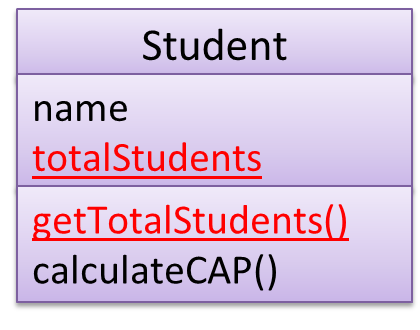
Composition
Composition
UML uses a solid diamond symbol to denote composition.
Notation:
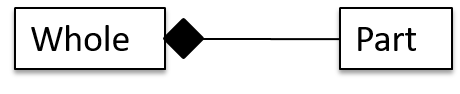
📦 A Book consists of Chapter objects. When the Book object is destroyed, its Chapter objects are destroyed too.

Aggregation
Aggregation
UML uses a hollow diamond is used to indicate an aggregation.
📦 Example:

Class Inheritance
Inheritance
You can use a triangle and a solid line (not to be confused with an arrow) to indicate class inheritance.
Notation:
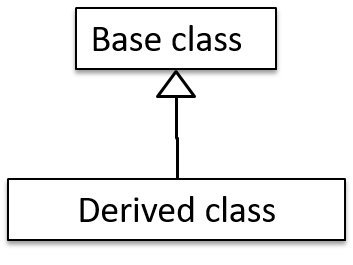
📦 Examples: The Car class inherits from the Vehicle class. The Cat and Dog classes inherit from the Pet class.
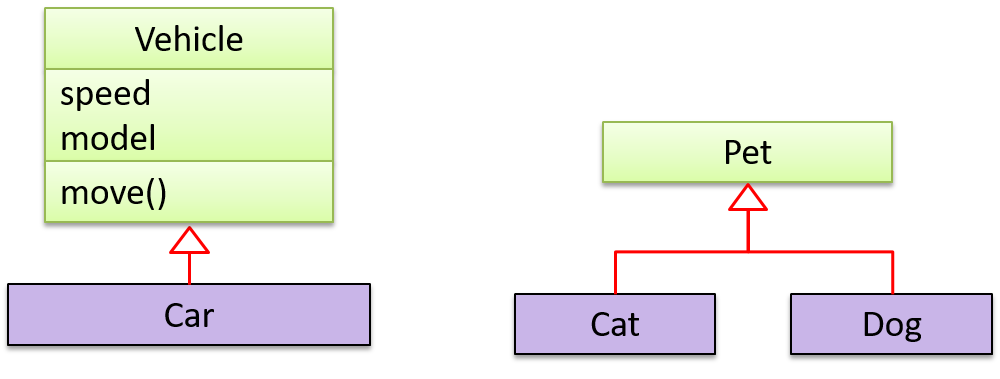
Object Diagrams
Introduction
An object diagram shows an object structure at a given point of time.
Objects
Notation:
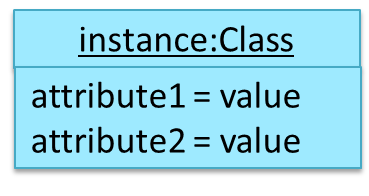
Notes:
- The class name and object name e.g.
car1:Carare underlined. objectName:ClassNameis meant to say 'an instance ofClassNameidentified asobjectName'.- Unlike classes, there is no compartment for methods.
- Attributes compartment can be omitted if it is not relevant to the task at hand.
- Object name can be omitted too e.g.
:Carwhich is meant to say 'an unnamed instance of a Car object'.
📦 Some example objects:

What
A solid line indicates an association between two objects.

📦 An example object diagram showing two associations:
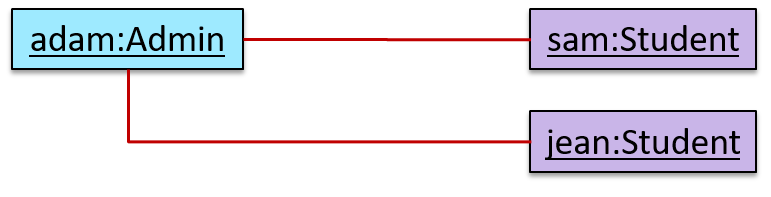
Activity Diagrams
Introduction
Introduction
A UML Activity diagram (AD) can model workflows.
An example activity diagram:
[source:wikipeida]
Basic Notations
Linear Paths
An activity diagram (AD) captures an activity of actions and control flows that makes up the activity.
- An action is a single step in an activity. It is shown as a rectangle with rounded corners.
- A control flow shows the flow of control from one action to the next. It is shown by drawing a line with an arrow-head to show the direction of the flow.
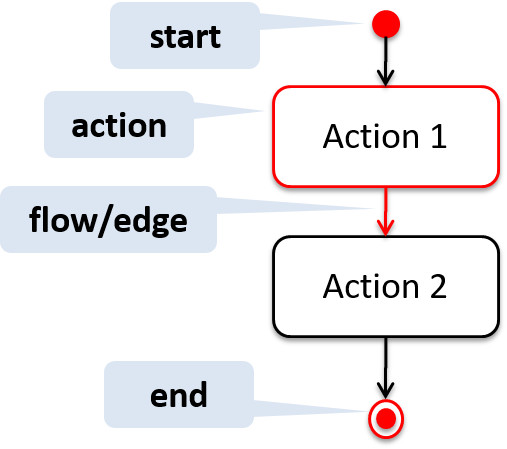
Note the slight difference between the start node and the end node which represent the start and the end of the activity, respectively.
📦 This activity diagram shows the action sequence of the activity a passenger rides the bus:

Alternate Paths
A branch node shows the start of alternate paths. Each control flow exiting a branch node has a guard condition : a boolean condition that should be true for execution to take that path. Only one of the guard condition can be true at any time.
A merge node shows the end of alternate paths.
Both branch nodes and merge nodes are diamond shapes. Guard conditions must be in square brackets.
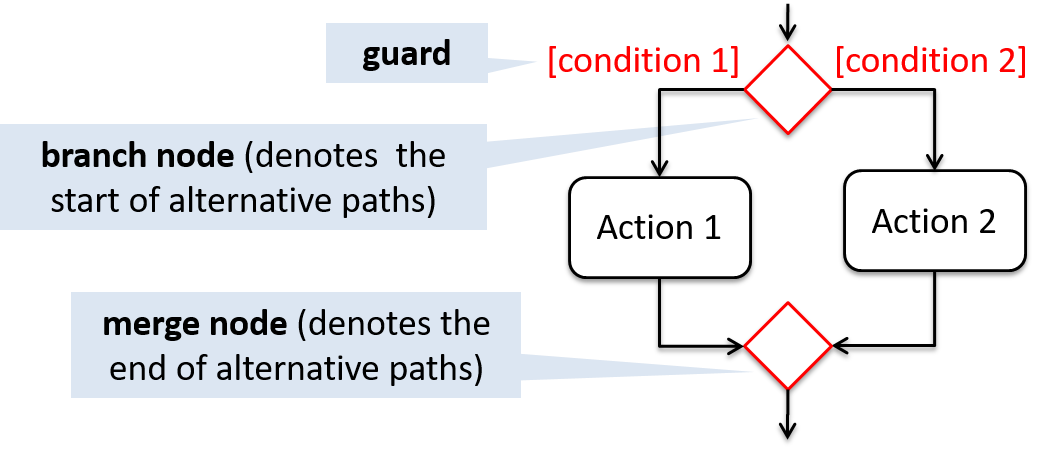
📦 The AD below shows alternate paths involved in the workflow of the activity shop for product:
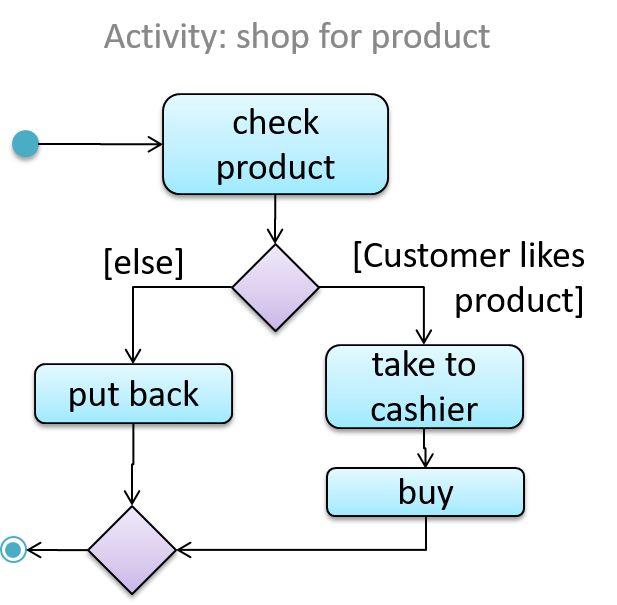
Parallel Paths
Fork nodes indicate the start of
Join nodes indicate the end of parallel paths.
Both have the same notation: a bar.
In a
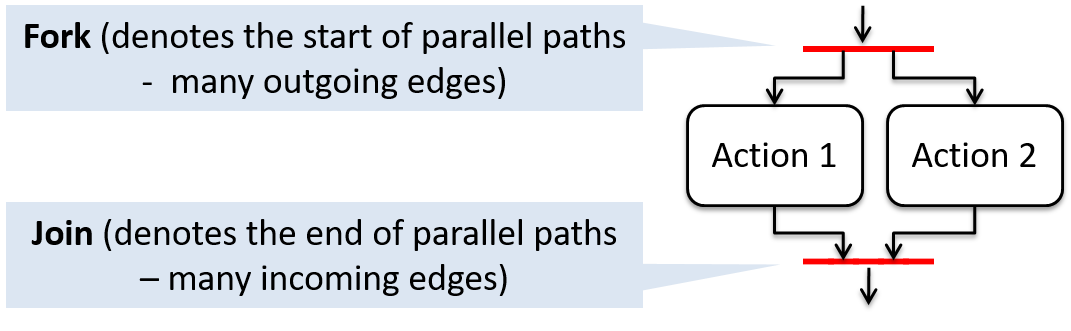
📦 In this activity diagram (from an online shop website) the actions User browsers products and System records browsing data happen in parallel. Both of them need to finish before the log out action can take place.
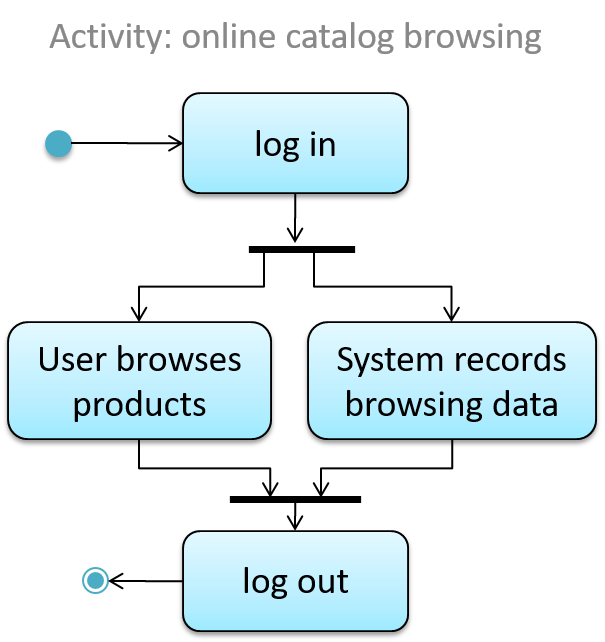
Notes
Notes
UML notes can augment UML diagrams with additional information. These notes can be shown connected to a particular element in the diagram or can be shown without a connection. The diagram below shows examples of both.
📦 Example:
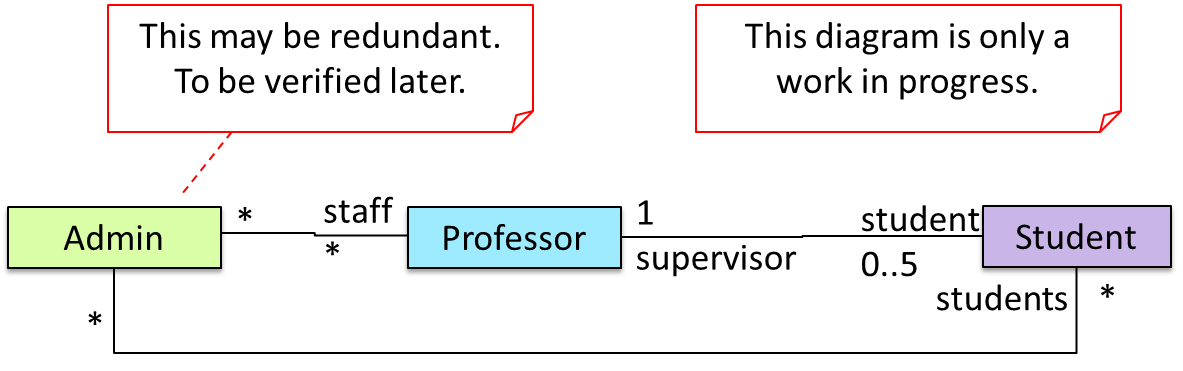
[END OF BOOK]