Error Handling
Introduction to Errors
In Python, there are (at least) two kinds of errors: syntax errors and exceptions.
Syntax Errors
A syntax error, also known as a parsing error, is when your code does not follow rules for writing Python code. Python interpreter shows an error message when it encounters a syntax error.
📦 The code below has a syntax error because it breaks the Python rule that requires a : to follow the condition of an if statement.
|
→ |
|
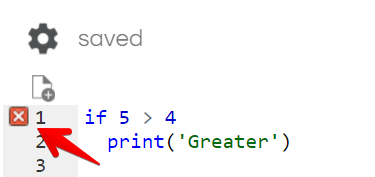
Some Python editors (e.g., REPL) flag syntax errors even before you run the code.
📦 Note how REPL Python editor points out the syntax error using a red ❌ in the
Handling Exceptions
Errors detected during execution are called exceptions. Even if the code is syntactically correct, it may cause an error during execution. Python
📦 The code below raises an exception when it attempts to divide a number by 0. The type of the exception raised is ZeroDivisionError, as mentioned in the last line of the error message.
|
→ |
|
It is not desirable for programs to 'crash' every time an exception occurs. You can use the try-except syntax to specify how to handle exceptions. The try clause contains the code that can possibly raise
an exception while the except clause contains the code that handles the exception.
📦 The code below specifies what to do if the ZeroDivisionError is raised, thereby avoiding a program crash in such an event.
|
→ | |
When the code in a try clause raises an error, the program execution immediately moves to the code in the except clause, provided the exception that happened matches the exception the except clause is supposed
to except clause, the execution continues as normal.
If the exception does not match the except clause, the program crashes.
📦 The code below crashes because the actual exception (caused by passing a string when an foloating point number is expected) does not match the specified exception ZeroDivisionError.
|
→ |
|
You can specify multiple except clauses, one for each type of exception expected.
📦 The code below handles two types of exceptions: ZeroDivisionError and ValueError.
💡 The ValueError is raised when the string abc is being converted to a float using float(divisor).
|
→ | |
It is possible to specify multiple exception types in one except clause.
📦 The code below handles both ZeroDivisionError and ValueError in the same except clause.
|
→ | |
IndexError is an exception thrown when you try to access an index (e.g., when reading values form a list) that does not exist.
📦
|
→ |
|
It is also possible to use except Exception to catch any kind of exception. However, that practice is discouraged.
📦 The code below handles both ZeroDivisionError and ValueError in the same except clause.
|
→ |
|
📎 Resources:
Exercise : Enter Integer
The code below assumes the entered string will always represent an integer.
value = input('Input an integer:')
print('You entered', value)
However, users may not follow that assumption. If the user were to enter a non-integer string, the program crashes. To avoid such crashes, programs need to do input validation i.e., perform checks on inputs to ensure their validity.
Update the above code so that it accepts integers only, and produces the behavior given below.
Input an integer: x
That is not an integer, try again
Input an integer: 5.5
That is not an integer, try again
Input an integer: 6
You entered 6
- The
int(s)function raises aValueErrorwhen the stringsdoes not represent an integer. - You can use a
while Trueloop to repeatedly ask for an input until the user enters an integer.
while True:
  try:
    value = int(input('Input an integer:'))
    # YOUR CODE HERE! print? break? continue?
  except ValueError:
    # YOUR CODE HERE!

print('You entered', value)
Raising Exceptions
You can raise an exception yourself to indicate an error.
📦 The get_body(items) function below raises an exception when it receives a list that has fewer than 3 items. That exception is 'caught' and handled by the hide_ends(items) function.
💡 Also note how an except clause can assign a name to the exception using as temporary_name (as done by except ValueError as e:) so that the exception object can be referenced later (as done in print('Cannot hide ends', str(e)))
|
→ |
|
It is also possible to catch an exception, do something, and then raise it again so that the exception propagates to the caller.
📦 The code hide_ends2(items) function below catches the ValueError exception, prints an error message, and raises it again so that the code that called the function can catch the exception again. Also note how the line
hide_ends2([0, 1, 2, 3, 4]) is never executed due to the exception raised by the line just above it.
|
→ |
|
Exercise : Is Even-Integer in Range
❗️ This exercise has a long description because it explains how the given code is structured. It is important for you to learn how to break down code into smaller functions like the ones given in this exercise.
The function given below checks if a given input is an even integer in a given range.
def check(number, start, end):
  print(number, 'is an int in range', start, '-', end, '?', is_even_int_in_range(number, start, end))
Some example inputs and outputs are given below:
check('x', 'y', 'z')
check(3, 'y', 'z') # False (3 is not even)
check(2, 3.4, 5)
check(2, 3, [])
check(2, 5, 1)
check(2, 5, 5)
check(3, 1, 5)
check(4, 1, 4) # False ( range 1 to 4 excludes 4)
check(4, 1, 5)
⤵️
x is an int in range y - z ? Value error: x is not an integer
3 is an int in range y - z ? No
2 is an int in range 3.4 - 5 ? Value error: 3.4 is not an integer
2 is an int in range 3 - [] ? Value error: [] is not an integer
2 is an int in range 5 - 1 ? Value error: end is smaller than start
2 is an int in range 5 - 5 ? No
3 is an int in range 1 - 5 ? No
4 is an int in range 1 - 4 ? No
4 is an int in range 1 - 5 ? Yes
Note how the check function uses an is_even_int_in_range functions whose code and the behavior are given below.
is_even_int_in_range(number, start, end):
- Returns
'Yes'ifnumberis an even integer in the rangestarttoend. Returns'No'otherwise. - Returns an error message if any of the inputs are incorrect.
- Code:
def is_even_int_in_range(number, start, end):
  try:
    if is_even_int(number) and is_in_range(number, start, end):
      return 'Yes'
    else:
      return 'No'
  except ValueError as e:
    return 'Value error: ' + str(e)
Note how the above function uses two other functions is_even_int and is_in_range given below:
is_even_int(number):
- Returns
Trueif thenumberis an even integer.Falseotherwise. - Raises a
ValueErrorif thenumberis not an integer. - Code:
def is_even_int(number):
  confirm_is_int(number)
  return int(number)%2 == 0
is_in_range(number, start, end):
- Returns
Trueif thenumberis in the rangestarttoend(includingstartbut excludingend, as per how Python define ranges).Falseotherwise. - Raises a
ValueErrorif thenumberis not an integer orstartandenddo not specify a range correctly. - Code:
def is_in_range(number, start, end):
  confirm_is_int(number)
  confirm_range_correct(start, end)
  return number >= start and number < end
Note how the above two functions use two other functions confirm_is_int and confirm_range_correct. Their expected behavior and partial code is given below. Your job is to complete those two functions.
confirm_is_int(number):
- Raises a
ValueErrorif thenumberis not an integer. - Partial code:
def confirm_is_int(number): pass # ADD YOUR CODE HERE! - 💡 You can use the
type(value) is type_nameandtype(value) is not type_nameto check if avalueis of typetype_name
e.g.,type('x') is not floatevaluates toTruebecause'x'is not afloat.
[ more examples ...]
confirm_range_correct(start, end):
- Raises a
ValueErrorifendorstartare not integers. This behavior is already implemented by the code given below, using two calls to theconfirm_in_intfunction. - Raises a
ValueError('end is smaller than start)ifendis smaller thanstart. You need to implement this behavior. - Partial code:
def confirm_range_correct(start, end):
  confirm_is_int(start)
  confirm_is_int(end)
  # ADD YOUR CODE HERE!
def confirm_is_int(number):
  if type(number) is not int:
    raise ValueError(str(number) + ' is not an integer')
Exercise : Flexible Word Game
Implement a word game similar to the one you implement in the
- The player is asked to choose the word size. The word size can only be 4 to 8 (both inclusive). If the user entry is not an integer or not in the range 4..8, the program keeps asking for the word size.
Exercise : Word Game
Implement a word game with the following rules:
- The player inputs four-letter words. Words that are not four letters are rejected.
- If the player inputs the same word multiple times, that word is banned.
- When the player cannot think of any more suitable words, he/she can end the game by entering the word
end - The score is the number of words entered by the player and accepted by the game (i.e., banned words are not counted)
Given below is a sample session. Try to follow the exact output format in your implementation:
========================================================
Welcome to the WORD GAME
Give all four-letter words you know, one word at a time
Enter the word 'end' to exit
========================================================
What's the next word?  park
What's the next word?  puck
What's the next word?  cut
Not a four-letter word
What's the next word?  people
Not a four-letter word
What's the next word?  team
What's the next word?  puck
Repeated word! puck is number 2 in the accepted words list.
puck is no longer an accepted word and is banned
What's the next word?  bust
What's the next word?  puck
puck is banned!
What's the next word?  meat
What's the next word?  team
Repeated word! team is number 2 in the accepted words list.
team is no longer an accepted word and is banned
What's the next word?  end
========================================================
Your score: 3
Accepted words (in order of entry): park bust meat
Accepted words (in sorted order): bust meat park
Banned words (in sorted order): puck team
Thank you for playing the WORD GAME
========================================================
💡 Implementation suggestions:
- Maintain two lists: one to keep accepted words, one to keep banned words
- When a word is entered for the second time, move it from the accepted words list to the banned words list.
Given below is a sample session. Try to follow the exact output format in your implementation:
========================================================
Welcome to the FLEXIBLE WORD GAME
Enter the word size (4 to 8): xyz
That is not a number. Try again
Enter the word size (4 to 8): 3
Number not in correct range. Try again
Enter the word size (4 to 8): 5
Give all 5-letter words you know, one word at a time
Enter the word 'end' to exit
========================================================
What's the next word?  frame
What's the next word?  great
What's the next word?  treat
What's the next word?  fat
Not a 5-letter word
What's the next word?  creamy
Not a 5-letter word
What's the next word?  treat
Repeated word! treat is number 3 in the accepted words list.
treat is no longer an accepted word and is banned
What's the next word?  crime
What's the next word?  treat
treat is banned!
What's the next word?  end
========================================================
Your score: 3
Accepted words (in order of entry): frame great crime
Accepted words (in sorted order): crime frame great
Banned words (in sorted order): treat
Thank you for playing the FLEXIBLE WORD GAME
========================================================