Functions
Writing Functions
You can write your own functions in Python. Function are useful when you want to execute a bunch of statements multiple times at different points of a program.
Format:
def function_name():
    statement_1
    statement_2
    ...
📦 The code below defines a function named say_hello and calls it twice.
|
→ |
|
Note how the statements inside the function are not executed unless the method is called.
The function definition should appear in the code before it is called.
|
👍 this works |
→ |
👎 this doesn't work |
Exercise : Hip Hip Hooray
Define the missing functions in the code below so that it produces the given output:
|
→ |
|
Function Parameters
You can configure a function to have parameters. The parameters can be used by the code inside the function like a variable. That means we can pass arguments (i.e., values for those parameters) to affect the behavior of a function so that the function behaves differently each time it is executed.
Format:
def function_name(parameter1_name, parameter2_name, ...):
    ...
A note about terminology: a function can have parameters and when we call the function we can assign arguments (i.e. values) to each of those parameters.
📦 The say_hello function below takes one parameter. The first time we call it we pass the argument Gina to that parameter, and the next time we pass a different argument John to the same parameter.
|
→ |
|
📦 The code below has one function that takes one parameter and one that takes two. Furthermore, note how one function calls the other.
def say_hello(name):
  print('Knock knock ' + name)

def repeat_hello(name, times):
  print('Greeting ', name, times, 'times')
  for i in range(times):
    say_hello(name)

repeat_hello('Penny', 3)
say_hello('Sheldon')
Parameter values are are forgotten after the function returns.
📦 The code below produces an error because variable v1 is not available after the function has returned.
def print_uniqueness(v1, v2, v3):
  print(v1 != v2 and v2 != v3 and v3 != v1)

print_uniqueness(1,2,4) # True
print_uniqueness(1,1,2) # False

# Error. v1 is not available after function returns
print(v1)
Exercise : Grader - print_score Function
The code below prints the grade based on exam and project score, somewhat similar to
project_score = int(input('Enter project score:'))
exam_score = int(input('Enter exam score:'))
total_score = project_score + exam_score
print('Total:', total_score)

if total_score >= 60 and project_score >= 25 and exam_score >= 25:
    grade = 'A'
elif (total_score >= 50) and (project_score >= 25 or exam_score >= 25):
    grade = 'B'
elif total_score >= 40:
    grade = 'C'
else:
    grade = 'D'

print('Project :', '=' * (project_score//5))
print('Exam    :', '=' * (exam_score//5))
print('Total   :', '=' * (total_score//5))
print('Grade   :', grade)
Add a print_score function to the code and replace the following three lines,
print('Project :', '=' * (project_score//5))
print('Exam    :', '=' * (exam_score//5))
print('Total   :', '=' * (total_score//5))
with these three lines
print_score('Project :', project_score)
print_score('Exam    :', exam_score)
print_score('Total   :', total_score)
without changing the external behavior of the program.
Exercise : Grade Analyzer
Write a program to read project score and exam score from the keyboard and print a bar chart of the scores and a grade. Follow the example below:
Enter project score:
30

Enter exam score:
40

Total: 70

Project : ======
Exam    : ========
Total   : ==============
Grade   : A
- Note how the colons are aligned.
- Note the extra blank lines in the expected output.
- The bar chart has one
=for each 5 marks 24 marks should be shown as====. - Assume all inputs are positive integers.
Grading rules:
A: at least 25 marks for each component and at least 60 in totalB: at least one component has 25 or more marks and at least 50 in totalC: at least 40 in totalD: otherwise
Return Value
You can use a return statement to make a function return a value.
📦 The play() function below returns one of the strings Rock, Paper, Scissors randomly.
import random

def play():
  value = random.randint(1,3)
  if value == 1:
    return 'Rock'
  elif value == 2:
    return 'Paper'
  else:
    return 'Scissors'

print('Player1 response : ' + play())
print('Player2 response : ' + play())
You can use an empty return statement to return from the function without executing the remainder of the function.
📦 The print_all_products function below uses an empty return statement to return from the function early if one of the arguments is 0:
def print_product(a, b):
  print(a, 'x', b, '=', a*b)

def print_all_products(n1, n2, n3):
  # return early if any value is 0
  if n1 == 0 or n2 == 0 or n3 == 0:
    print('Values cannot be zeros')
    return

  # print all possible products
  print_product(n1, n2)
  print_product(n2, n3)
  print_product(n3, n1)


print_all_products(2,3,4)
print_all_products(0,2,3)
Exercise : Grader - calculate_grade Function
In a previous exercise you wrote a function to print scores (an example solution is given below).
def print_score(name, value):
  print(name, '=' * (value//5))

project_score = int(input('Enter project score:'))
exam_score = int(input('Enter exam score:'))

total_score = project_score + exam_score
print('Total:', total_score)

if total_score >= 60 and project_score >= 25 and exam_score >= 25:
    grade = 'A'
elif (total_score >= 50) and (project_score >= 25 or exam_score >= 25):
    grade = 'B'
elif total_score >= 40:
    grade = 'C'
else:
    grade = 'D'

print_score('Project :', project_score)
print_score('Exam    :', exam_score)
print_score('Total   :', total_score)
print('Grade   :', grade)
Add a calculate_grade function to the code and replace the following lines,
if total >= 60 and project_score >= 25 and exam_score >= 25:
    grade = 'A'
elif (total >= 50) and (project_score >= 25 or exam_score >= 25):
    grade = 'B'
elif total >= 40:
    grade = 'C'
else:
    grade = 'D'
with the line,
grade = calculate_grade(project_score, exam_score)
without changing the external behavior of the program.
Local and Global Scope
The scope of a variable is which part of the code it can be read/modified. Think of a scope as a container for variables. When a scope is destroyed, all the values stored in the scope’s variables are forgotten.
The global scope is the scope that is applicable to the entire program. There is only one global scope, and it is created when your program begins. When your program terminates, the global scope is destroyed, and all its variables are forgotten. Otherwise, the next time you ran your program, the variables would remember their values from the last time you ran it. A variable that exists in the global scope is called a global variable.
A local scope is a scope that applies only during the execution of a function. A local scope is created whenever a function is called. Parameters and variables that are assigned in the called function are said to exist in that function’s local scope. A variable that exists in a local scope is called a local variable. When the function returns, the local scope is destroyed, and these variables are forgotten. The next time you call this function, the local variables will not remember the values stored in them from the last time the function was called.
A variable must be in the global scope or the local scope; it cannot be in both.
[Some parts of the above explanation were adapted from Automate the Boring Stuff]
Consider the code given below, apparently from a program related to a farm, with the global scope and the local scope of each function indicated by shaded areas.
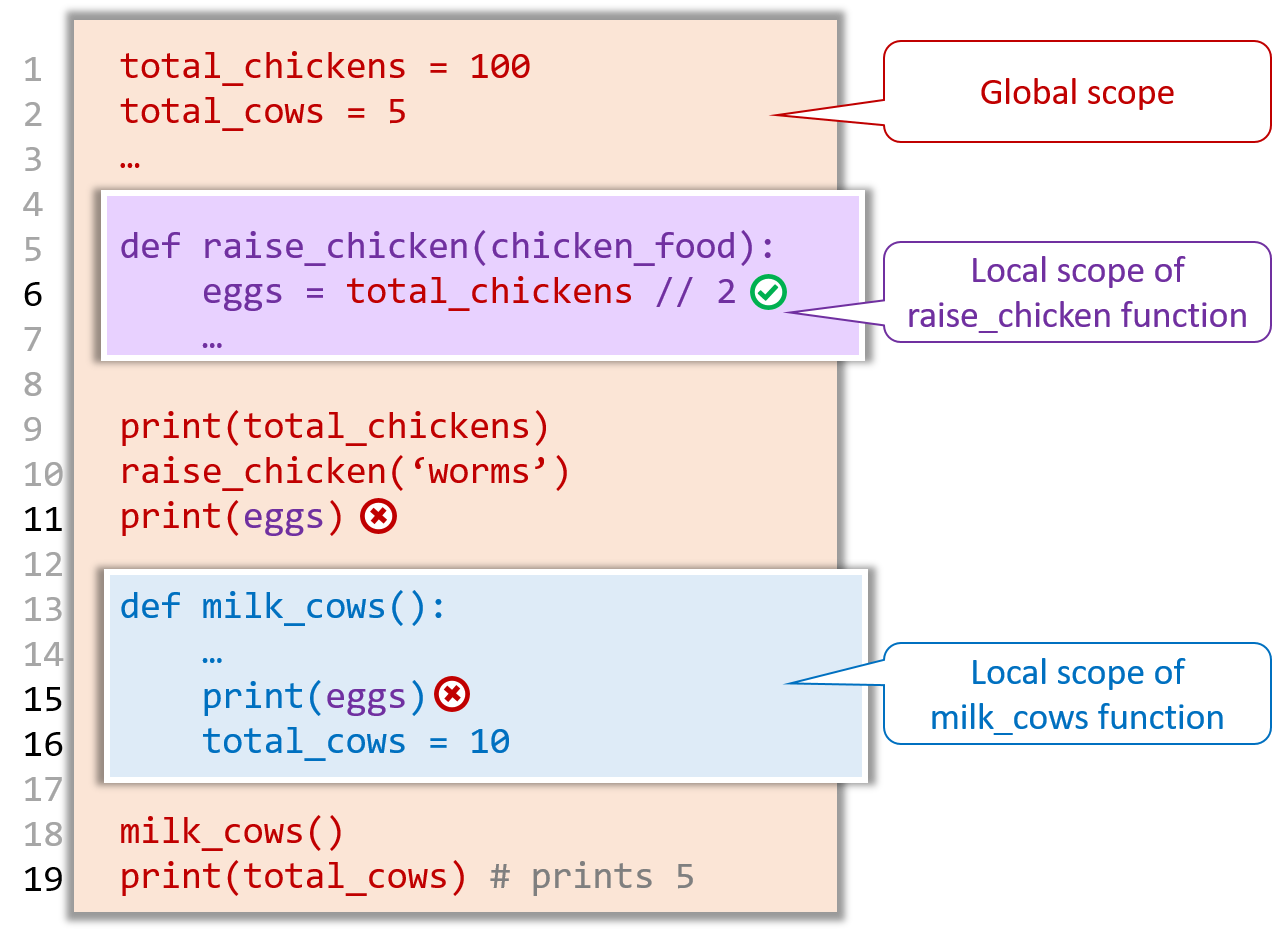
Note the following rules about scope:
- Rule 1: Local scopes can read global variables e.g.,
raise_chickenfunction can access the global variabletotal_chickens(see line 6). - Rule 2: Global scope cannot read/write local variables e.g., line 11 will be rejected because it reads the local variable
eggs. - Rule 3: Local scopes cannot read/write variables of other local scopes e.g., line 15 will be rejected because it reads the local variable
eggs. - Rule 4: If a variable is assigned in a local scope, it becomes a local variable even if a global variable has the same name. That is, there can be separate global and local variables with the same name. e.g.,
line 16 (
total_cows = 10) creates a local variabletotal_cowsalthough there is also a global variabletotal_cows; the line 19 prints5because thetotal_cowsglobal variable remains5and the local variabletotal_cowswhich has the value10is destroyed after the functionmilk_cowsis executed.
To modify a global variable within a local scope, use the global statement on that variable.
📦 The breed_cows function below can increase the global variable total_cows to 10 from the local scope because it has a global total_cows statement. If you remove that statement, the last print
statement will print 5 instead of 10
total_cows = 5
print('total cows before breeding:', total_cows)

def breed_cows():
    global total_cows
    print('breeding cows')
    total_cows = 10
    print('total cows at the end of breeding:', total_cows)

breed_cows()
print('total cows after breeding:', total_cows) # prints 10
|
⤵️ |
⤵️ without the |
Exercise : Grader - Analyze Grades in a Loop
Write a program to analyze grades of multiple students. The grade analysis can be similar to
Enter project score: 10
Enter exam score: 50
Total: 60
Project : ==
Exam    : ==========
Total   : ============
Grade   : B
Continue y/n? y
Enter project score: 50
Enter exam score: 49
Total: 99
Project : ==========
Exam    : =========
Total   : ===================
Grade   : A
Continue y/n? n
You are required to divide your code into multiple functions.
Exercise : Grade Analyzer
Write a program to read project score and exam score from the keyboard and print a bar chart of the scores and a grade. Follow the example below:
Enter project score:
30

Enter exam score:
40

Total: 70

Project : ======
Exam    : ========
Total   : ==============
Grade   : A
- Note how the colons are aligned.
- Note the extra blank lines in the expected output.
- The bar chart has one
=for each 5 marks 24 marks should be shown as====. - Assume all inputs are positive integers.
Grading rules:
A: at least 25 marks for each component and at least 60 in totalB: at least one component has 25 or more marks and at least 50 in totalC: at least 40 in totalD: otherwise