Lists
The List Data Structure
A data structure contains data that are more complex than a single data value such as an integer. Lists are one such very useful data structure in Python. A list contains an ordered sequence of items. Python uses square brackets to indicate lists.
📦 Some list examples:
friends = [] # an empty list
fruits = ['apple', 'banana', 'orange'] # a list containing 3 string items
values = [0, 3.4, 'High', True] # a list containing items of different types
print(friends, fruits, values)

everything = [friends, fruits, values] # a list containing other lists
print(everything)
⤵️
[] ['apple', 'banana', 'orange'] [0, 3.4, 'High', True]
[[], ['apple', 'banana', 'orange'], [0, 3.4, 'High', True]]
Exercise : Countries
Complete the get_countries() function so that it return the list of countries shown on the right.
💡 You can follow the example of the get_numbers() function given.
|
→ |
|
You can use the notation list_name[index_of_item] to access an item of a list. List indexes start from 0 i.e., the first item in a list has the index 0.
📦 The code below shows how to use indexes to access items in a list.
|
→ |
|
💡 As you can see from the above example, list indexes can be negative; index -1 refers to the last item in the list, -2 refers to the second last item in the list, and so on.
📦 The code below shows how to use indexes to update items in a list.
|
→ |
|
📦 The example below shows how to access an item of a list that is inside another list; list_of_lists[2] accesses list_of_lists[2] which gives you the item at index 2 ([0.1, 0.2]) which is also a list, and
then accesses the item at index 0 from that list, which is 0.1.
|
→ |
|
Exercise : Get Head, Get Tail
Complete the functions as described below:
get_head(item_list): returns the first item of the list received as theitem_listparameter.get_tail(item_list): returns the last item of the list received as theitem_listparameter.
|
→ |
|
def get_head(item_list):
  return item_list[0]
Object References
Objects of some Python types are immutable. An immutable object, once created, cannot be modified.
| Some immutable types | |||
|---|---|---|---|
int |
float |
decimal |
complex |
bool |
string |
tuple |
range |
frozenset |
bytes |
Objects of some other Python types are mutable. A mutable object can be modified during its lifetime.
| Some mutable types | |||
|---|---|---|---|
list |
dict |
set |
bytearray |
📦 In the example below, i = 5 assigns an integer to i. Because integers are immutable, i = i + 1 is not mutating the integer object 5; rather, it is simply creating a new integer object 6 and assigning that to i. Similarly, s = s + ' World!' is not adding more letters to the existing string object Hello; ratehr, it is creating a new string object 'Hello World!' and assigning
that to s.
i = 5
i = i + 1 # i is assigned a new integer object 6

s = 'Hello'
s = s + '  World!' # s is assigned a new string objet 'Hello World!'

numbers = [1, 2, 3]
numbers[0] = 4 # the existing list is being modified
However, lists are mutable. Therefore, numbers[0] = 4 is changing the existing list [1, 2, 3] rather than creating a new list object.
An object reference is the address of the memory location where an object is currently stored. A variable is a name that is bound to an object reference. We can think of it as the variable pointing to an object that is stored at the object reference.
📦 The variable spam is bound to the object reference 57207444 which is the memory location of the list object [0, 1, 2, 3, 4, 5]. i.e., spam is pointing to the object [0, 1, 2, 3, 4, 5] using the object reference 57207444.
spam = [0, 1, 2, 3, 4, 5]
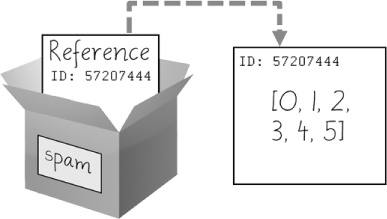
Image credit: AtBSwP
When you assign variables as v1 = v2, if v2 is pointing to a mutable object, its object reference is copied to v1 so that now both v1 and v2 are pointing to the same
object. However, if v2 is pointing to a mutable object, v1 = v2 results in each variable pointing to its own copy of the object.
📦 Continuing with the previous example, cheese = spam results in the object reference stored in spam being copied into the variable cheese. The end result is both variables are now pointing to the same list
object.
cheese = spam
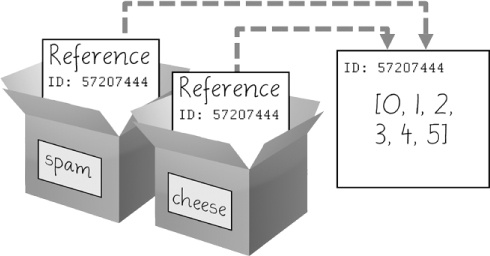
Image credit: AtBSwP
This means any change to the list pointed by cheese will be reflected as a change to the list pointed to by spam (because both are pointing to the same list object!).
|
→ |
|
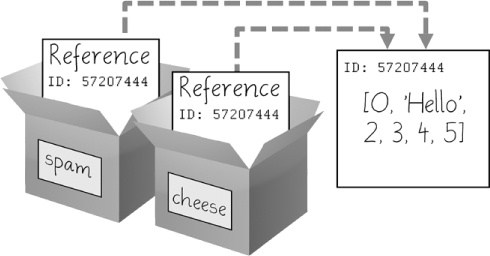
Image credit: AtBSwP
However, the behavior is different when we do a similar variable assignment and update using integers instead of lists. Because integers are immutable, cheese points to a copy of the integer pointed to by spam,
not the same object.
|
→ |
|
The behavior for passing arguments to a function is similar to that of assigning one variable to another. If the argument is mutable, its object reference is assigned to the parameter. That means the code inside the function is able to modify the object passed as the argument and such changes remain after the function execution is over.
📦 In the foo function below, when foo(original) is executed, the object reference of the argument original is copied to the parameter items. Now the function is able to modify the list object
now being pointed to by both original and items, and the changes remain in the list even after the function has finished.
|
→ |
|
Contrast the above example with the one below. The bar(items) function assigns a new list to items parameter. That means items is not longer pointing to the list object that was passed in as the argument.
After the function is executed, the original list remains the same as before.
|
→ |
|
If the argument passed to a function is of an immutable type, the function receives the reference to a copy of the argument. That means the code inside the function is unable to modify the object passed as the argument. However, it can return a new object that is based on the given object copy.
📦 In this example, the function increment(age) is given an immutable object 25 as the argument. Although the parameter v that received the argument is assigned a new object (i.e., v = v + 1)
inside the function, that change is not reflected in the argument age. That is because v is given a reference to a copy of age, not a reference to the actual object in age.
|
→ |
|
Exercise : Swap Ends
Complete the functions as described below:
swap_ends(item_list): swaps the first and the last items of theitem_list. Note that the function should modify the givenitem_listlist, not return a new list.
Notes:
- You can follow the example of
set_head(item_list, new_head)function which modifies the givenitem_listby setting its first element tonew_head. passis a dummy statement that does nothing. We use it here because Python does not accept empty functions. You should replace it with your own implementation of the function.
|
→ |
|
Working with Lists
You can use the slice notation list_name[start_index:end_index] to copy a start_index is omitted, it means
'from the beginning of the list'. If the end_index is omitted, it means 'till the end of the list'.
📦 Some example of slicing to get a sub list:
letters = ['0a', '1b', '2c', '3d', '4e']
sublist = letters[0:3]
print(sublist) # print items 0, 1, 2
print(letters[:3]) # same as above (first 3 items)
print(letters[1:4]) # print items 1, 2, 3
print(letters[3:]) # print from item 3 till end
print(letters[-2:]) # print last two items
print(letters[1:-1]) # print from item 1 to 2nd last item
⤵️
['0a', '1b', '2c']
['0a', '1b', '2c']
['1b', '2c', '3d']
['3d', '4e']
['3d', '4e']
['1b', '2c', '3d']
Note that slicing gives you a copy of a portion of the original list i.e., you get a new list.
📦 In the example below, the first item 0a of the list letters is deleted after taking the first two elements as a sub list. Note how the item 0a still remains in the sub list after it has been deleted from
the original list.
letters = ['0a', '1b', '2c', '3d', '4e']
first_two_letters = letters[:2]
print('original list:', letters)
print('sub list     :', first_two_letters)
del letters[0] # delete first element in original list
print('original list:', letters)
print('sub list     :', first_two_letters)
⤵️
original list: ['0a', '1b', '2c', '3d', '4e']
sub list     : ['0a', '1b']
original list: ['1b', '2c', '3d', '4e']
sub list     : ['0a', '1b']
Exercise : Get Body
Complete the functions as described below:
get_body(item_list): returns a sublist ofitem_listparameter, without the first and the last items.get_without_head(item_list): returns a sublist ofitem_listparameter, without the first item.get_without_tail(item_list): returns a sublist ofitem_listparameter, without the last item.
|
→ |
|
def get_without_head(item_list):
  return item_list[1:]
You can use del to delete an item at a specific position of a list.
📦 The code below shows how to use del to delete items in a list.
|
→ |
|
Exercise : Delete Head, Delete Tail
Complete the functions as described below:
delete_head(item_list): deletes the first item in the list passed asitem_listparameter.delete_tail(item_list): deletes the last item in the list passed asitem_listparameter.
|
→ |
|
def delete_head(item_list):
  del item_list[0]
You can use the len function to find the number of items in a list.
|
→ |
|
Exercise : Get Mid
Complete the functions as described below:
get_mid(item_list): returns the middle element of the listitem_list
💡 follow the example in the code below when defining which element is considered the middle element when the list has an even number of elements.
|
→ |
|
You can use the + operator to combine two lists into a new list.
|
→ |
|
You can use the * operator to create a new list by replicating an existing list multiple times.
|
→ |
|
Exercise : Expand to Fill
Complete the functions as described below:
expand_to_fill(item_list, length): returns a list containing a total oflengthitems, where the items are repetitions of the items in theitem_list.
💡 hints
- full_repetitions_needed =
length//length_of_item_list - return
item_list*full_repetitions_needed+portion_of_item_list
def expand_to_fill(item_list, length):
  return

meals = ['Rice', 'Bread', 'Noodles']
print(expand_to_fill(meals, 5))
print(expand_to_fill(meals, 7))
⤵️
['Rice', 'Bread', 'Noodles', 'Rice', 'Bread']
['Rice', 'Bread', 'Noodles', 'Rice', 'Bread', 'Noodles', 'Rice']
  ...
  temp = item_list * (length//len(item_list))
  shortfall = length - len(temp)
  if shortfall > 0:
    result = temp + item_list[:shortfall]
  ...
You can use in or not in to check if an item is in a list.
valid_responses = ['Yes', 'No', 'Maybe']
response = ''
while response not in valid_responses:
  response = input('What is your response?')
print('Your response:', response)

current_drinks = ['Tea', 'Coffee']
suggested_drink = input('Suggest a new drink:')
if suggested_drink in current_drinks:
  print(suggested_drink, 'is already in the list')
⤵️
What is your response? abc
What is your response? Yes
Your response: Yes
Suggest a new drink: Tea
Tea is already in the list
Exercise : XOR
📖 In case you didn't know: XOR (short for eXclusive OR) is a logical operation, when applied to two booleans, that outputs True only when inputs differ (one is True, the other is False)
Complete the functions as described below:
xor(list1, list2, item): returnsTrueifitemis in only one of the two listslist1andlist2. i.e., returnsFalseif theitemis absent from both lists or present in both lists.
|
→ |
|
return (item in list1 and item not in list2) or (...)
You can traverse through items in a list using the for item_name in list_name: notation.
|
→ |
|
Exercise : Print Card Deck
Complete the functions as described below:
print_card_deck(): Prints all cards in a deck of regular playing cards, en example of the output (partial) is given below.
|
→ |
|
Use two nested for loops to iterate over the two lists.
  ...
  for suite in suits:
    for ...:
      print(...)
The enumerate function can help you easily maintain an iteration counter while traversing a list.
|
→ |
|
Exercise : First Quarter
Complete the functions as described below:
-
print_dates(): prints the dates of the first four months of the year, in the format given in the sample output. -
You must use the given lists
monthsandlengthsin your solution. -
You can use the functions given below:
generate_number_string(start, end): Returns a string containing integers fromstarttoend(not inclusive), separated by space.
e.g.,generate_number_string(5, 10)→'5 6 7 8 9'
def generate_number_string(start, end):
  number_string = ''
  for i in range(start, end):
    number_string = number_string + ' ' + str(i)
  return number_string

def print_dates():
  months = ['Jan', 'Feb', 'Mar', 'Apr'] # months of the first quarter
  lengths = [31, 28, 31, 30] # number of days in each month of the first quarter
  # ADD CODE HERE

print_dates()
⤵️
Jan: 1 2 3 4 5 6 7 8 9 10 11 12 13 14 15 16 17 18 19 20 21 22 23 24 25 26 27 28 29 30 31
Feb: 1 2 3 4 5 6 7 8 9 10 11 12 13 14 15 16 17 18 19 20 21 22 23 24 25 26 27 28
Mar: 1 2 3 4 5 6 7 8 9 10 11 12 13 14 15 16 17 18 19 20 21 22 23 24 25 26 27 28 29 30 31
Apr: 1 2 3 4 5 6 7 8 9 10 11 12 13 14 15 16 17 18 19 20 21 22 23 24 25 26 27 28 29 30
  ...
  for i, month in enumerate(months):
      print( ... + generate_number_string(1, lengths[i]+1))
Methods
In Python, everything is an object. For example, 'Hello' (is a string object), 14 is an integer object, [2.0, 3.5] is a list object that contains two float objects, and so on.
Accordingly, most Python objects have methods. Methods represent what the object can do. They are functions attached to an object and are executed in relation to the attached object. Methods are executed using object.method_name notation. The methods an object will have depend on the type of object e.g., methods a string object will have are different from the methods a list object will have.
📦 The first line below uses the strip() method of the string object to get rid of leading and trailing spaces. The second statement uses the replace() method to replace spaces with dashes.
|
→ |
|
Some methods return an object. In such cases another method can be called on the returned object immediately. Such calling of methods on the returned object is called method chaining.
📦 In the example of method chaining given below, 'aa bb cc '.strip() returns a string object 'aa bb cc' on which the replace(' ', '_') method is called. That returns a string object 'aa_bb_cc' on which the upper() method is called. That method converts the string into its upper case, giving us the final output of 'AA_BB_CC'
|
→ |
|
Exercise : Remove Extra Spaces
Complete the functions as described below:
remove_extra_spaces(text): returns a string that is similar to the given stringtextbut with only one space between words if there were multiple spaces before. Also removes leading and trailing spaces.
You may find these built-in string functions useful:
-
split(): splits a string into a list of words.
e.g.,' quick brown fox'.split()→['quick', 'brown', 'fox']
[ more about the split() function] -
join(list_of_items): joins the items in thelist_of_itemsusing the given string.
e.g.,'-'.join(['a', 'b', 'c'])→'a-b-c'
|
→ |
|
Split the text into a list of words and join them back using a space (' '.join(...))
List Methods
Here are some useful list methods:
| Method | Description |
|---|---|
index() |
finds the index of an item in a list |
append() |
adds an item to the end of the list |
insert() |
inserts an item to a specific position in the list |
remove() |
removes the specified item from the list |
sort() |
sorts items in the list |
📦 Here are some examples of how those list methods can be used:
pets = ['Cats', 'Dogs', 'Hamsters']
print('Hamster is at', pets.index('Hamsters'))
print('Dog is at', pets.index('Dogs'))

pets.append('Parrots')
print('After apending Parrots', pets)

pets.insert(1, 'Rabbits')
print('After inserting Rabbits', pets)

pets.remove('Cats')
print('After removing Cats', pets)

pets.sort()
print('After sorting', pets)

pets.sort(reverse=True)
print('After reverse-sorting', pets)
⤵️
Hamster is at 2
Dog is at 1
After apending Parrots ['Cats', 'Dogs', 'Hamsters', 'Parrots']
After inserting Rabbits ['Cats', 'Rabbits', 'Dogs', 'Hamsters', 'Parrots']
After removing Cats ['Rabbits', 'Dogs', 'Hamsters', 'Parrots']
After sorting ['Dogs', 'Hamsters', 'Parrots', 'Rabbits']
After reverse-sorting ['Rabbits', 'Parrots', 'Hamsters', 'Dogs']
Note how in the example above sort(reverse=True) sorts the list in the reverse order. This notation of method(parameter_name=argument) is known as passing a keyword argument. Explanation: Some
methods/functions has optional parameters. To specify an argument for such an optional parameter, we have to specify which parameter we are supplying. In the case of sort(reverse=True), we are supplying the boolean argument True to the optional parameter named reverse.
📦 The print function takes an optional parameter end. If you provide it with an empty string i.e., end='', the function will not print a line break at the end. The example below illustrates the difference
it makes.
|
→ |
|
Note that some methods
📦 In the example below, lower() (a non-mutating method) returns a new string that is in lower case while the original string remains unchanged. However, sort() (a mutating method) changes the list object
it is attached to (and does not return anything).
|
→ |
|
|
→ |
|
Exercise : Anagram Checker
Complete the functions as described below:
is_anagram(word1, word2): returnsTrueifword1is an anagram ofword2(i.e., letters ofword1can be rearranged to getword2e.g.,tonandnotare anagrams).
You may find these built-in functions useful to this exercise:
list(string): splits a string into a list of letters.
e.g.,'quick'.split()→['q', 'u', 'i', 'c', 'k']
|
→ |
|
Convert each word into a list of letters and sort the letters. If the words are anagrams, sorted letters of one word should be same as the sorted letters of the others.
Example:
'ton'→ convert to list of letters →['t', 'o', 'n']→ sort →['n', 'o', 't']'not'→ convert to list of letters →['n', 'o', 't']→ sort →['n', 'o', 't']
def letters_sorted(word):
  letters = list(word)
  letters.sort()
  return letters

def is_anagram(word1, word2):
  return letters_sorted(word1) == ...
Exercise : Word Game
Implement a word game with the following rules:
- The player inputs four-letter words. Words that are not four letters are rejected.
- If the player inputs the same word multiple times, that word is banned.
- When the player cannot think of any more suitable words, he/she can end the game by entering the word
end - The score is the number of words entered by the player and accepted by the game (i.e., banned words are not counted)
Given below is a sample session. Try to follow the exact output format in your implementation:
========================================================
Welcome to the WORD GAME
Give all four-letter words you know, one word at a time
Enter the word 'end' to exit
========================================================
What's the next word?  park
What's the next word?  puck
What's the next word?  cut
Not a four-letter word
What's the next word?  people
Not a four-letter word
What's the next word?  team
What's the next word?  puck
Repeated word! puck is number 2 in the accepted words list.
puck is no longer an accepted word and is banned
What's the next word?  bust
What's the next word?  puck
puck is banned!
What's the next word?  meat
What's the next word?  team
Repeated word! team is number 2 in the accepted words list.
team is no longer an accepted word and is banned
What's the next word?  end
========================================================
Your score: 3
Accepted words (in order of entry): park bust meat
Accepted words (in sorted order): bust meat park
Banned words (in sorted order): puck team
Thank you for playing the WORD GAME
========================================================
💡 Implementation suggestions:
- Maintain two lists: one to keep accepted words, one to keep banned words
- When a word is entered for the second time, move it from the accepted words list to the banned words list.