TE3201 Software Engineering
- Lectures
- Project
- Learning Materials
- Exam
- Grading
- Multiple Repo!
Lectures
TUE 1800-2130 in E3‐06‐02
-
😟 No webcast (Reason: the lecture venue does not have the webcast facility)
-
The lecture will be broken into small segments (about 30 minutes) of fairly independent parts so that late comers can still follow the remainder of the lecture.
-
First 15 minutes will be a recap of previous lecture or free-flow discussion so that those slightly late will not miss the beginning of the lecture proper.
-
Python topics will be in the 2nd half of the lecture so that those not interested in learning Python can leave early.
Learning materials
A customized online text book is used for this module. Topic coverage may not follow the exact topic sequence in the book. There are several ways for you to access the text book.
- Full version is here: The relevant sections are embedded under the corresponding week in the schedule page.
- 📜 Printable version (excludes exercises) is here. PDF copies of the relevant sections will be uploaded to IVLE, by Monday of each week. You are encouraged to use the online full version when possible (instead of the printable version or the PDF version), as it has more content videos, exercises, etc.
Using This Book
Browser Compatibility
This book is best viewed using the Chrome browser.
Information Layers
The book tries to layer information so that readers can decide to omit less important layers if they wish to.
More important information are in bold or highlighted while less important information are dimmed or in collapsed panels such as the below.
Less important info
Less important info
Tabs indicate alternative formats of the same content (e.g. video vs text). You can choose the one you like and ignore the other tabs.
Video describing X
Dotted underlines indicate
Sections tagged as  can be ignored because they are tangential info that are strictly not within the scope of the topic.
Conventions Used
Meaning of some shortened headings:
-
What : the meaning of the concept in concern
-
Why : the motivation behind the concept in concern
-
How : the usage of the concept in concern
-
When : the pros and cons of the concept in concern, when to use the concept
Boxed-text styles:
Meaning of icons:


 : indication of the depth of the topic, in order of increasing depth ( is the least depth)
- : tangential info, can be ignored if not interested
- : direct link to the LO.
Ctrl+Clickto open the LO in new window/tab. - 🏆 : learning outcomes
- 🎓 : prerequisite learning outcome
- 📦 : examples
- 📎 : resources
- 💪 : exercises
- 📜 : printable version
- 🔍 : preview/more info
- 📺 : video
- 🔤 : textual description
- 📊 : slides
- ⤵️ : output produced by running code
- 🔒 question without answer
- 🔒🔑 question with answer
Searching
The book currently does not have a search feature. The workaround is to load the entire book into the web page (i.e. either the full version or the printer-friendly version) and use the Browser's search function.
Saving as PDF Files
-
Use Chrome to load the page you want to save as pdf.
-
Click on the
Printoption in Chrome’s menu. -
Set the destination to
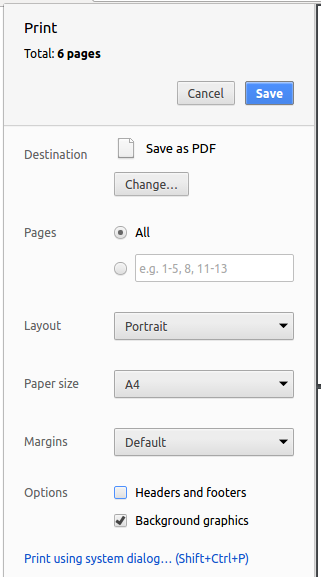
Save as PDF, then clickSaveto save a copy of the file in PDF format. For best results, use the settings indicated in the screenshot below.
Printing
A printer-friendly version of the entire book can be found here
An additional guide on programming basics is provided for you to get started or programming. Contents in that guide are to help you do the programming part of the project; they are not examinable in the final exam. Furthermore, we try to use external resources as much as possible in our guide so that you can continue your learning using those resources beyond the scope of this module.
📊 Slides will be uploaded to IVLE after the lecture. Note that lecture slides are to assist in lecture delivery only; they are not suitable for printing or as an exam reference.
Project
To be done in individually, or teams of 2-3 members.
Programming language: The recommended language is Python but another Object-Oriented language (e.g. Java, C#, C++, ...) is acceptable if there is consensus among team members.
Software to build
You will be building a personal assistant chat-bot software named PAC (PAC is a temporary name; you should give a different name to your own chat bot)
Basic Functionality:
-
PAC interface can be text-based (i.e., no need for a graphical UI)
-
PAC helps with storing and retrieving at least one type of data that is useful to the user. Some examples of different types of data (you can pick one of them): details of contacts, todo items, appointments, deadlines, reminders, technical terms to remember, etc. Here is an example interaction between a user and a PAC that deals with TODO items:
>> Hi, I'm PAC. What can I do to help you with your TODOs? add Return library book >> TODO added: Return library book list >> Here are the list of TODOs you have: 1. Return library book 2. Do TE3201 exercises 3. Call back Jina delete 2 >> TODO deleted: Do TE3201 exercises are you single? >> Sorry. I did not understand your request. help >> Here are the requests I understand. add {TODO description} : adds a TODO to the list list : lists all TODOs ... -
There is no need for PAC to be able to understand natural language sentences. It is fine for the user requests to need to follow a strict format. Defining the request format is part of the project. The example interaction given above is just an example only. Hint: try to design a request format that is easy to remember and type.
-
PAC should support adding, deleting, listing, searching (by keyword) of data items.
-
Persistence: The data should be stored in the hard disk so that restarting PAC should not cause a loss of data entered in a previous session.
- The data files should be in a human-readable format such as
.csv(recommended),xml,json, plain text, etc.
- The data files should be in a human-readable format such as
Basic functionality given above counts as 2 units of functionality. On top of that, you are required to add some more additional functionality (of your own choice). The total amount of functionality required is given below.
| Team size | Total amount of functionality |
|---|---|
| 1-person | 3-4 units |
| 2-persons | 4-5 units |
| 3-persons | 5-6 units |
Additional Functionality:
Some suggestions for additional functionality:
- More attributes for data items e.g., priorities, tags, birthdays
- Multiple data item types e.g., support saving TODOs, appointments, and deadlines
- Support connections between data items e.g., ability to assign a TODO to a contact
- Multi-user support e.g., assume the software is installed in a common computer in your office and allow multiple users to interact with it
- More ways to query data e.g., find contacts that has a birthday in next 2 days, find all TODOs with high priority, etc.
- Any other feature (get approval from prof before implementing)
Constraints
- You should not use relational/SQL databases e.g., MySQL
- The software should work in a Windows computer that has the latest releases of Java, .NET, and Python 3.
- If your software need other software to be installed (e.g., third-party libraries), please get prof's permission first.
Deliverables
-
Week 8 (mid-term submission): 10%
- Deadline: Week 8, Tuesday 6pm
- Functionality: at least most of the basic requirements are fulfilled (you may leave out the persistence requirement)
- Submission: demo during lecture in week 8
- Documentation:
- Sections to include:
- Cover page: Include product name, names of team members
- User stories: Give user stories to cover all current and future functionalities
- Use cases: Give 2-3 use case descriptions. Choose use cases that require most number of steps or most complicated.
- Non-functional requirements: Give 5-10 NFRs for the project. Try to include a diverse range of NFRs.
- Activity Diagrams: Give at least one activity diagram related to the product e.g., an AD that explains a workflow of how the user uses your product or an algorithm in the code. You can use any drawing software (e.g. PowerPoint), or hand-sketch and photograph/scan the diagrams.
- Submission: upload to IVLE as a
.docxor.pdffile. File name should contain team member names. e.g.,John Doe, Sarah Tan, Viet Ngoc.docx
- Sections to include:
-
Week 13 (final submission): 30%
- Functionality: all functionality
- Submission: Upload to IVLE, demo during lecture in week 13
- Documentation: TBD
- Functionality: all functionality
Exam
- Total: 2 hours
- Part 1: MCQ (1 hour)
- Part 2: Essay (1 hour)
- Open book
Grading
- Project: 40%
- Exam: 60%